YouTube Fast Forward
Customizable Buttons to Skip Forward/Rewind and Seek Through videos on YouTube.
As of June 2026, YouTube Fast Forward has 2,000 users and a 4.63/5 rating from 19 reviews in the Functionality & UI category.
Usersno change0%
2.0K
2,000
Ratingup 0.4 percent+0.4%
4.63
19 reviews
Reviewsup 5.6 percent+5.6%
19
Version
2.7
Manifest V3
90-day change · In the last 90 days this extension 1 version update.
History
6 snapshotsTracking since Apr 22, 2026.
View as table
| Date | Users | Rating | Reviews | Version |
|---|---|---|---|---|
| Apr 22, 2026 | 2.0K | 4.61 | 18 | 2.6 |
| May 7, 2026 | 2.0K | 4.63 | 19 | 2.6 |
| May 11, 2026 | 3.0K | 4.63 | 19 | 2.7 |
| May 14, 2026 | 4.0K | 4.63 | 19 | 2.7 |
| May 23, 2026 | 5.0K | 4.63 | 19 | 2.7 |
| May 27, 2026 | 3.0K | 4.63 | 19 | 2.7 |
| Now | 2.0K | 4.63 | 19 | 2.7 |
Permissions & access
- Permissions
- activeTabstoragescriptingwebNavigationdeclarativeContent
- Host access
- None declared
Screenshots



About
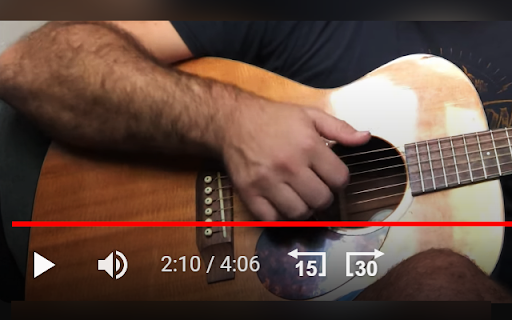
• Adjust fast forward and rewind intervals to suit your preferences.
• Choose whether to override your keyboard's arrow/J+L keys.
• Skip at your own pace: set a custom delay between each skip event and execution timing.
• The buttons blend right into the player by using youtube's UI style.
• Instant Sync Across Tabs: Any changes you make to the skip intervals and seek through values are instantly applied across all open youtube tabs.
• Automatic Save: Your custom settings are saved automatically in your browser's local storage, so you don't have to set them every time.

Note:
• Please be aware that settings saved in your browser's local storage may be cleared if you clear your browser's cache or cookies.
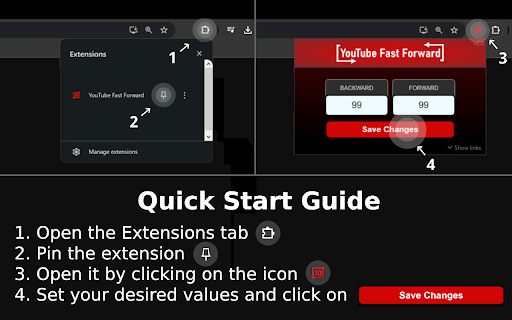
• Skip intervals are adjustable in seconds, with a maximum limit of 99 seconds.
• Seek through values are adjustable in milliseconds, with the min/max limits stated under each setting.
• Keyboard override setting is OFF by default.
• If you are experiencing issues with the popup not hiding along with the rest of the elements after your mouse leaves the player, enable the new setting for injecting the buttons outside the player until it is fixed. They will be injected next to the subscribe button.

Suggest features or report bugs/issues to [email protected]
Technical
- Version
- 2.7
- Manifest
- V3
- Size
- 82.3KiB
- Min Chrome
- 88
- Languages
- 1
- Featured
- No
Metadata
- ID
- pknkmgaijamjmeeglhmgkpfgbkogkbob
- Developer ID
- u1a5cb02de7fdd22aabedaf5c223e9a85
- Developer Email
- [email protected]
- Created
- Aug 17, 2023
- Last Updated (Store)
- May 3, 2026
- Last Scraped
- Jun 21, 2026
- Website
- repuddle.com
- Support URL
- —
- Privacy Policy
- —
Similar extensions
Alternatives to YouTube Fast Forward, ranked by description similarity.

YouTube Fast Forward & Rewind
Fast Forward and Rewind YouTube videos by a customizable amount of seconds!
801
★ 4.6

YtScroll
Add custom rewind and forward buttons to YouTube video player
3

YouTube Rewind & Fast Forward Buttons
Add Rewind & Fast Forward buttons to videos player in a YouTube site
10.0K
★ 4.6

YouTube Speed Controller
Control YouTube video playback with just a click!
257
★ 5.0

Smart Video Controls
Keyboard shortcuts & position memory for streaming sites. Works where others don't — iframe video players supported.
310
★ 5.0

Seek Buttons for YouTube
Adds fast forward and rewind buttons to YouTube's video player
16
★ 5.0

YouTube Enhancer
Enhance your YouTube experience with bookmarks, transcripts, and speed control.
4

Smart Playback Speed Control for YouTube
Maintains your preferred YouTube playback speed and automatically restores playback settings after interruptions.
—
Data sourced from the Chrome Web Store · last verified Jun 21, 2026.