
YouTube Rewind & Fast Forward Buttons
Add Rewind & Fast Forward buttons to videos player in a YouTube site
As of June 2026, YouTube Rewind & Fast Forward Buttons has 10,000 users and a 4.57/5 rating from 123 reviews in the Functionality & UI category.
Usersno change0%
10.0K
10,000
Ratingup 0.4 percent+0.4%
4.57
123 reviews
Reviewsup 3.4 percent+3.4%
123
Version
1.4.4
Manifest V3
History
5 snapshotsTracking since Apr 5, 2026.
View as table
| Date | Users | Rating | Reviews | Version |
|---|---|---|---|---|
| Apr 5, 2026 | 10.0K | 4.55 | 119 | 1.4.4 |
| Apr 16, 2026 | 10.0K | 4.56 | 120 | 1.4.4 |
| May 11, 2026 | 10.0K | 4.56 | 120 | 1.4.4 |
| May 18, 2026 | 10.0K | 4.56 | 121 | 1.4.4 |
| Jun 5, 2026 | 10.0K | 4.57 | 122 | 1.4.4 |
| Now | 10.0K | 4.57 | 123 | 1.4.4 |
Permissions & access
- Permissions
- storage
- Host access
- None declared
Screenshots



About
Enhance your YouTube experience with the Rewind & Fast Forward Chrome extension. This tool adds dedicated buttons for rewinding and fast-forwarding videos.

Features:

1. Customizable Time Skips — Choose the skip duration for each button individually, with up to four customizable buttons.

2. Arrow Key Override — Choose whether to synchronize the Left and Right arrow keys with your configured skip durations. (Default: No override)

3. Media Key Integration — Map your keyboard's media keys (Previous/Next track) to use the same skip durations as the extension buttons.

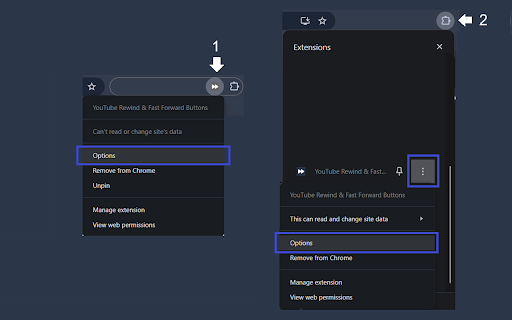
How to Access the Options Page

1. If you've pinned the extension, click the extension icon and then click "Open the options page".
2. If you haven't pinned it, click the Chrome extensions icon; you'll have two options:
   - Click the three dots next to "YouTube Rewind & Fast Forward Buttons" and select Options.
   - Click the extension name, then click "Open the options page".

See the screenshots below for guidance.
Technical
- Version
- 1.4.4
- Manifest
- V3
- Size
- 53.88KiB
- Min Chrome
- 88
- Languages
- 1
- Featured
- Yes
Metadata
- ID
- bmdiaadnpgbbfepggiiajgadlhhcphgk
- Developer ID
- u392c950c7a712f6f145c450076688033
- Developer Email
- [email protected]
- Created
- Sep 2, 2019
- Last Updated (Store)
- Feb 23, 2026
- Last Scraped
- Jun 5, 2026
- Website
- —
- Privacy Policy
- —
Similar extensions
Alternatives to YouTube Rewind & Fast Forward Buttons, ranked by description similarity.

YouTube Fast Forward & Rewind
Fast Forward and Rewind YouTube videos by a customizable amount of seconds!
801
★ 4.6

YtScroll
Add custom rewind and forward buttons to YouTube video player
3

Seek Buttons for YouTube
Adds fast forward and rewind buttons to YouTube's video player
16
★ 5.0

YouTube Speed Shortcuts
Shortcuts for Youtube Playback Speed
11

YouTube Quick Controls
Fast, customizable quality and speed controls with keyboard shortcuts for YouTube videos
22
★ 5.0
YouTube Fast Forward
Customizable Buttons to Skip Forward/Rewind and Seek Through videos on YouTube.
2.0K
★ 4.6

Swallow Video Control
Seek HTML5 video ±10s using WebHID Consumer Control buttons (0x00B3/0x00B4). Single-target tab, with hold-to-repeat.
8

Keyboard-operated YouTube
An extension that allows you to control YouTube (and other video players) via global hotkeys
63
Data sourced from the Chrome Web Store · last verified Jun 5, 2026.