G-calize
On Google Calendar... Sunday, Saturday, Today, and other weekdays, You can select the text color and background color.
As of June 2026, G-calize has 200,000 users and a 4.21/5 rating from 217 reviews in the Workflow & Planning category.
Usersno change0%
200.0K
200,000
Ratingup 0.2 percent+0.2%
4.21
217 reviews
Reviewsno change0%
217
Version
2.3.2
Manifest V3
History
2 snapshotsTracking since Apr 19, 2026.
View as table
| Date | Users | Rating | Reviews | Version |
|---|---|---|---|---|
| Apr 19, 2026 | 200.0K | 4.20 | 217 | 2.3.2 |
| May 4, 2026 | 200.0K | 4.20 | 216 | 2.3.2 |
| Now | 200.0K | 4.21 | 217 | 2.3.2 |
Permissions & access
- Permissions
- tabsstoragecontextMenus
- Host access
- None declared
Screenshots
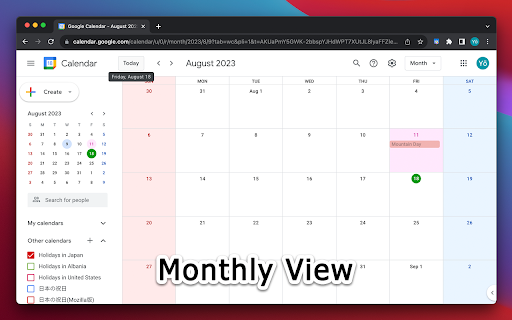
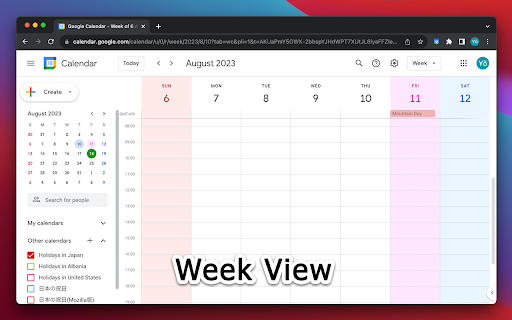


About
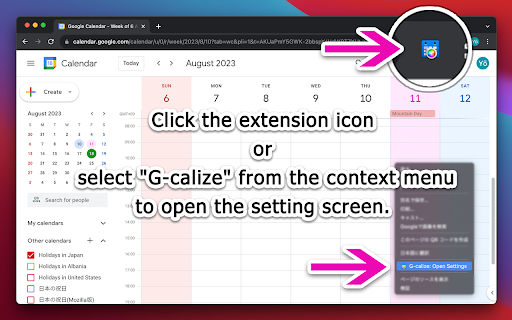
1. Click the extension icon or select "G-calize" from the context menu to open the settings screen.
2. Set your preferred colors for each day of the week.
3. Optional: Select a holiday calendar and set holiday colors.
* You must reload the calendar page once after installation.
* Works with the URL calendar.google.com/calendar. Does not work if you use a Google Workspace custom address.

--------------------------------------------------

### 🆕 2024.12.05 Version 2.3.0
- Supports schedule display.
- Added a function to display the settings screen in a smaller size only in month view.
- Other fine-tuning.

### 2024.11.06 Version 2.2.0
- Supports dark mode display. Other fine-tuning.

### 2023.11.27 Version 2.1.0
- Added background color and border color to today's color.
- Fixed an issue where colors were misaligned in week view.

### 2023.08.20 Version 2.0.0
- Changed the way to open the settings screen.
- Renewed the settings screen.
- Removed today's text color and background color, changed to accent color selection.
- Fixed an issue where the holiday calendar could not be selected.

### 2018.02.02 Version 1.4.0
- Supports the new Google Calendar design.

### 2011.09.28 Version 1.0.0
- First release.
Technical
- Version
- 2.3.2
- Manifest
- V3
- Size
- 80.53KiB
- Min Chrome
- 88
- Languages
- 37
- Featured
- Yes
Metadata
- ID
- piiljfhidimfponnkjlkecnpjhdijfde
- Developer ID
- uec511786b313c5f17d6da47fa5049887
- Developer Email
- [email protected]
- Created
- Dec 23, 2014
- Last Updated (Store)
- May 6, 2025
- Last Scraped
- Jun 8, 2026
- Website
- http://piayo.com/
- Support URL
- —
- Privacy Policy
- —
Similar extensions
Alternatives to G-calize, ranked by description similarity.

Hue: More Colors for Google Calendar
A Chrome extension designed to enhance and personalize your Google Calendar experience.
10.0K
★ 3.6
More Colors for Calendar!
Adds more colors to Google Calendar!
70.0K
★ 2.4

GCalPlus
Extra Options for Google Calendar
60.0K
★ 3.9

GCal Pro: More Custom Colors for Google Calendar Events
Customize Google Calendar events with more colors for better organization and readability, no OAuth required!
329
★ 5.0
Add More Colors to Calendar
Enhance your Google Calendar with a Chrome extension that adds custom colors to each event for a personalized, organized schedule.
5.0K
★ 3.4

Custom Labels & Colors for Calendar
Add custom labels, solid & gradient colors to Google Calendar events for better organization, clarity, and productivity.
462
★ 4.0

App for Google Calendar
App for Google Calendar is a browser extension that gives you quick access to google calendar
10.0K
★ 4.8
Custom Week Number - Google Calendar
Extension to set custom week number for Google calendar
859
★ 2.9
Data sourced from the Chrome Web Store · last verified Jun 8, 2026.