More Colors for Calendar!
Adds more colors to Google Calendar!
As of May 2026, More Colors for Calendar! has 70,000 users and a 2.35/5 rating from 270 reviews in the Workflow & Planning category.
Usersno change0%
70.0K
70,000
Ratingdown 0.4 percent−0.4%
2.35
270 reviews
Reviewsup 0.4 percent+0.4%
270
Version
1.1.2
Manifest V3
History
2 snapshotsTracking since May 1, 2026.
View as table
| Date | Users | Rating | Reviews | Version |
|---|---|---|---|---|
| May 1, 2026 | 70.0K | 2.36 | 269 | 1.1.2 |
| May 29, 2026 | 70.0K | 2.35 | 271 | 1.1.2 |
| Now | 70.0K | 2.35 | 270 | 1.1.2 |
Permissions & access
- Permissions
- declarativeContentstorage
- Host access
- None declared
Screenshots


About
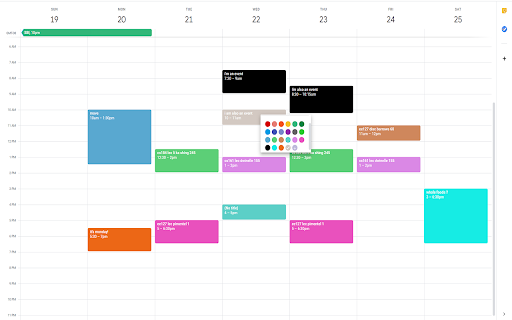
Adds more colors to Google Calendar's color selection menu.

HOW TO USE:
This extension adds the ability to insert custom colors into Google Calendar events. Upon installing the extension, you might need to refresh Google Calendar for it to load.

Once the extension has been installed, you can access the custom color creation by either right clicking events (accessing the color palette), or double clicking the event and accessing the other color palette within the advanced event details page.

You can verify that the extension has been installed properly by the existence of an additional circle in the color palette with a plus (+) sign. Clicking on this plus sign should prompt you to insert a custom color defined by a hexcode (For example, typing 000000 will give you the color black. One recommended place to find colors is https://htmlcolorcodes.com/). Pressing "OK" on the color entry prompt will add this custom color to your color palette for coloring events.

You can remove custom colors from your color palette by clicking on the extension icon in your browser's extension bar. This will open a small window where clicking on a color will remove it from the extension and your color palette.

NEW FEATURE: The window that was used for removing custom colors now contains a button to toggle between cloud and local mode. Originally, this extension only ran on cloud mode. This allowed your calendar colors to be synced across different computers and browsers. However, it also came with the limitation of max 512 events. Now, with the local mode, this limitation has been increased dramatically. Choose whichever option is better for you! You can toggle between the two as well, and they are managed independently.

Feedback greatly appreciated!

Note:
The colors are only available on the web version of Google Calendar.
The colors will only be consistent on one browser on a computer unless Google Chrome sync is enabled, in which case the colors will be tied to your Google Chrome profile.

Newest Update (1/7/2023):
Fix a lot of things.
Technical
- Version
- 1.1.2
- Manifest
- V3
- Size
- 37.97KiB
- Min Chrome
- 88
- Languages
- 1
- Featured
- Yes
Metadata
- ID
- gmfgalicoeacemhkeakceigfeofbchod
- Developer ID
- uf39fa9203d91cc8e8ffa6291cfd25554
- Developer Email
- [email protected]
- Created
- Jan 11, 2020
- Last Updated (Store)
- Jan 24, 2023
- Last Scraped
- May 29, 2026
- Website
- —
- Support URL
- —
- Privacy Policy
- —
Similar extensions
Alternatives to More Colors for Calendar!, ranked by description similarity.

Hue: More Colors for Google Calendar
A Chrome extension designed to enhance and personalize your Google Calendar experience.
10.0K
★ 3.6
Add More Colors to Calendar
Enhance your Google Calendar with a Chrome extension that adds custom colors to each event for a personalized, organized schedule.
5.0K
★ 3.4

GCal Pro: More Custom Colors for Google Calendar Events
Customize Google Calendar events with more colors for better organization and readability, no OAuth required!
329
★ 5.0

Custom Labels & Colors for Calendar
Add custom labels, solid & gradient colors to Google Calendar events for better organization, clarity, and productivity.
462
★ 4.0

PaintCal
Add custom colors to Google Calendar events with auto text contrast
123
★ 5.0

Colorful Calendar Events
Add custom colors to Google Calendar events.
578
★ 4.0
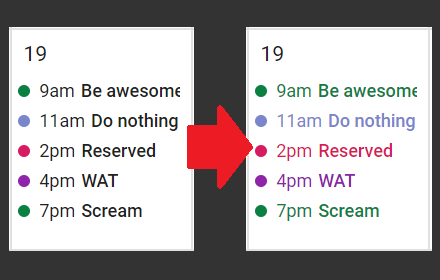
GcalColor
Colorize events in the new Google Calendar. (Keywords: Gcal color colors event)
5.0K
★ 4.5
G-calize
On Google Calendar... Sunday, Saturday, Today, and other weekdays, You can select the text color and background color.
200.0K
★ 4.2
Data sourced from the Chrome Web Store · last verified May 29, 2026.