
GCal Pro: More Custom Colors for Google Calendar Events
Customize Google Calendar events with more colors for better organization and readability, no OAuth required!
As of June 2026, GCal Pro: More Custom Colors for Google Calendar Events has 329 users and a 5.00/5 rating from 2 reviews in the Workflow & Planning category.
Usersup 123.8 percent+123.8%
329
329
Ratingno change0%
5.00
2 reviews
Reviewsno change0%
2
Version
1.0.8
Manifest V3
90-day change · In the last 90 days this extension 2 version updates.
History
13 snapshotsTracking since Apr 6, 2026.
View as table
| Date | Users | Rating | Reviews | Version |
|---|---|---|---|---|
| Apr 6, 2026 | 147 | 5.00 | 2 | 1.0.6 |
| Apr 18, 2026 | 171 | 5.00 | 2 | 1.0.6 |
| Apr 24, 2026 | 207 | 5.00 | 2 | 1.0.6 |
| Apr 29, 2026 | 221 | 5.00 | 2 | 1.0.7 |
| May 9, 2026 | 227 | 5.00 | 2 | 1.0.8 |
| May 12, 2026 | 256 | 5.00 | 2 | 1.0.8 |
| May 16, 2026 | 261 | 5.00 | 2 | 1.0.8 |
| May 20, 2026 | 277 | 5.00 | 2 | 1.0.8 |
| May 25, 2026 | 294 | 5.00 | 2 | 1.0.8 |
| May 29, 2026 | 297 | 5.00 | 2 | 1.0.8 |
| Jun 3, 2026 | 307 | 5.00 | 2 | 1.0.8 |
| Jun 8, 2026 | 322 | 5.00 | 2 | 1.0.8 |
| Jun 14, 2026 | 310 | 5.00 | 2 | 1.0.8 |
| Now | 329 | 5.00 | 2 | 1.0.8 |
Changelog
- Apr 29, 2026description
GCal Pro helps you customize Google Calendar event colors beyond the default palette, making your schedule easier to scan, organize, and understand at a glance.

If you rely on Google Calendar every day, limited color options can make everything blend together. GCal Pro gives you more control over event colors, so your calendar works the way you think.

✨ What you can do with GCal Pro
	•	Add unlimited custom colors to Google Calendar events
        •       Set custom text colors for calendar events
	•	Go beyond Google’s default color palette
	•	Use HEX and RGB color values for precise color control
	•	Save custom colors to your Chrome profile, so they sync automatically across your signed-in Chrome browsers
	•	Reuse saved colors anytime without re-creating them
	•	Edit a saved color once and automatically update all events with the same title
	•	Improve visual clarity for work, personal time, or multiple calendars

All color changes are applied directly inside Google Calendar and update instantly.

⚡ Designed to feel native

GCal Pro integrates seamlessly into the Google Calendar interface. There’s no setup, no separate dashboard, and no learning curve — it simply adds more flexibility to the calendar you already use.

🔒 Privacy-first
	•	No accounts required
	•	No tracking or analytics
	•	No external servers
	•	All customization happens locally in your browser

Your calendar data stays private.

📝 Important notes
	•	This extension works only on the desktop web version of Google Calendar (calendar.google.com).
	•	It does not work on the mobile version or the Google Calendar mobile apps (Android or iOS).

Enhance your schedule with more custom colors, better visual organization, and full control over how your Google Calendar looks.

Version 1.0.6:
• Added new Event Text Color controls: Auto, Light, Dark, and Custom.

• Added custom text color picker support in the popup.

• Improved readability for dark event colors by enforcing better text visibility.

• Updated saved event color editing to be direct (click edit icon and pick immediately).

• Refined popup UI with clearer sectioning (Event Colors) and improved picker styling.

Version 1.0.7:
• Added smarter custom color targeting for Google Calendar events:
This series only (recurring event instance group)
All events (same event title across calendar)

• Improved event color consistency between calendar chips and event edit/details views.

• Fixed color swatch sync in event edit dialog so custom colors appear correctly.

• Fixed precedence handling when both mappings exist:
Series-specific color now correctly overrides title-wide color.

• Improved scope switching behavior in color picker UI:
Easier switching between series-only and all-events mapping.

• Improved reset behavior:
Reset from series falls back to all-events color if present, then to default.

• Reworked selector logic to be more robust:
Reduced reliance on language-dependent UI text.
Removed brittle popup detection logic based on color name strings.

• General reliability fixes for recurring events and same-title event groups.
GCal Pro helps you customize Google Calendar event colors beyond the default palette, making your schedule easier to scan, organize, and understand at a glance. If you rely on Google Calendar every day, limited color options can make everything blend together. GCal Pro gives you more control over event colors, so your calendar works the way you think. ✨ What you can do with GCal Pro • Add unlimited custom colors to Google Calendar events • Set custom text colors for calendar events • Go beyond Google’s default color palette • Use HEX and RGB color values for precise color control • Save custom colors to your Chrome profile, so they sync automatically across your signed-in Chrome browsers • Reuse saved colors anytime without re-creating them • Edit a saved color once and automatically update all events with the same title • Improve visual clarity for work, personal time, or multiple calendars All color changes are applied directly inside Google Calendar and update instantly. ⚡ Designed to feel native GCal Pro integrates seamlessly into the Google Calendar interface. There’s no setup, no separate dashboard, and no learning curve — it simply adds more flexibility to the calendar you already use. 🔒 Privacy-first • No accounts required • No tracking or analytics • No external servers • All customization happens locally in your browser Your calendar data stays private. 📝 Important notes • This extension works only on the desktop web version of Google Calendar (calendar.google.com). • It does not work on the mobile version or the Google Calendar mobile apps (Android or iOS). Enhance your schedule with more custom colors, better visual organization, and full control over how your Google Calendar looks. Version 1.0.6: • Added new Event Text Color controls: Auto, Light, Dark, and Custom. • Added custom text color picker support in the popup. • Improved readability for dark event colors by enforcing better text visibility. • Updated saved event color editing to be direct (click edit icon and pick immediately). • Refined popup UI with clearer sectioning (Event Colors) and improved picker styling. Version 1.0.7: • Added smarter custom color targeting for Google Calendar events: This series only (recurring event instance group) All events (same event title across calendar) • Improved event color consistency between calendar chips and event edit/details views. • Fixed color swatch sync in event edit dialog so custom colors appear correctly. • Fixed precedence handling when both mappings exist: Series-specific color now correctly overrides title-wide color. • Improved scope switching behavior in color picker UI: Easier switching between series-only and all-events mapping. • Improved reset behavior: Reset from series falls back to all-events color if present, then to default. • Reworked selector logic to be more robust: Reduced reliance on language-dependent UI text. Removed brittle popup detection logic based on color name strings. • General reliability fixes for recurring events and same-title event groups. Version 1.0.8: • Added a dedicated Save button workflow so users explicitly confirm changes. • Added one-click HEX copy button inside the HEX field, including copied-state feedback. • Enabled opacity slider in the custom color picker. • Refined popup UI styling for consistency - Apr 24, 2026description
GCal Pro helps you customize Google Calendar event colors beyond the default palette, making your schedule easier to scan, organize, and understand at a glance. If you rely on Google Calendar every day, limited color options can make everything blend together. GCal Pro gives you more control over event colors, so your calendar works the way you think. ✨ What you can do with GCal Pro • Add unlimited custom colors to Google Calendar events • Set custom text colors for calendar events • Go beyond Google’s default color palette • Use HEX and RGB color values for precise color control • Save custom colors to your Chrome profile, so they sync automatically across your signed-in Chrome browsers • Reuse saved colors anytime without re-creating them • Edit a saved color once and automatically update all events with the same title • Improve visual clarity for work, personal time, or multiple calendars All color changes are applied directly inside Google Calendar and update instantly. ⚡ Designed to feel native GCal Pro integrates seamlessly into the Google Calendar interface. There’s no setup, no separate dashboard, and no learning curve — it simply adds more flexibility to the calendar you already use. 🔒 Privacy-first • No accounts required • No tracking or analytics • No external servers • All customization happens locally in your browser Your calendar data stays private. 📝 Important notes • This extension works only on the desktop web version of Google Calendar (calendar.google.com). • It does not work on the mobile version or the Google Calendar mobile apps (Android or iOS). Enhance your schedule with more custom colors, better visual organization, and full control over how your Google Calendar looks. Version 1.0.6: Added new Event Text Color controls: Auto, Light, Dark, and Custom. Added custom text color picker support in the popup. Improved readability for dark event colors by enforcing better text visibility. Updated saved event color editing to be direct (click edit icon and pick immediately). Refined popup UI with clearer sectioning (Event Colors) and improved picker styling.GCal Pro helps you customize Google Calendar event colors beyond the default palette, making your schedule easier to scan, organize, and understand at a glance. If you rely on Google Calendar every day, limited color options can make everything blend together. GCal Pro gives you more control over event colors, so your calendar works the way you think. ✨ What you can do with GCal Pro • Add unlimited custom colors to Google Calendar events • Set custom text colors for calendar events • Go beyond Google’s default color palette • Use HEX and RGB color values for precise color control • Save custom colors to your Chrome profile, so they sync automatically across your signed-in Chrome browsers • Reuse saved colors anytime without re-creating them • Edit a saved color once and automatically update all events with the same title • Improve visual clarity for work, personal time, or multiple calendars All color changes are applied directly inside Google Calendar and update instantly. ⚡ Designed to feel native GCal Pro integrates seamlessly into the Google Calendar interface. There’s no setup, no separate dashboard, and no learning curve — it simply adds more flexibility to the calendar you already use. 🔒 Privacy-first • No accounts required • No tracking or analytics • No external servers • All customization happens locally in your browser Your calendar data stays private. 📝 Important notes • This extension works only on the desktop web version of Google Calendar (calendar.google.com). • It does not work on the mobile version or the Google Calendar mobile apps (Android or iOS). Enhance your schedule with more custom colors, better visual organization, and full control over how your Google Calendar looks. Version 1.0.6: • Added new Event Text Color controls: Auto, Light, Dark, and Custom. • Added custom text color picker support in the popup. • Improved readability for dark event colors by enforcing better text visibility. • Updated saved event color editing to be direct (click edit icon and pick immediately). • Refined popup UI with clearer sectioning (Event Colors) and improved picker styling. Version 1.0.7: • Added smarter custom color targeting for Google Calendar events: This series only (recurring event instance group) All events (same event title across calendar) • Improved event color consistency between calendar chips and event edit/details views. • Fixed color swatch sync in event edit dialog so custom colors appear correctly. • Fixed precedence handling when both mappings exist: Series-specific color now correctly overrides title-wide color. • Improved scope switching behavior in color picker UI: Easier switching between series-only and all-events mapping. • Improved reset behavior: Reset from series falls back to all-events color if present, then to default. • Reworked selector logic to be more robust: Reduced reliance on language-dependent UI text. Removed brittle popup detection logic based on color name strings. • General reliability fixes for recurring events and same-title event groups.
Permissions & access
- Permissions
- storage
- Host access
- https://www.google-analytics.com/*, https://api.lemonsqueezy.com/*, https://api.gumroad.com/*
Screenshots


About
GCal Pro helps you customize Google Calendar event colors beyond the default palette, making your schedule easier to scan, organize, and understand at a glance.

If you rely on Google Calendar every day, limited color options can make everything blend together. GCal Pro gives you more control over event colors, so your calendar works the way you think.

✨ What you can do with GCal Pro
	•	Add unlimited custom colors to Google Calendar events
        •       Set custom text colors for calendar events
	•	Go beyond Google’s default color palette
	•	Use HEX and RGB color values for precise color control
	•	Save custom colors to your Chrome profile, so they sync automatically across your signed-in Chrome browsers
	•	Reuse saved colors anytime without re-creating them
	•	Edit a saved color once and automatically update all events with the same title
	•	Improve visual clarity for work, personal time, or multiple calendars

All color changes are applied directly inside Google Calendar and update instantly.

⚡ Designed to feel native

GCal Pro integrates seamlessly into the Google Calendar interface. There’s no setup, no separate dashboard, and no learning curve — it simply adds more flexibility to the calendar you already use.

🔒 Privacy-first
	•	No accounts required
	•	No tracking or analytics
	•	No external servers
	•	All customization happens locally in your browser

Your calendar data stays private.

📝 Important notes
	•	This extension works only on the desktop web version of Google Calendar (calendar.google.com).
	•	It does not work on the mobile version or the Google Calendar mobile apps (Android or iOS).

Enhance your schedule with more custom colors, better visual organization, and full control over how your Google Calendar looks.

Version 1.0.6:
• Added new Event Text Color controls: Auto, Light, Dark, and Custom.
• Added custom text color picker support in the popup.
• Improved readability for dark event colors by enforcing better text visibility.
• Updated saved event color editing to be direct (click edit icon and pick immediately).
• Refined popup UI with clearer sectioning (Event Colors) and improved picker styling.

Version 1.0.7:
• Added smarter custom color targeting for Google Calendar events:
This series only (recurring event instance group)
All events (same event title across calendar)
• Improved event color consistency between calendar chips and event edit/details views.
• Fixed color swatch sync in event edit dialog so custom colors appear correctly.
• Fixed precedence handling when both mappings exist:
Series-specific color now correctly overrides title-wide color.
• Improved scope switching behavior in color picker UI:
Easier switching between series-only and all-events mapping.
• Improved reset behavior:
Reset from series falls back to all-events color if present, then to default.
• Reworked selector logic to be more robust:
Reduced reliance on language-dependent UI text.
Removed brittle popup detection logic based on color name strings.
• General reliability fixes for recurring events and same-title event groups.

Version 1.0.8:
•  Added a dedicated Save button workflow so users explicitly confirm changes.
•  Added one-click HEX copy button inside the HEX field, including copied-state feedback.
•  Enabled opacity slider in the custom color picker.
• Refined popup UI styling for consistencyTechnical
- Version
- 1.0.8
- Manifest
- V3
- Size
- 111KiB
- Min Chrome
- 88
- Languages
- 1
- Featured
- Yes
Metadata
- ID
- kdhdaioodkddidehloakcmmkpbcjonnc
- Developer ID
- ucc8b0fa784af371f900793a32125e20e
- Developer Email
- [email protected]
- Created
- Jan 4, 2026
- Last Updated (Store)
- Apr 27, 2026
- Last Scraped
- Jun 14, 2026
- Website
- gcal.pro
- Support URL
- —
- Privacy Policy
- https://gcal.pro/privacy
Similar extensions
Alternatives to GCal Pro: More Custom Colors for Google Calendar Events, ranked by description similarity.
More Colors for Calendar!
Adds more colors to Google Calendar!
70.0K
★ 2.4

Custom Labels & Colors for Calendar
Add custom labels, solid & gradient colors to Google Calendar events for better organization, clarity, and productivity.
462
★ 4.0
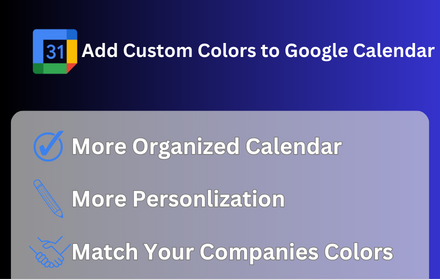
Add More Colors to Calendar
Enhance your Google Calendar with a Chrome extension that adds custom colors to each event for a personalized, organized schedule.
5.0K
★ 3.4

Hue: More Colors for Google Calendar
A Chrome extension designed to enhance and personalize your Google Calendar experience.
10.0K
★ 3.6

PaintCal
Add custom colors to Google Calendar events with auto text contrast
123
★ 5.0

CalendarBoost
Add unlimited colors & tags to Google Calendar. Color-code events, apply themed tags, organize beautifully, boost productivity.
23
★ 5.0

GCalPlus
Extra Options for Google Calendar
60.0K
★ 3.9
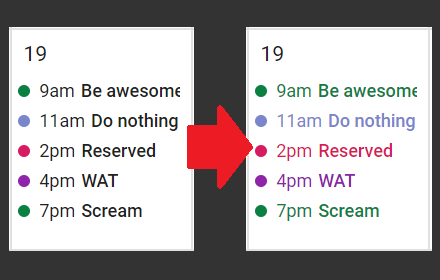
GcalColor
Colorize events in the new Google Calendar. (Keywords: Gcal color colors event)
5.0K
★ 4.5
Data sourced from the Chrome Web Store · last verified Jun 14, 2026.