
Historical U.S. Counties Auto-Checker
While searching Ancestry & FamilySearch, auto-checks county and place, notes boundary changes, shows historical county maps
As of June 2026, Historical U.S. Counties Auto-Checker has 2,000 users and a 5.00/5 rating from 8 reviews in the Productivity category.
Usersno change0%
2.0K
2,000
Ratingno change0%
5.00
8 reviews
Reviewsno change0%
8
Version
4.79
Manifest V3
90-day change · In the last 90 days this extension 1 version update.
History
1 snapshotsTracking since May 22, 2026.
View as table
| Date | Users | Rating | Reviews | Version |
|---|---|---|---|---|
| May 22, 2026 | 2.0K | 5.00 | 8 | 4.76 |
| Now | 2.0K | 5.00 | 8 | 4.79 |
Changelog
- May 22, 2026description
Let this tool do the location work for you as you search on Ancestry.com or FamilySearch.org.

Optional upgrade for Ancestry.com users:  Tree Fact-Checking and LifeMap!

U.S. county boundaries have changed over 17,600 times since America was settled in colonial times. Don’t sabotage your search for ancestors by not knowing the correct county for the historical years you are researching.

While searching on Ancestry or FamilySearch, this Historical U.S. Counties Auto-Checker extension for Google Chrome automatically checks that the county existed in the year you are searching, checks for valid places, warns of boundary changes, and links to historical county lines on Google Maps for the place and years you are searching!

Install today and never let an ancestor fall off the map again!

The Historical U.S. Counties Auto-Checker Chrome extension makes use of the award-winning randymajors.org Research Hub’s Historical U.S. Counties on Google Maps tool, underpinned with the complete dataset of the authoritative Newberry Atlas of Historical County Boundaries.

INSTRUCTIONS:

1.  Install the Historical U.S. Counties Auto-Checker Chrome extension by clicking the "Add to Chrome" button in the upper right corner of this page.

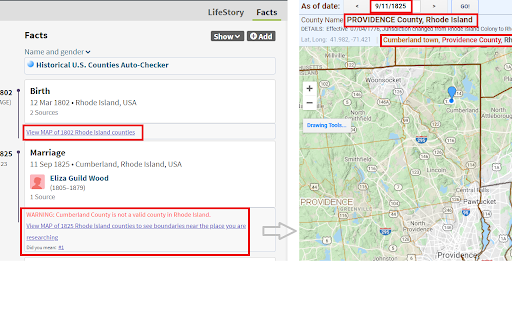
2.  Go to any search form on Ancestry.com or FamilySearch.org and start typing a place and a year.  As you finish typing in each box, the Historical U.S. Counties Auto-Checker Chrome extension will update information in a box as shown in the screenshots.  Note that the information shown is updated based on the last year box and place box you were interacting with.

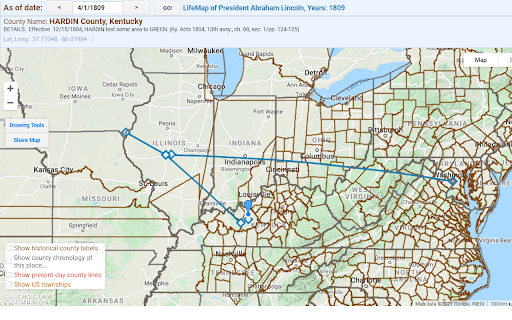
3.  Read the Note and Warning messages that appear about some counties, and click the MAP link to view historical county boundaries for the place/county/state and historical year you are researching.  The Auto-Checker first tries to center the map on the city/place/township you are searching for, and if it cannot find an exact match, it centers on the county you are searching for, and as a final fallback centers on the state you are searching for.

4.  Using the map, when you find the correct county name for the year you are researching, put that county name in the place search box on Ancestry or FamilySearch in the form "City, County, State, USA"

ENABLE TREE FACT-CHECKING & LIFEMAP FUNCTIONALITY: If you are a randymajors.org Research Hub Monthly Contributor, the Auto-Checker will also check all U.S. location facts on Person profile pages on Ancestry trees, plus create a link to an interactive LifeMap for each ancestor! And your MAP links will open into ad-free fullscreen map windows any time you click a MAP link!  LEARN MORE HERE:  https://www.randymajors.org/access-ad-free-fullscreen-tools#compare

That's all there is to it.  Hope the tool helps you discover some "hidden" records!

(When you install the Auto-Checker, you may see a standard confirmation window that states that the extension can “Read and change your data on www.ancestry.com or www.familysearch.org or www.google-analytics.com”.  Rest assured that the Historical U.S. Counties Auto-Checker Chrome extension ONLY reads the place and year fields and shows the county information as shown in the screenshots above; it absolutely DOES NOT make any changes to your data whatsoever.  No logins or email addresses are required to use the extension!)
Let this tool do the location work for you as you search on Ancestry.com or FamilySearch.org.

Optional upgrade for Ancestry.com users:  Tree Fact-Checking and LifeMap!

U.S. county boundaries have changed over 17,600 times since America was settled in colonial times. Don’t sabotage your search for ancestors by not knowing the correct county for the historical years you are researching.

While searching on Ancestry or FamilySearch, this Historical U.S. Counties Auto-Checker extension for Google Chrome automatically checks that the county existed in the year you are searching, checks for valid places, warns of boundary changes, and links to historical county lines on Google Maps for the place and years you are searching!

Install today and never let an ancestor fall off the map again!

The Historical U.S. Counties Auto-Checker Chrome extension makes use of the award-winning RandyMajors.org’s Historical U.S. Counties on Google Maps tool, underpinned with the complete dataset of the authoritative Newberry Atlas of Historical County Boundaries.

INSTRUCTIONS:

1.  Install the Historical U.S. Counties Auto-Checker Chrome extension by clicking the "Add to Chrome" button in the upper right corner of this page.

2.  Go to any search form on Ancestry.com or FamilySearch.org and start typing a place and a year.  As you finish typing in each box, the Historical U.S. Counties Auto-Checker Chrome extension will update information in a box as shown in the screenshots.  Note that the information shown is updated based on the last year box and place box you were interacting with.

3.  Read the Note and Warning messages that appear about some counties, and click the MAP link to view historical county boundaries for the place/county/state and historical year you are researching.  The Auto-Checker first tries to center the map on the city/place/township you are searching for, and if it cannot find an exact match, it centers on the county you are searching for, and as a final fallback centers on the state you are searching for.

4.  Using the map, when you find the correct county name for the year you are researching, put that county name in the place search box on Ancestry or FamilySearch in the form "City, County, State, USA"

ENABLE TREE FACT-CHECKING & LIFEMAP FUNCTIONALITY: If you are a RandyMajors.org Monthly Contributor, the Auto-Checker will also check all U.S. location facts on Person profile pages on Ancestry trees, plus create a link to an interactive LifeMap for each ancestor! And your MAP links will open into ad-free fullscreen map windows any time you click a MAP link!  LEARN MORE HERE:  https://www.randymajors.org/access-ad-free-fullscreen-tools#compare

That's all there is to it.  Hope the tool helps you discover some "hidden" records!

(When you install the Auto-Checker, you may see a standard confirmation window that states that the extension can “Read and change your data on www.ancestry.com or www.familysearch.org or www.google-analytics.com”.  Rest assured that the Historical U.S. Counties Auto-Checker Chrome extension ONLY reads the place and year fields and shows the county information as shown in the screenshots above; it absolutely DOES NOT make any changes to your data whatsoever.  No logins or email addresses are required to use the extension!)
Permissions & access
- Permissions
- storage
- Host access
- https://www.google-analytics.com/
Screenshots

About
Let this tool do the location work for you as you search on Ancestry.com or FamilySearch.org.

Optional upgrade for Ancestry.com users:  Tree Fact-Checking and LifeMap!

U.S. county boundaries have changed over 17,600 times since America was settled in colonial times. Don’t sabotage your search for ancestors by not knowing the correct county for the historical years you are researching.

While searching on Ancestry or FamilySearch, this Historical U.S. Counties Auto-Checker extension for Google Chrome automatically checks that the county existed in the year you are searching, checks for valid places, warns of boundary changes, and links to historical county lines on Google Maps for the place and years you are searching!

Install today and never let an ancestor fall off the map again!

The Historical U.S. Counties Auto-Checker Chrome extension makes use of the award-winning RandyMajors.org’s Historical U.S. Counties on Google Maps tool, underpinned with the complete dataset of the authoritative Newberry Atlas of Historical County Boundaries.

INSTRUCTIONS:

1.  Install the Historical U.S. Counties Auto-Checker Chrome extension by clicking the "Add to Chrome" button in the upper right corner of this page.

2.  Go to any search form on Ancestry.com or FamilySearch.org and start typing a place and a year.  As you finish typing in each box, the Historical U.S. Counties Auto-Checker Chrome extension will update information in a box as shown in the screenshots.  Note that the information shown is updated based on the last year box and place box you were interacting with.

3.  Read the Note and Warning messages that appear about some counties, and click the MAP link to view historical county boundaries for the place/county/state and historical year you are researching.  The Auto-Checker first tries to center the map on the city/place/township you are searching for, and if it cannot find an exact match, it centers on the county you are searching for, and as a final fallback centers on the state you are searching for.

4.  Using the map, when you find the correct county name for the year you are researching, put that county name in the place search box on Ancestry or FamilySearch in the form "City, County, State, USA"

ENABLE TREE FACT-CHECKING & LIFEMAP FUNCTIONALITY: If you are a RandyMajors.org Monthly Contributor, the Auto-Checker will also check all U.S. location facts on Person profile pages on Ancestry trees, plus create a link to an interactive LifeMap for each ancestor! And your MAP links will open into ad-free fullscreen map windows any time you click a MAP link!  LEARN MORE HERE:  https://www.randymajors.org/access-ad-free-fullscreen-tools#compare

That's all there is to it.  Hope the tool helps you discover some "hidden" records!

(When you install the Auto-Checker, you may see a standard confirmation window that states that the extension can “Read and change your data on www.ancestry.com or www.familysearch.org or www.google-analytics.com”.  Rest assured that the Historical U.S. Counties Auto-Checker Chrome extension ONLY reads the place and year fields and shows the county information as shown in the screenshots above; it absolutely DOES NOT make any changes to your data whatsoever.  No logins or email addresses are required to use the extension!)
Technical
- Version
- 4.79
- Manifest
- V3
- Size
- 5.97MiB
- Min Chrome
- 88
- Languages
- 1
- Featured
- No
Metadata
- ID
- phafnnacanbkdnkemiomjpaamomdgjhm
- Developer ID
- uf00c2f32c98d155a49e286124f240046
- Developer Email
- [email protected]
- Created
- Mar 23, 2020
- Last Updated (Store)
- May 15, 2026
- Last Scraped
- Jun 18, 2026
- Website
- randymajors.org
- Support URL
- https://www.randymajors.org/help
Similar extensions
Alternatives to Historical U.S. Counties Auto-Checker, ranked by description similarity.

Genealogy Blurring Tool
Automatically blurs sensitive elements on genealogy websites for privacy-minded screenshots and screencasts.
571
★ 5.0

Genealogy Assistant
Adds custom features to popular genealogy websites like Ancestry, MyHeritage, 23andMe and more!
2.0K
★ 5.0

Find Temple Ordinances
Finds family names to take to the temple
13

YFull Finder (Ajwla)
YFull Finder (Ajwla) - Visualization and management of genealogical data on YFull.com
85
★ 5.0

Family Tree Validator
Ensure your family's information on FamilySearch is correct and complete. Validator makes this quick and easy.
589
★ 5.0

FS Tools
Supercharge your FamilySearch experience!
97

iCloud Find My GPS Logger
Logs device movements from iCloud Find My and exports to GPX files
68

Bible Place Finder
This extension helps the user locate geographic places listed in the Bible and facilitates viewing them on maps.
9
Data sourced from the Chrome Web Store · last verified Jun 18, 2026.