
FS Tools
Supercharge your FamilySearch experience!
As of June 2026, FS Tools has 97 users in the Productivity category.
Usersup 22.8 percent+22.8%
97
97
Ratingno change0%
—
— reviews
Reviewsno change0%
—
Version
1.0.34
Manifest V3
History
9 snapshotsTracking since Apr 1, 2026.
View as table
| Date | Users | Rating | Reviews | Version |
|---|---|---|---|---|
| Apr 1, 2026 | 79 | — | — | 1.0.34 |
| Apr 21, 2026 | 84 | — | — | 1.0.34 |
| Apr 26, 2026 | 88 | — | — | 1.0.34 |
| May 3, 2026 | 91 | — | — | 1.0.34 |
| May 9, 2026 | 97 | — | — | 1.0.34 |
| May 20, 2026 | 96 | — | — | 1.0.34 |
| May 27, 2026 | 93 | — | — | 1.0.34 |
| Jun 3, 2026 | 95 | — | — | 1.0.34 |
| Jun 9, 2026 | 100 | — | — | 1.0.34 |
| Now | 97 | — | — | 1.0.34 |
Changelog
- Apr 21, 2026description
FS Tools adds several helpful features to FamilySearch.org, FindAGrave.com, and other helpful genealogical research sites to improve your FamilySearch tree-building experience. Features:

**ONE-CLICK SEARCH FOR POTENTIAL DUPLICATES**

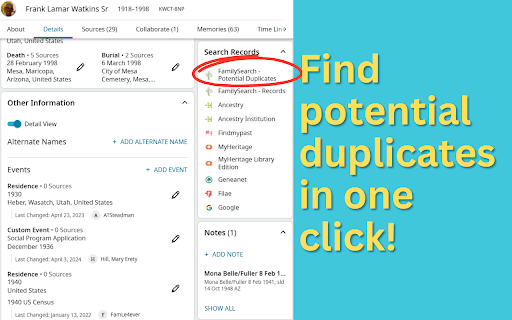
Sometimes there is another version of the person you are working on somewhere else in the tree. But you won't see a "Possible duplicate" hint on that person unless the system is *very* confident. Experienced users know to go search the tree to see if there is another version of that person somewhere in the tree. Constructing this search takes time.

FS Tools adds a link to the records section of the page that builds that search for you based on the information on the page. You can check for potential duplicates with a single click!

**FULL-TEXT SEARCH ON FILMS**

FamilySearch recently added a new labs feature called "Full-Text Search" that leverages the power of AI to search films and other images for text. This is especially helpful when you want to read a record from a microfilm scan but the page number is not included in the record. But opening the full-text search tool and building the search parameters for your film is tricky.

FS Tools adds a full-text search box to all film records, allowing you to quickly jump right to the page you want!

**SEARCH BY RECORD**

When you're looking at a record on FamilySearch and the record isn't attached as a source to a person, the system helpfully shows you a list of what it thinks might be related records along the side. But this is a very short list. And it only shows if the record isn't attached. If you want to search the tree or other records based on the information of a record, you currently have to open up a search window (one for records and one for the tree) and type all the information from the record.

FS Tools adds links to the record to automatically perform a search of the records or tree system based on the information present in the record you're looking at.

**FIND-A-GRAVE INTEGRATION*

When browsing Find-a-Grave, FS Tools adds icons linking you from the grave memorial to the corresponding record in FamilySearch. If you have already logged into FamilySearch in your browser, it will even show you whether there is already a person in the tree for that grave record!

**MORE FEATURES TO COME**

FS Tools is a new extension, and I'm adding features all the time. If you think of an idea you'd like to see, contact me at watkins.dev!
FS Tools adds several helpful features to FamilySearch.org, FindAGrave.com, and other helpful genealogical research sites to improve your FamilySearch tree-building experience. Features:

**ONE-CLICK SEARCH FOR POTENTIAL DUPLICATES**

Sometimes there is another version of the person you are working on somewhere else in the tree. But you won't see a "Possible duplicate" hint on that person unless the system is *very* confident. Experienced users know to go search the tree to see if there is another version of that person somewhere in the tree. Constructing this search takes time.

FS Tools adds a link to the records section of the page that builds that search for you based on the information on the page. You can check for potential duplicates with a single click!

**FULL-TEXT SEARCH ON FILMS**

FamilySearch recently added a new labs feature called "Full-Text Search" that leverages the power of AI to search films and other images for text. This is especially helpful when you want to read a record from a microfilm scan but the page number is not included in the record. But opening the full-text search tool and building the search parameters for your film is tricky.

FS Tools adds a full-text search box to all film records, allowing you to quickly jump right to the page you want!

**SEARCH BY RECORD**

When you're looking at a record on FamilySearch and the record isn't attached as a source to a person, the system helpfully shows you a list of what it thinks might be related records along the side. But this is a very short list. And it only shows if the record isn't attached. If you want to search the tree or other records based on the information of a record, you currently have to open up a search window (one for records and one for the tree) and type all the information from the record.

FS Tools adds links to the record to automatically perform a search of the records or tree system based on the information present in the record you're looking at.

**FIND-A-GRAVE INTEGRATION*

When browsing Find-a-Grave, FS Tools adds icons linking you from the grave memorial to the corresponding record in FamilySearch. If you have already logged into FamilySearch in your browser, it will even show you whether there is already a person in the tree for that grave record!

**MORE FEATURES TO COME**

FS Tools is a new extension, and I'm adding features all the time. If you think of an idea you'd like to see, contact me at watkins.dev!

**ABOUT THIS EXTENSION**

This is an independent personal project unaffiliated with FamilySearch and uses only the public APIs and tooling available in the FamilySearch and FindAGrave applications.

Read the full extension details at https://www.watkins.dev/portfolio/fs-tools
Permissions & access
- Permissions
- scriptingstorage
- Host access
- https://www.familysearch.org/*
Screenshots


About
FS Tools adds several helpful features to FamilySearch.org, FindAGrave.com, and other helpful genealogical research sites to improve your FamilySearch tree-building experience. Features:

**ONE-CLICK SEARCH FOR POTENTIAL DUPLICATES**

Sometimes there is another version of the person you are working on somewhere else in the tree. But you won't see a "Possible duplicate" hint on that person unless the system is *very* confident. Experienced users know to go search the tree to see if there is another version of that person somewhere in the tree. Constructing this search takes time.

FS Tools adds a link to the records section of the page that builds that search for you based on the information on the page. You can check for potential duplicates with a single click!

**FULL-TEXT SEARCH ON FILMS**

FamilySearch recently added a new labs feature called "Full-Text Search" that leverages the power of AI to search films and other images for text. This is especially helpful when you want to read a record from a microfilm scan but the page number is not included in the record. But opening the full-text search tool and building the search parameters for your film is tricky.

FS Tools adds a full-text search box to all film records, allowing you to quickly jump right to the page you want!

**SEARCH BY RECORD**

When you're looking at a record on FamilySearch and the record isn't attached as a source to a person, the system helpfully shows you a list of what it thinks might be related records along the side. But this is a very short list. And it only shows if the record isn't attached. If you want to search the tree or other records based on the information of a record, you currently have to open up a search window (one for records and one for the tree) and type all the information from the record.

FS Tools adds links to the record to automatically perform a search of the records or tree system based on the information present in the record you're looking at.

**FIND-A-GRAVE INTEGRATION*

When browsing Find-a-Grave, FS Tools adds icons linking you from the grave memorial to the corresponding record in FamilySearch. If you have already logged into FamilySearch in your browser, it will even show you whether there is already a person in the tree for that grave record!

**MORE FEATURES TO COME**

FS Tools is a new extension, and I'm adding features all the time. If you think of an idea you'd like to see, contact me at watkins.dev!

**ABOUT THIS EXTENSION**

This is an independent personal project unaffiliated with FamilySearch and uses only the public APIs and tooling available in the FamilySearch and FindAGrave applications.

Read the full extension details at https://www.watkins.dev/portfolio/fs-tools
Technical
- Version
- 1.0.34
- Manifest
- V3
- Size
- 50.83KiB
- Min Chrome
- 88
- Languages
- 1
- Featured
- No
Metadata
- ID
- mdkonnbiomkkmccchabmcjgocnbpokah
- Developer ID
- u79932ba8979de0e5a4f4e0a3e9e0967a
- Developer Email
- [email protected]
- Created
- Mar 6, 2025
- Last Updated (Store)
- Apr 14, 2026
- Last Scraped
- Jun 9, 2026
- Website
- watkins.dev
- Support URL
- https://www.watkins.dev/portfolio/fs-tools
- Privacy Policy
- —
Similar extensions
Alternatives to FS Tools, ranked by description similarity.

YFull Finder (Ajwla)
YFull Finder (Ajwla) - Visualization and management of genealogical data on YFull.com
85
★ 5.0

Genealogy Assistant
Adds custom features to popular genealogy websites like Ancestry, MyHeritage, 23andMe and more!
2.0K
★ 5.0

Find Temple Ordinances
Finds family names to take to the temple
13

Family Tree Validator
Ensure your family's information on FamilySearch is correct and complete. Validator makes this quick and easy.
589
★ 5.0

Historical U.S. Counties Auto-Checker
While searching Ancestry & FamilySearch, auto-checks county and place, notes boundary changes, shows historical county maps
2.0K
★ 5.0

Find a Grave Memorial Extractor
Extracts a list of memorials from a Find a Grave cemetery memorial list page and saves the data in CSV format.
49

Family Tree Maker (by TheFamilyTree.app)
Family tree maker with lots of customization. Set reminders and take notes for members. Download your family tree as a HQ image
1.0K
★ 3.3

Ancestor Surname Highlighter
Highlights specified surnames on genealogy pages.
157
★ 5.0
Data sourced from the Chrome Web Store · last verified Jun 9, 2026.