
Family Tree Validator
Ensure your family's information on FamilySearch is correct and complete. Validator makes this quick and easy.
As of June 2026, Family Tree Validator has 589 users and a 5.00/5 rating from 6 reviews in the Productivity category.
Usersup 8.1 percent+8.1%
589
589
Ratingno change0%
5.00
6 reviews
Reviewsno change0%
6
Version
26.03.01 (05/21/2026)
Manifest V3
90-day change · In the last 90 days this extension 4 version updates.
History
10 snapshotsTracking since Apr 6, 2026.
View as table
| Date | Users | Rating | Reviews | Version |
|---|---|---|---|---|
| Apr 6, 2026 | 545 | 5.00 | 6 | 26.00.00 (02/24/2026) |
| Apr 19, 2026 | 549 | 5.00 | 6 | 26.00.01 (03/29/2026) |
| Apr 24, 2026 | 584 | 5.00 | 6 | 26.00.01 (03/29/2026) |
| May 1, 2026 | 613 | 5.00 | 6 | 26.02.00 (04/21/2026) |
| May 8, 2026 | 593 | 5.00 | 6 | 26.02.00 (04/21/2026) |
| May 12, 2026 | 587 | 5.00 | 6 | 26.02.00 (04/21/2026) |
| May 18, 2026 | 574 | 5.00 | 6 | 26.02.00 (04/21/2026) |
| May 24, 2026 | 577 | 5.00 | 6 | 26.03.00 (05/14/2026) |
| May 31, 2026 | 580 | 5.00 | 6 | 26.03.01 (05/21/2026) |
| Jun 6, 2026 | 582 | 5.00 | 6 | 26.03.01 (05/21/2026) |
| Now | 589 | 5.00 | 6 | 26.03.01 (05/21/2026) |
Changelog
- May 18, 2026description
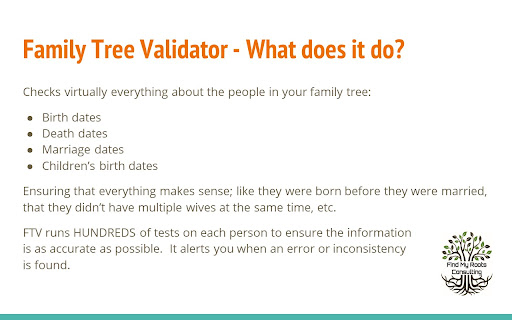
The purpose of the Family Tree Validator is to find inconsistencies, errors, missing data in your family's tree. Because these errors are under the surface, you may not even be aware that anything is wrong. It will make suggestions that may help FamilySearch find additional matches. It will find simple cleanup items like date and location inconsistencies. Best of all, it makes fixing these simple issues fast and easy!

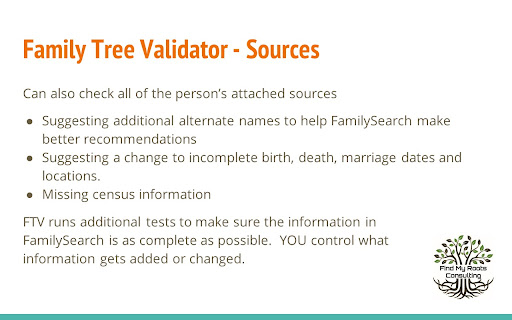
Validator checks that the information currently in FamilySearch about your family is 'reasonable'. That means common sense tests are applied EVERYWHERE (and if I've missed some, please let me know). It checks all of the information currently available, comparing husband and wife, children, parents and siblings. The extension further checks each attached source record that the information was fully added into FamilySearch. This saves you massive time in doing this review yourself!

TO BEGIN: Install the extension and then return to FamilySearch and login. As you access a person's page, click on the Validator icon in the upper right of your browser. (If you don't see the  icon, click on the extension icon - looks like a puzzle piece - and then on the 'pin' next to Family Tree Validator.) The person's name will appear on a small popup window. To validate them, simply click on the "Validate This Person" button. During Validation, the person and their family will be displayed on a separate Progress page, along with any information about them that needs to be reviewed.

To help you with your use of Validator, full help and suggestions are located on our website FindMyRoots.tech/help. The Options page gives you full control of Family Tree Validator's behavior. Validation should be viewed as a process rather than an event. As items are corrected and added, FamilySearch may find more items to be added to your tree.

Lastly, we appreciate your use of the Family Tree Validator as it continues to grow and be enhanced. Despite best our efforts to make everything work as expected, you may find issues in its use. We believe the potential benefits far outweigh any problems that may occur. Please report any errors, items missed, things that could be checked, or plain old suggestions to [email protected] or on our website FindMyRoots.tech/support..
The purpose of the Family Tree Validator is to find inconsistencies, errors, missing data in your family's tree on FamilySearch. Because these errors are under the surface, you may not even be aware that anything is wrong. It will make suggestions that may help FamilySearch find additional matches. It will find simple cleanup items like date and location inconsistencies. Best of all, it makes fixing these simple issues fast and easy!

Validator checks that the information currently in FamilySearch about your family is 'reasonable'. That means common sense tests are applied EVERYWHERE (and if I've missed some, please let me know). It checks all of the information currently available, comparing husband and wife, children, parents and siblings. The extension further checks, for each attached source record, the information was fully added into FamilySearch. This saves you massive time in doing this review yourself!

TO BEGIN: Install the extension and it will walk you through a few simple steps.  Then return to FamilySearch and login. As you access a person's page, click on the Validator icon in the upper right of your browser. (If you don't see the  icon, click on the extension icon - looks like a puzzle piece - and then on the 'pin' next to Family Tree Validator.) The person's name will appear on a small popup window. To validate them, simply click on the "Validate This Person" button. During Validation, the person and their family will be displayed on a separate Progress page, along with any information about them that needs to be reviewed.  IMPORTANT: the first time, the amount of information can be concerning.  Do not worry, we'll make the cleanup easy!

To help you with your use of Validator, full help and suggestions are located on our website FindMyRoots.tech/help. The Options page gives you full control of Family Tree Validator's behavior. Validation should be viewed as a process rather than an event. As items are corrected and added, FamilySearch may find more items to be added to your tree.

Lastly, we appreciate your use of the Family Tree Validator as it continues to grow and be enhanced. Despite best our efforts to make everything work as expected, you may find issues in its use.  Please report any errors, items missed, things that could be checked, or new suggestions to [email protected] or on our website FindMyRoots.tech/support.  Enjoy!!!
Permissions & access
- Permissions
- tabsactiveTabstoragealarmswindows
- Host access
- https://*.familysearch.org/*, https://*.findmyroots.tech/*, https://*.findagrave.com/*, http://*.billiongraves.com/*, https://*.billiongraves.com/*, https://*.ancestry.com/*
Screenshots



About
The purpose of the Family Tree Validator is to find inconsistencies, errors, missing data in your family's tree on FamilySearch. Because these errors are under the surface, you may not even be aware that anything is wrong. It will make suggestions that may help FamilySearch find additional matches. It will find simple cleanup items like date and location inconsistencies. Best of all, it makes fixing these simple issues fast and easy!

Validator checks that the information currently in FamilySearch about your family is 'reasonable'. That means common sense tests are applied EVERYWHERE (and if I've missed some, please let me know). It checks all of the information currently available, comparing husband and wife, children, parents and siblings. The extension further checks, for each attached source record, the information was fully added into FamilySearch. This saves you massive time in doing this review yourself!

TO BEGIN: Install the extension and it will walk you through a few simple steps.  Then return to FamilySearch and login. As you access a person's page, click on the Validator icon in the upper right of your browser. (If you don't see the  icon, click on the extension icon - looks like a puzzle piece - and then on the 'pin' next to Family Tree Validator.) The person's name will appear on a small popup window. To validate them, simply click on the "Validate This Person" button. During Validation, the person and their family will be displayed on a separate Progress page, along with any information about them that needs to be reviewed.  IMPORTANT: the first time, the amount of information can be concerning.  Do not worry, we'll make the cleanup easy!

To help you with your use of Validator, full help and suggestions are located on our website FindMyRoots.tech/help. The Options page gives you full control of Family Tree Validator's behavior. Validation should be viewed as a process rather than an event. As items are corrected and added, FamilySearch may find more items to be added to your tree.

Lastly, we appreciate your use of the Family Tree Validator as it continues to grow and be enhanced. Despite best our efforts to make everything work as expected, you may find issues in its use.  Please report any errors, items missed, things that could be checked, or new suggestions to [email protected] or on our website FindMyRoots.tech/support.  Enjoy!!!
Technical
- Version
- 26.03.01 (05/21/2026)
- Manifest
- V3
- Size
- 842KiB
- Min Chrome
- 88
- Languages
- 1
- Featured
- No
Metadata
- ID
- lehejnjdpfokhdbgdnecoigaelonneld
- Developer ID
- udb7dc491a50b28ce0f6cd4ed2e3e7ccb
- Developer Email
- [email protected]
- Created
- Jul 16, 2023
- Last Updated (Store)
- May 22, 2026
- Last Scraped
- Jun 6, 2026
- Website
- findmyroots.tech
- Support URL
- https://www.findmyroots.tech/support
- Privacy Policy
- http://findmyroots.tech/privacy/
Similar extensions
Alternatives to Family Tree Validator, ranked by description similarity.

Find Temple Ordinances
Finds family names to take to the temple
13

FS Tools
Supercharge your FamilySearch experience!
97

Historical U.S. Counties Auto-Checker
While searching Ancestry & FamilySearch, auto-checks county and place, notes boundary changes, shows historical county maps
2.0K
★ 5.0

Family Tree Maker (by TheFamilyTree.app)
Family tree maker with lots of customization. Set reminders and take notes for members. Download your family tree as a HQ image
1.0K
★ 3.3

YFull Finder (Ajwla)
YFull Finder (Ajwla) - Visualization and management of genealogical data on YFull.com
85
★ 5.0

WikiTree Sourcer
WikiTree Sourcer assists in finding and citing genealogy sources for use on wikitree.com.
7.0K
★ 4.8

Genealogy Assistant
Adds custom features to popular genealogy websites like Ancestry, MyHeritage, 23andMe and more!
2.0K
★ 5.0

Family Temple Reminder
Add a temple ordinance reminder while viewing a person on FamilySearch.
7
Data sourced from the Chrome Web Store · last verified Jun 6, 2026.