
TensorBoard Companion
Make TensorBoard's run color persistent and support batch downloading run data selected in the search panal.
As of May 2026, TensorBoard Companion has 42 users and a 5.00/5 rating from 1 reviews in the Workflow & Planning category.
Usersup 13.5 percent+13.5%
42
42
Ratingno change0%
5.00
1 reviews
Reviewsno change0%
1
Version
2.0.0
Manifest V3
History
1 snapshotsTracking since May 22, 2026.
View as table
| Date | Users | Rating | Reviews | Version |
|---|---|---|---|---|
| May 22, 2026 | 37 | 5.00 | 1 | 2.0.0 |
| Now | 42 | 5.00 | 1 | 2.0.0 |
Permissions & access
- Permissions
- activeTabtabsdownloads
- Host access
- None declared
Screenshots


About
**New Features in 2.0.0 - Batch Download**
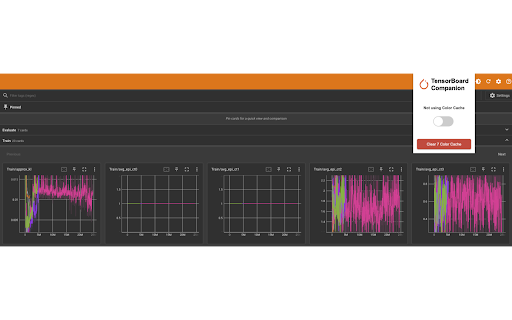
Are you having a hard time filtering and downloading experiment trials data manually from TensorBoard? You don't need to from now on! For any scalar chart, you can download all the selected runs shown in the figure. What you see is what you get!

In tab "Time Series", when you click on "Download Data" of any scalar chart, you will find two more new buttons that enable you to download the exact data of all the curves currently shown in the graph.

Basic Usage:
This is enabled by default as long as you enabled and pinned the extension to the toolbar. If not seeing the new buttons, please refresh the tfboard webpage after you enable this extension.

Other Updates
- Fixed a bug where in newer version Chrome the popup window may not show properly;
- Fixed a bug where color change monitor may not be triggered properly;
- Improved stability and efficiency.


**Features in 1.0.0**

The default color palette of TensorBoard might not satisfy AI/ML practitioners' needs.
However, user specified colors will be reset on each refresh or page reloading, which has been disappointing the developer community for a long time. Now, with this little Chrome extension, you can set whatever colors to different runs and they will never disappear after page reloading!

Basic Usage:
1. Pin the extension to toolbar;
2. Click the extension icon and make sure that the toggle is on (showing "Using Color Cache");
3. Now if you set a color to a run in TensorBoard, they will be automatically saved.
4. After refreshing or reloading the page, you will find that the color you just set is still there (instead of the default set by TensorBoard automatically).

Clear Selected Color Cache:
1. Click the orange button in the extension and all runs currently shown in the left panel of TensorBoard will have their color reset back to the TensorBoard default.

Clear Color Cache:
1. Click the big red button in the extension and all user defined run colors will be deleted.

Note:
1. The extension binds color with each run's name;
2. It saves color info to cookies and you can choose to clear them by clicking the button "Clear (X) Color Cache" in the extension (X is the number of runs' colors stored so far w.r.t the current tab's base url);
3. You can opt to use or not use stored color cache by toggling on/off in the extension.

ENJOY!
Technical
- Version
- 2.0.0
- Manifest
- V3
- Size
- 41.33KiB
- Min Chrome
- 88
- Languages
- 1
- Featured
- No
Metadata
- ID
- pfegpadkldihppnddpbkdgkjgdoklgdp
- Developer ID
- u6b009c1cd24018c924060329c5bf1e77
- Developer Email
- [email protected]
- Created
- Aug 16, 2023
- Last Updated (Store)
- Mar 6, 2024
- Last Scraped
- May 22, 2026
- Website
- —
- Support URL
- —
- Privacy Policy
- https://add0n.com/policies/unixeco.txt
Similar extensions
Alternatives to TensorBoard Companion, ranked by description similarity.

Color Bookmarker (Your Ultimate Color Picker for Capturing Colors Anywhere)
Color Bookmarker is your essential tool for organizing and managing colors while browsing the web.
1.0K
★ 5.0

Chrome History Analysis to CSV
Easily export your Chrome browsing history analysis to CSV
931
★ 5.0

New Tab Custom Colour Blank Page
New Tab opens with a (user chosen) colour blank page
480
★ 4.4

Coolors for Chrome Lite Beta
Generate beautiful palettes right from the browser tab.
707
★ 1.0
Color Eyedropper
Pick colors from web pages, color picker and your personal color history.
5.0K
★ 5.0
Easy Color Picker
Grab colors from webpages anytime, instant color picker and personal color history.
8.0K
★ 4.5

Canvas+
CanvasPlus: Power up your learning with color themes, navigation shortcuts, and improved performance.
50.0K
★ 4.0

Monochrome Mode Switch
## Overview
The Mode Switcher is a lightweight Chrome extension designed to help enhance your browsing experience by enabling you…
556
★ 1.0
Data sourced from the Chrome Web Store · last verified May 22, 2026.