
Canvas+
CanvasPlus: Power up your learning with color themes, navigation shortcuts, and improved performance.
As of June 2026, Canvas+ has 50,000 users and a 4.03/5 rating from 33 reviews in the Workflow & Planning category.
Usersdown 28.6 percent−28.6%
50.0K
50,000
Ratingno change0%
4.03
33 reviews
Reviewsno change0%
33
Version
0.4.9
Manifest V3
90-day change · In the last 90 days this extension lost 20.0K users, 1 version update.
History
3 snapshotsTracking since Apr 25, 2026.
View as table
| Date | Users | Rating | Reviews | Version |
|---|---|---|---|---|
| Apr 25, 2026 | 70.0K | 4.03 | 33 | 0.4.7 |
| May 20, 2026 | 70.0K | 4.03 | 33 | 0.4.9 |
| May 29, 2026 | 60.0K | 4.03 | 33 | 0.4.9 |
| Now | 50.0K | 4.03 | 33 | 0.4.9 |
Changelog
- Apr 25, 2026description
Canvas+ is a free Chrome Browser extension that improves the experience of students using Canvas. Everything you could need, from color themes, to navigation shortcuts, to improved performance.

The extension has an easy-to-use settings menu, and all of our features are toggle-able.

You have a full suite of appearance settings, including dark and dim mode, custom link colors, and custom sidebar colors and layouts.

Quick Inbox opens a popup on the left side of the page, allowing you to check previews of your emails without reloading the page and possibly losing what you were working on.

If enabled, the Speed Boost feature will preload links while you're idling, resulting in much faster loading speeds of 2x or 4x on struggling connections.

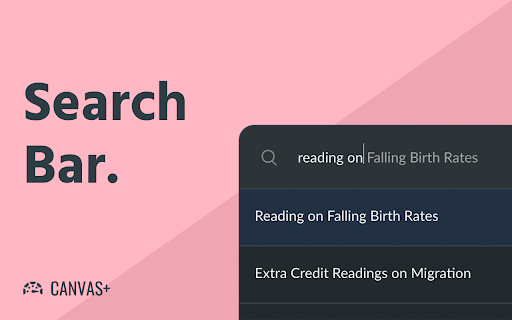
A feature to improve navigation is the search box. The search box can be enabled with Control+K (Command+K on Mac) or with a sidebar button and allows you to search all of your courses for pages and module items.

Rounder Modules does just as the name says, it makes canvas modules rounder.

If the "Smart Scrolling" setting is enabled, you'll see "Scroll to Bottom" and "Back to Top" buttons on pages, discussions, and modules/assignment lists.
This can greatly speed up navigating a course with hundreds of modules.

You can see more features that are being worked on at https://github.com/canvasplus/extension . This project is open source.

The website for Canvas+ is currently https://canvasplus.org/ . This website serves as a hub for FAQ and announcements.
Canvas+ is now part of BetterCampus! Please install BetterCampus instead.

==============================================================

Canvas+ is a free Chrome Browser extension that improves the experience of students using Canvas. Everything you could need, from color themes, to navigation shortcuts, to improved performance.

The extension has an easy-to-use settings menu, and all of our features are toggle-able.

You have a full suite of appearance settings, including dark and dim mode, custom link colors, and custom sidebar colors and layouts.

Quick Inbox opens a popup on the left side of the page, allowing you to check previews of your emails without reloading the page and possibly losing what you were working on.

If enabled, the Speed Boost feature will preload links while you're idling, resulting in much faster loading speeds of 2x or 4x on struggling connections.

A feature to improve navigation is the search box. The search box can be enabled with Control+K (Command+K on Mac) or with a sidebar button and allows you to search all of your courses for pages and module items.

Rounder Modules does just as the name says, it makes canvas modules rounder.

If the "Smart Scrolling" setting is enabled, you'll see "Scroll to Bottom" and "Back to Top" buttons on pages, discussions, and modules/assignment lists.
This can greatly speed up navigating a course with hundreds of modules.

You can see more features that are being worked on at https://github.com/canvasplus/extension . This project is open source.

The website for Canvas+ is currently https://canvasplus.org/ . This website serves as a hub for FAQ and announcements.
Permissions & access
- Permissions
- storage
- Host access
- *://*.instructure.com/*
Screenshots



About
Canvas+ is now part of BetterCampus! Please install BetterCampus instead.

==============================================================

Canvas+ is a free Chrome Browser extension that improves the experience of students using Canvas. Everything you could need, from color themes, to navigation shortcuts, to improved performance.

The extension has an easy-to-use settings menu, and all of our features are toggle-able.

You have a full suite of appearance settings, including dark and dim mode, custom link colors, and custom sidebar colors and layouts.

Quick Inbox opens a popup on the left side of the page, allowing you to check previews of your emails without reloading the page and possibly losing what you were working on.

If enabled, the Speed Boost feature will preload links while you're idling, resulting in much faster loading speeds of 2x or 4x on struggling connections.

A feature to improve navigation is the search box. The search box can be enabled with Control+K (Command+K on Mac) or with a sidebar button and allows you to search all of your courses for pages and module items.

Rounder Modules does just as the name says, it makes canvas modules rounder.

If the "Smart Scrolling" setting is enabled, you'll see "Scroll to Bottom" and "Back to Top" buttons on pages, discussions, and modules/assignment lists.
This can greatly speed up navigating a course with hundreds of modules.

You can see more features that are being worked on at https://github.com/canvasplus/extension . This project is open source.

The website for Canvas+ is currently https://canvasplus.org/ . This website serves as a hub for FAQ and announcements.
Technical
- Version
- 0.4.9
- Manifest
- V3
- Size
- 13.25MiB
- Min Chrome
- 88
- Languages
- 1
- Featured
- No
Metadata
- ID
- kdkadcnebmokaadholinmnpjelphnghh
- Developer ID
- u676f2f7866e7124f39104137fedb2ced
- Developer Email
- [email protected]
- Created
- Jan 19, 2021
- Last Updated (Store)
- Apr 10, 2026
- Last Scraped
- Jun 13, 2026
- Website
- —
- Support URL
- —
- Privacy Policy
- —
Similar extensions
Alternatives to Canvas+, ranked by description similarity.

Canvas MAX
Adds useful features to Canvas!
190
★ 5.0

Super Canvas
Supercharge Your Canvas LMS Experience
926
★ 5.0

Canvas Modulebar
Keep Your Modules Visible on Canvas!
64
★ 5.0

Gradepeek
See Canvas without being in Canvas
28
★ 5.0

CanvasCape
A suite of tools that enhance the Canvas LMS. Each tool is simple and designed with students and teaching teams in mind.
1.0K
★ 5.0

Canvas Assistant
Stay on top of your Canvas assignments and find new students to study with!
1.0K
★ 4.4
Canvas Easy Grader
This extension will increase the number of features in calculating grades on the Canvas Interface
9.0K
★ 4.3

Canvas Themeinator
Gives Canvas more themes
411
★ 4.0
Data sourced from the Chrome Web Store · last verified Jun 13, 2026.