
Monochrome Mode Switch
## Overview The Mode Switcher is a lightweight Chrome extension designed to help enhance your browsing experience by enabling you…
As of June 2026, Monochrome Mode Switch has 556 users and a 1.00/5 rating from 2 reviews in the Workflow & Planning category.
Usersup 1.8 percent+1.8%
556
556
Ratingno change0%
1.00
2 reviews
Reviewsup 100.0 percent+100.0%
2
Version
1.0
Manifest V3
History
3 snapshotsTracking since Apr 23, 2026.
View as table
| Date | Users | Rating | Reviews | Version |
|---|---|---|---|---|
| Apr 23, 2026 | 546 | 1.00 | 1 | 1.0 |
| May 12, 2026 | 568 | 1.00 | 1 | 1.0 |
| Jun 7, 2026 | 530 | 1.00 | 1 | 1.0 |
| Now | 556 | 1.00 | 2 | 1.0 |
Permissions & access
- Permissions
- activeTabscripting
- Host access
- None declared
Screenshots

About
## Overview

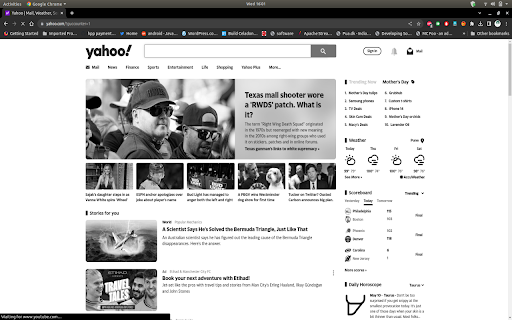
The Mode Switcher is a lightweight Chrome extension designed to help enhance your browsing experience by enabling you to quickly toggle between colour and grayscale modes. This functionality can be particularly useful for individuals looking to reduce visual distractions, increase accessibility, or simply prefer a more minimalist, black-and-white browsing experience.

This extension is easy to use and integrates seamlessly with your browser. With just one click, you can switch the entire webpage between full colour and grayscale, making it as simple as possible to customize your viewing experience according to your preferences.

## Features

* **One-Click Toggle:** Switch between colour and grayscale modes instantly with just one click.
* **Universal Compatibility:** Works on any webpage, providing a consistent and reliable experience.
* **Minimalist Design:** Simple and unobtrusive, the Mode Switcher blends into your browser without disrupting your workflow.
* **Free and Open Source:** The Mode Switcher is completely free to use and its source code is available for anyone to inspect or modify.

## Important Note

Please note that this extension operates on a per-tab basis. This means that changes made to a webpage will only persist for the duration of the session. If the webpage is refreshed or the browser is closed and reopened, the webpage will revert back to its original colours. This design is intentional, as it allows for a non-permanent, easily reversible customization of your browsing experience.

## Getting Started

1. Download the extension from the Chrome Web Store.
2. Navigate to a webpage of your choice.
3. Click on the Mode Switcher icon in your browser's toolbar to switch between colour and grayscale modes.

We hope you enjoy using the Mode Switcher Chrome extension and find it helpful in customizing your browsing experience!

## Author

Harshad Joshi @ Bufferstack.IO Analytics Technology LLP
Technical
- Version
- 1.0
- Manifest
- V3
- Size
- 40.35KiB
- Min Chrome
- 88
- Languages
- 1
- Featured
- Yes
Metadata
- ID
- efhcdhoogbikgnlmahadjikkigdbfobn
- Developer ID
- uf563308feb398e0cfa6f5c16da819d1a
- Developer Email
- [email protected]
- Created
- May 11, 2023
- Last Updated (Store)
- May 11, 2023
- Last Scraped
- Jun 7, 2026
- Website
- —
- Privacy Policy
- https://bufferstack.io/privacy-policy/
Similar extensions
Alternatives to Monochrome Mode Switch, ranked by description similarity.

Dark Mode Toggle
Toggle between dark mode and light mode with a single click.
2.0K
★ 3.4
Midnight Dark Mode - Chrome's Dark Theme
Enable dark mode on all sites. Customize theme and brightness. Dark reader - Chrome's dark skin.
6.0K
★ 4.5
Instant Dark Mode
Lightweight extension to instantly invert website colors for dark mode. Smart invert does not invert colors on images and videos.
2.0K
★ 3.2

Colorfy
Change colors of elements on a web page easily.
436
★ 4.7
Color Bookmarker (Your Ultimate Color Picker for Capturing Colors Anywhere)
Color Bookmarker is your essential tool for organizing and managing colors while browsing the web.
1.0K
★ 5.0

Canva Dark Mode
Enable dark mode on Canva
2.0K
★ 3.9

GrayZen
This extension makes websites appear in grayscale to promote calmness and reduce distractions.
2
Light and Dark New Tab
A minimal light and dark mode new tab page for Google Chrome. No external network requests. No analytics. No tracking. No bullshit.
116
★ 5.0
Data sourced from the Chrome Web Store · last verified Jun 7, 2026.