Vidline Screen Recorder
Quickly record screen with audio and camera. Instantly share videos with one click.
As of May 2026, Vidline Screen Recorder has 40,000 users and a 4.61/5 rating from 229 reviews in the Workflow & Planning category.
Usersno change0%
40.0K
40,000
Ratingno change0%
4.61
229 reviews
Reviewsup 0.9 percent+0.9%
229
Version
0.2.1
Manifest V3
History
2 snapshotsTracking since Apr 25, 2026.
View as table
| Date | Users | Rating | Reviews | Version |
|---|---|---|---|---|
| Apr 25, 2026 | 40.0K | 4.61 | 227 | 0.2.1 |
| May 22, 2026 | 40.0K | 4.61 | 228 | 0.2.1 |
| Now | 40.0K | 4.61 | 229 | 0.2.1 |
Permissions & access
- Permissions
- alarmstabscookiesdesktopCapturetabCapturenotificationsactiveTabunlimitedStoragecontextMenusstoragescripting
- Host access
- *://*.haolu.com/*, <all_urls>
Screenshots



About
The work & class environment has changed dramatically, and there are now countless uses for short videos in the workplace from daily standups to video sale pitches, from bug reports to design demos. Vidline is especially useful for companies with remote workers. Vidline helps streamline video communication and increase productivity.
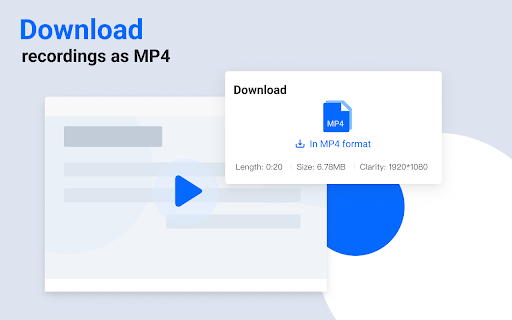
✅ Download screen recording file as MP4
✅ Support cloud recording for instant sharing(No need to wait for uploading)
✅ Support local recording for privacy concern
✅ Record up to 4k high quality videos
✅ All your team/classroom videos in one place
✅ Comment on timeline for accuarate communication
✅ Point and draw on-screen while recording to catch the attention
✅ More features are coming soon and we are all ears.
🎥 Easily record videos with the Vidline extension:
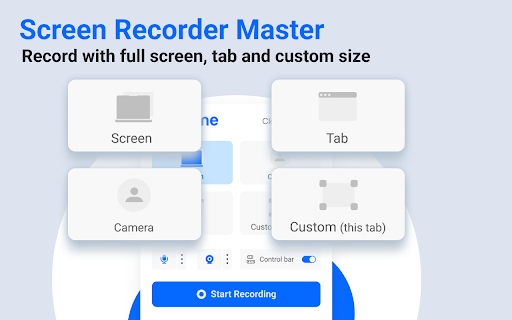
▸ Record computer screen only
▸ Record computer screen with webcam to include your face
▸ Record with webcam only
🧑 Record videos for your individual use
▸ Record a remote class for later reference
▸ Record a zoom meeting for people who can’t participate
▸ Record a game to show your skills
👩💻 Integrate Vidline with your existing workflow
▸ Share videos with your customers, colleagues, and friends by copying and sharing links
▸ Send a quick video link for Google docs, Gmail, project management tools like Trello, Bug management tools like Jira, team collaborative platforms like Microsoft Teams and Slack
▸ Paste links in the Vidline comment to connect with other resources
🎓 Connect teachers and students through short videos
▸ Work with educational tools like Schoology, Google Classroom, Blackboard, and more!
▸ Show your research projects through videos
▸ Explain concept clearly through 1:1 or 1:many videos
▸ Designed for Chromebook
👥 Create your teams in Vidline for instant video sharing and quick feedback
▸ Send videos to organizations you create or join in the Vidline extension for group collaboration
▸ Comment on time stamped sections of videos
▸ Tag team members in comments to notify them instantlyTechnical
- Version
- 0.2.1
- Manifest
- V3
- Size
- 3.59MiB
- Min Chrome
- 88
- Languages
- 54
- Featured
- Yes
Metadata
- ID
- peaiabjigdmcjiigljknblkdmllgmklp
- Developer ID
- u7940399ce3ad5f805172c7a395b8b66b
- Developer Email
- [email protected]
- Created
- Jul 19, 2021
- Last Updated (Store)
- Feb 27, 2025
- Last Scraped
- May 22, 2026
- Website
- vidline.com
- Support URL
- —
- Privacy Policy
- https://sider.ai/privacy.html
Similar extensions
Alternatives to Vidline Screen Recorder, ranked by description similarity.

Vimeo Record - Screen & Webcam Recorder
Record and share free video messages from your browser
600.0K
★ 4.5

Screen & Webcam recorder - Flonnect
Allows Screen Recording from your Webcam and Desktop
100.0K
★ 4.6

Vmaker - Free Screen Recorder
Asynchronous Video Messaging tool for all
70.0K
★ 2.7

Vidnoz Flex - Video recorder & Video share
Easily record your screen and webcam, share your video with a link anytime, and track video performance timely.
5.0K
★ 4.5

Screencastify - Screen Video Recorder
An easy-to-use screen recorder for your browser. Capture, edit and share videos in seconds.
6.0M
★ 4.0

Video & Screen Recorder For Work | Covideo
Record video from your webcam & screen, share them instantly, track who’s watching!
2.0K
★ 5.0

Screen Recorder with Webcam + Video Editor
Screen recorder & desktop capture tool. Record a video, presentation, open a front camera, or a window. Edit, download, and share.
1.0K
★ 4.3

Clipy — Screen Recorder, Annotate & Share
Record screen, tab, or webcam in Chrome. Annotate, blur, spotlight cursor. Get a shareable link the second you stop.
128
★ 5.0
Data sourced from the Chrome Web Store · last verified May 22, 2026.