
Screencastify - Screen Video Recorder
An easy-to-use screen recorder for your browser. Capture, edit and share videos in seconds.
As of June 2026, Screencastify - Screen Video Recorder has 6,000,000 users and a 3.95/5 rating from 11,749 reviews in the Workflow & Planning category.
Usersdown 33.3 percent−33.3%
6.0M
6,000,000
Ratingno change0%
3.95
11.7K reviews
Reviewsno change0%
11.7K
Version
4.24.1 (89704c90-1))
Manifest V3
90-day change · In the last 90 days this extension lost 3.0M users, 3 version updates.
History
17 snapshotsTracking since Apr 1, 2026.
View as table
| Date | Users | Rating | Reviews | Version |
|---|---|---|---|---|
| Apr 1, 2026 | 9.0M | 3.95 | 11.7K | 4.22.5 (743b5a14-1)) |
| Apr 6, 2026 | 10.0M | 3.95 | 11.7K | 4.22.5 (743b5a14-1)) |
| Apr 10, 2026 | 8.0M | 3.95 | 11.7K | 4.22.5 (743b5a14-1)) |
| Apr 16, 2026 | 9.0M | 3.95 | 11.7K | 4.22.6 (e6f3ac9a-1)) |
| Apr 26, 2026 | 10.0M | 3.95 | 11.7K | 4.22.6 (e6f3ac9a-1)) |
| Apr 29, 2026 | 10.0M | 3.95 | 11.7K | 4.22.6 (e6f3ac9a-1)) |
| May 6, 2026 | 10.0M | 3.95 | 11.7K | 4.22.6 (e6f3ac9a-1)) |
| May 12, 2026 | 10.0M | 3.95 | 11.7K | 4.22.6 (e6f3ac9a-1)) |
| May 16, 2026 | 10.0M | 3.95 | 11.7K | 4.22.6 (e6f3ac9a-1)) |
| May 18, 2026 | 10.0M | 3.95 | 11.8K | 4.23.0 (216dea43-1)) |
| May 21, 2026 | 10.0M | 3.95 | 11.8K | 4.23.0 (216dea43-1)) |
| May 24, 2026 | 10.0M | 3.95 | 11.8K | 4.23.1 (8b92054b-1)) |
| May 26, 2026 | 9.0M | 3.95 | 11.8K | 4.23.1 (8b92054b-1)) |
| May 29, 2026 | 9.0M | 3.95 | 11.8K | 4.23.1 (8b92054b-1)) |
| Jun 1, 2026 | 8.0M | 3.95 | 11.8K | 4.23.1 (8b92054b-1)) |
| Jun 12, 2026 | 7.0M | 3.95 | 11.8K | 4.23.1 (8b92054b-1)) |
| Jun 17, 2026 | 6.0M | 3.95 | 11.8K | 4.24.1 (89704c90-1)) |
| Now | 6.0M | 3.95 | 11.7K | 4.24.1 (89704c90-1)) |
Permissions & access
- Permissions
- alarmsstoragetabsactiveTaboffscreenscriptingunlimitedStoragetabCapturedesktopCapturewebNavigationnotificationssystem.display
- Host access
- <all_urls>, *://*/*
Screenshots

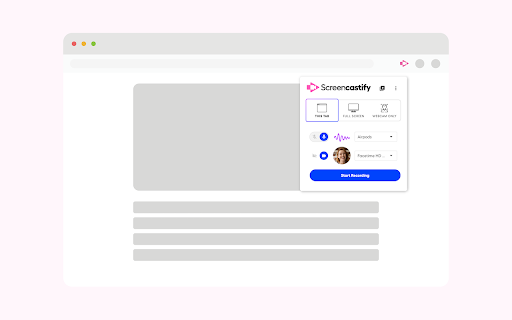


About
An easy-to-use screen recorder for Chrome. Capture, edit and share videos in seconds.

Screencastify, now part of Castify is Chrome's simplest free screen recorder and interactive video platform, empowering anyone to become a better communicator by recording, editing, and sharing videos in seconds. Plus, easily turn any video into an assessment by adding Interactive Questions.

With Screencastify, use simple yet powerful screen recording tools to:

▸ Record your desktop, browser tab, and/or webcam
▸ Edit video from your browser
▸ Edit YouTube videos
▸ Translate and add voiceovers on any video in 90+ Languages
▸ Share your video in multiple ways
▸ Add Interactive Questions to videos and see analytics to measure engagement
▸ Request video submissions with Submit

Educators, professionals, and personal creators across the world use Screencastify screen recorder as a simple way to communicate more effectively through video.

🎬 Join a massive community of video creators
✔ Millions of weekly users
✔ Hundreds of millions of videos recorded
✔ Incredibly easy to learn and use

🎥 Create engaging videos with our easy-to-use screen recorder
▸ Record your browser tab, desktop, and/or your webcam
▸ Narrate with your microphone’s audio
▸ Embed your webcam into the recording
▸ Annotate in real time to highlight key points
▸ Add captions to make your video more accessible
▸ Add questions to check viewer comprehension

✂️ Simple video editing
▸ Trim the start and end of your videos
▸ Draw on your tab with the pen tool
▸ Merge, crop, and add text to videos

🚀 Share with your audience, wherever they are
▸ Share directly from Screencastify
▸ View and share videos on Google Drive
▸ Share to Google Classroom
▸ Export as MP4, animated GIF, or MP3
▸ See who has viewed your videos
▸ Translate the captions on your video into 50+ languages

👀Available free
▸ Create your first 10 videos free or upgrade for unlimited video creation
▸ Record videos up to 30 minutes for free

-------------------------------------------

How do people use Screencastify to communicate more effectively?

🎓 Education
▸ Create instructional videos to engage your students
▸ Add Interactive Questions to turn videos into assessments
▸ Personalize learning by creating differentiated videos for each level
▸ Embrace flipped classrooms or blended learning with video lessons
▸ Have your students practice foreign languages or public speaking
▸ Empower student video creation with Submit assignments

🏛️ At Work
▸ Eliminate emails or meetings in favor of more effective, async communication
▸ Create performance review videos for coworkers
▸ Share engaging messages with your customers, users, and colleagues
▸ Create training and onboarding videos that captivate your employees
▸ Cancel meetings by sharing video instead

🌍 Everyday creators
▸ With millions of weekly users, we’ve helped creators share countless ideas for videos to life - from professional YouTubers to personal trainers and attorneys to UFO hunters. What are you waiting for? Install Screencastify and inspire the world with your video communication.

-------------------------------------------

📝 Specs:
▸ Screencasts are captured as webm/vp8 files with ogg vorbis audio
▸ Videos can be saved to your local disk as various file types (GIF, MP4, etc), directly to your Google Drive, or you can simply share the link
▸ Screencastify screen recorder does not depend on any external software (like Java, Flash or other plugins) so it runs on Chrome OS, Chromebooks, and Chromeboxes
▸ Screen recording is a CPU intensive task. Older or weaker computers may lag if multiple programs and tabs are open at the same time as a screencast

📨 Info / Contact Us:
▸ Twitter: @Screencastify
▸ Support Docs: https://learn.screencastify.com
▸ Tech Support: [email protected]
Technical
- Version
- 4.24.1 (89704c90-1))
- Manifest
- V3
- Size
- 62.54MiB
- Min Chrome
- 88
- Languages
- 1
- Featured
- Yes
Metadata
- ID
- mmeijimgabbpbgpdklnllpncmdofkcpn
- Developer ID
- uce6f44d50e2c146d4e103d0e245ac03d
- Developer Email
- [email protected]
- Created
- Jan 31, 2014
- Last Updated (Store)
- Jun 16, 2026
- Last Scraped
- Jun 17, 2026
- Support URL
- https://learn.screencastify.com
- Privacy Policy
- https://www.screencastify.com/privacy/policy
Similar extensions
Alternatives to Screencastify - Screen Video Recorder, ranked by description similarity.

Screen Recorder for Chrome Free
Record your screen, tab, or camera with advanced features.
191
★ 4.7

Screen recorder
Elevate your productivity with Screen Recorder tool. Effortlessly capture and share your screen recordings for optimal efficiency.
4.0K
★ 3.6

Screen & Webcam recorder - Flonnect
Allows Screen Recording from your Webcam and Desktop
100.0K
★ 4.6

Vmaker - Free Screen Recorder
Asynchronous Video Messaging tool for all
70.0K
★ 2.7

Video Recorder
Use Video Recorder, a simple tool to screen record. It also lets you audio recorder online, capturing both your camera and display.
10.0K
★ 4.3

Screenity - Screen Recorder & Annotation Tool
The free and privacy-friendly screen recorder for everyone. Capture, annotate, edit videos and more - all with no sign in needed.
200.0K
★ 4.4

Screen Recorder with Webcam + Video Editor
Screen recorder & desktop capture tool. Record a video, presentation, open a front camera, or a window. Edit, download, and share.
1.0K
★ 4.3

Jumpshare: Free Screen Recorder & Screenshots
The best screen recorder, screenshot capture and annotation tool
3.0K
★ 3.8
Data sourced from the Chrome Web Store · last verified Jun 17, 2026.