Vmaker - Free Screen Recorder
Asynchronous Video Messaging tool for all
As of June 2026, Vmaker - Free Screen Recorder has 70,000 users and a 2.74/5 rating from 62 reviews in the Workflow & Planning category.
Usersno change0%
70.0K
70,000
Ratingdown 2.5 percent−2.5%
2.74
62 reviews
Reviewsno change0%
62
Version
6.0.2
Manifest V3
90-day change · In the last 90 days this extension 2 version updates.
History
5 snapshotsTracking since Apr 5, 2026.
View as table
| Date | Users | Rating | Reviews | Version |
|---|---|---|---|---|
| Apr 5, 2026 | 70.0K | 2.81 | 62 | 5.2.0 |
| Apr 8, 2026 | 70.0K | 2.81 | 62 | 6.0.1 |
| Apr 14, 2026 | 70.0K | 2.81 | 62 | 6.0.2 |
| Apr 25, 2026 | 70.0K | 2.78 | 63 | 6.0.2 |
| May 28, 2026 | 70.0K | 2.78 | 63 | 6.0.2 |
| Now | 70.0K | 2.74 | 62 | 6.0.2 |
Permissions & access
- Permissions
- tabCaptureactiveTabtabsscriptingstoragedesktopCapturenotificationsunlimitedStorageidle
- Host access
- <all_urls>
Screenshots



About
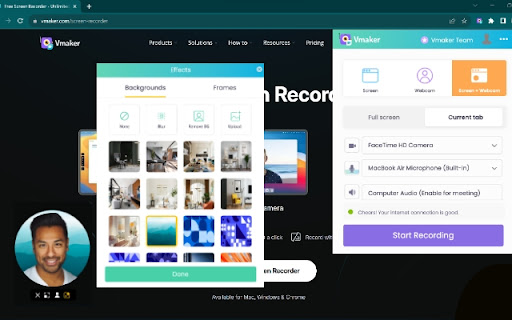
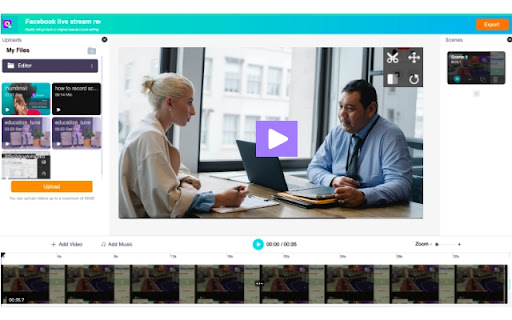
Record your screen, webcam, mic, and computer audio in just a click. Vmaker is a free screen recorder that can easily be downloaded as a Chrome Extension. The Vmaker Chrome Screen Recorder lets you record, edit, host, and share your videos effortlessly in just a matter of a few minutes. It has no watermark, comes with a built-in video editor, and allows you to export your recordings in MP4 file format. KEY FEATURES 🎥 Screen + Webcam Recording 🎥 ▪️ Record multiple tabs and windows ▪️ Record videos without any watermark ▪️ Record unlimited videos ▪️ Record dual screen ▪️ Record screen, webcam, or screen + webcam ▪️ Record both computer and mic audio ▪️ Highlight mouse clicks and add annotations ▪️ Customize webcam background with AI-powered virtual backgrounds (for screen + webcam mode) ▪️ Blur Tool: blur sensitive information before or while recording ▪️ Save your videos to the cloud ✂️ Video editing ✂️ ▪️ Trim, rotate, flip, or resize your recording ▪️ Merge external videos with your existing recording ▪️ Add cool intros and outros ▪️ Export in MP4 format at HD quality 💾 Video hosting, sharing, analytics, and more 💾 ▪️ Host and save unlimited videos to the cloud ▪️ Track view data ▪️ Add brand colors, logo, and CTA to your videos ▪️ Share the video as a copied link ▪️ Upload the video directly to social media platforms like YouTube, Facebook, Twitter, LinkedIn, etc. ▪️ Embed your video to your blog or website 👀 AVAILABLE FOR FREE 🚀Join our massive community of video creators today! ✔ 1 Million + videos recorded ✔ 350K+ users worldwide ✔ Available in 7 global languages ✔ Works on all versions of Chrome browsers ✔ Also available as Mac and Windows standalone applications. —------------------------------------------------------------------------------------------------------------------------- How to Record Your Screen Using Our Screen Recorder Chrome Extension? Step 1: Download Vmaker's Chrome plug-in Step 2: Pin the plug-in to your Chrome browser Step 3: Launch the plug-in Step 4: Customize your recording requirements Step 5: Record your video, edit, and share with everyone —------------------------------------------------------------------------------------------------------------------------- How Does Vmaker's Chrome Screen Recorder Promote Communication & Collaboration? 📚Education ▪️ Record training videos, how-to videos, tutorials, and presentations ▪️ Provide video feedback for students ▪️ Record FAQ videos 🗣️Customer support ▪️ Create troubleshooting guides ▪️ Create detailed report analysis ▪️ Provide personalized video replies to support tickets & mails 👩🏻💻Development ▪️ Review code & provide feedback ▪️ Create onboarding guides & manuals for new joinees ▪️ Provide a visual walkthrough of your project status ✍🏻Design ▪️ Share design feedback ▪️ Report UX bugs Record video messages to communicate your ideas with your design team 🎯Marketing ▪️ Record product demonstrations & presentations ▪️ Create onboarding or welcome videos 📈Sales ▪️ Send personalized video notes to book demos ▪️ Create product training videos highlighting its features ▪️ Reach out to leads via personalized cold calls 🎮Gaming ▪️ Record unlimited live streams & game plays ▪️ Record gaming reviews, comparison & highlights with crisp editing 💁🏽Others use cases ▪️ Record online meetings ▪️ Create video resume ▪️ Record instructional guides INFO/ CONTACT US: 📩Email: [email protected] 🗣Tech support: https://vmaker.com/support 📃Tutorials & Support docs: https://vmaker.com/tutorials
Technical
- Version
- 6.0.2
- Manifest
- V3
- Size
- 8.67MiB
- Min Chrome
- 88
- Languages
- 1
- Featured
- No
Metadata
- ID
- bjibimlhliikdlklncdgkpdmgkpieplj
- Developer ID
- u12eaa6faf693e37297cf929fc767067f
- Developer Email
- [email protected]
- Created
- Mar 12, 2021
- Last Updated (Store)
- Apr 6, 2026
- Last Scraped
- Jun 11, 2026
- Website
- vmaker.com
- Support URL
- https://www.vmaker.com/support
- Privacy Policy
- https://www.vmaker.com/terms-policy
Similar extensions
Alternatives to Vmaker - Free Screen Recorder, ranked by description similarity.

Screen & Webcam recorder - Flonnect
Allows Screen Recording from your Webcam and Desktop
100.0K
★ 4.6

Screen recorder
Elevate your productivity with Screen Recorder tool. Effortlessly capture and share your screen recordings for optimal efficiency.
4.0K
★ 3.6

Vimeo Record - Screen & Webcam Recorder
Record and share free video messages from your browser
600.0K
★ 4.5

Screen Recorder with Webcam + Video Editor
Screen recorder & desktop capture tool. Record a video, presentation, open a front camera, or a window. Edit, download, and share.
1.0K
★ 4.3

Live Screen Recorder
Effortlessly Record Your Screen with the Live Screen Recorder Browser Extension
30.0K
★ 4.3

Screen Recorder for Chrome Free
Record your screen, tab, or camera with advanced features.
191
★ 4.7

Videoyards - Screen Recorder with Custom Cursor & Auto Zoom
Create stunning, professional-quality screen recordings effortlessly. Perfect for tutorials, product demos, and more.
430
★ 4.5

Screencastify - Screen Video Recorder
An easy-to-use screen recorder for your browser. Capture, edit and share videos in seconds.
6.0M
★ 4.0
Data sourced from the Chrome Web Store · last verified Jun 11, 2026.