
TwExtract - export anyone's tweets to CSV
Export and download all tweets from a user to CSV/Excel for Twitter
As of June 2026, TwExtract - export anyone's tweets to CSV has 3,000 users and a 3.00/5 rating from 16 reviews in the Productivity category.
Usersno change0%
3.0K
3,000
Ratingno change0%
3.00
16 reviews
Reviewsup 14.3 percent+14.3%
16
Version
2.9.4
Manifest V3
90-day change · In the last 90 days this extension 1 version update.
History
3 snapshotsTracking since Apr 1, 2026.
View as table
| Date | Users | Rating | Reviews | Version |
|---|---|---|---|---|
| Apr 1, 2026 | 3.0K | 3.00 | 14 | 2.9.3 |
| Apr 5, 2026 | 3.0K | 2.87 | 15 | 2.9.3 |
| Apr 16, 2026 | 3.0K | 3.00 | 16 | 2.9.3 |
| Now | 3.0K | 3.00 | 16 | 2.9.4 |
Permissions & access
- Permissions
- identityidentity.emailstoragewebRequesttabs
- Host access
- https://*.twitter.com/*, https://*.x.com/*, https://api2.xtcodetech.com/*
Screenshots


About
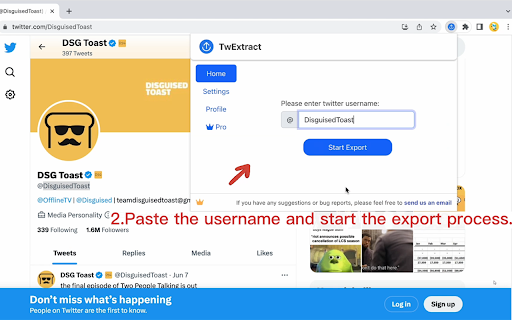
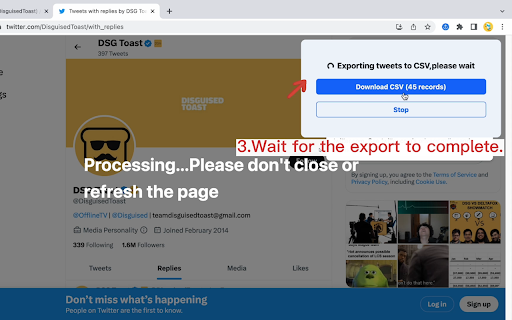
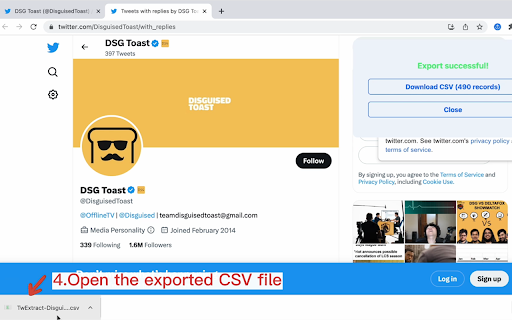
If you're looking for a way to export all the tweets of a specific Twitter user to a CSV file, you might find Twitter Exporter to be a helpful Chrome extension. With Twitter Exporter, you can quickly and easily copy and paste the Twitter username of the user you're interested in and start exporting their tweets.

🙂How it works:
1. Copy the Twitter handle(e.g., @NASA, copy NASA) and  paste it into the extension.
2. If you need to export tweets from specific dates, you can select a start date and an end date.
3. Click the "Start Export" button.

📋The exported CSV file contains the following columns:
1.id: The unique identifier for the tweet.
2.tweetText: The text of the tweet.
3.tweetURL: The URL of the tweet.
4.tweetType
5.tweetAuthor
6.handle: If it is a tweet, show the tweet author's handle, and if it is a retweet, show the original author's handle of the tweet being retweeted.
7.replyCount: The number of replies to the tweet.
8.quoteCount: The number of times the tweet has been quoted.
9.retweetCount: The number of times the tweet has been retweeted.
10.likeCount: The number of likes the tweet has received.
11.views: The number of views the tweet has received.(a retweet does not include views data and will be represented by a "-")
12.bookmarkCount: The number of times the tweet has been bookmarked.
13.createdAt: The date and time the tweet was created.
14.allMediaURL: The URLs of any media (e.g., images, videos) included in the tweet.
15.videoURL:  if the tweet contains a video, this URL is the source address of the highest quality video.

🔒Data Privacy:
Protecting the security and privacy of user data is of utmost importance to us, and we highly value the trust of our users. Therefore, we adhere to all privacy regulations and guidelines, including the General Data Protection Regulation (GDPR) and the California Consumer Privacy Act (CCPA).

📘Disclaimer:
Twitter is a trademark of Twitter, Inc. TwExtract is an independent browser extension and is not affiliated with Twitter. By using our product, users acknowledge that they have read and agreed to this disclaimer. For any questions or concerns, please contact us.

📝Changelogs:
2023/6/24 version 1.1.0:Fix bugs
2023/6/29 version 1.2.0:Fix the occasional issue of views column not appearing in the exported data
2023/8/8 version 2.0.0:
1. Added a new setting option: `scrape interval`. This allows users to set the interval for bulk fetching tweets. We recommend setting this to 15 seconds.
2. Twitter has introduced rate limits. TwExtract will now automatically handle these rate limits. You don't need to do anything - the rate limits will not affect you or your account in any way.
3. Fix bugs
2023/8/30 version 2.1.0:Fix bug
2023/8/31 version 2.2.0:Fix bug
2023/10/12 version 2.3.0:Fix bug
2023/10/15 version 2.4.0:
1. You can choose whether to include retweets in the exported CSV.
2. You can choose whether to include replies in the exported CSV
2024/1/7 version 2.5.0:
1. Add a field named 'handle' to display the user's handle; if it is a tweet, show the tweet author's handle, and if it is a retweet, show the original author's handle of the tweet being retweeted.
2. Add a field named 'videoURL'; if the tweet contains a video, this URL is the source address of the highest quality video.
3. Add the ability to select a start date and an end date to help you export tweets from specific dates.
2024/5/18 version 2.7.0: Compatible with X
2025/1/3 version 2.8.1
2025/4/30 version 2.8.2: Fix issue
2025/10/18 version 2.8.11: Fix issue
2026/2/3 version 2.9.0: Fix issue

✉️Contact us:
we're constantly developing new features to make your browsing experience even better. If you have any feedback or suggestions, please don't hesitate to reach out to us at [email protected]. We'd love to hear from you and improve our extension to meet your needs.

Please note, TwExtract is a freemium software. You can export up to 200 tweets per export for free. You need to upgrade to export more.
Technical
- Version
- 2.9.4
- Manifest
- V3
- Size
- 1.32MiB
- Min Chrome
- 88
- Languages
- 1
- Featured
- Yes
Metadata
- ID
- pbajmkgfblpcnmbceefnjbhbhkflameh
- Developer ID
- u1fbd61ee3e85bd66e3cd8adf57480720
- Developer Email
- [email protected]
- Created
- Jun 11, 2023
- Last Updated (Store)
- Apr 14, 2026
- Last Scraped
- Jun 21, 2026
- Support URL
- https://twextract.xtcodetech.com/terms.html
- Privacy Policy
- https://easyhighlight.xtcodetech.com/private.html
Similar extensions
Alternatives to TwExtract - export anyone's tweets to CSV, ranked by description similarity.

TwiBot - Export Tweets from Hashtags to CSV
Extract historical Twitter tweets from any Hashtag or Search Term to CSV/Excel for social media analysis
836
★ 4.0

TwExport - Export Tweets
TwExport is a Chrome extension designed for Twitter that enables you to export and download tweets from any account into a CSV file.
5.0K
★ 4.9

TweetExporter - Export Tweets From Any User
One click to export and download tweets from any user to CSV.
1.0K
★ 1.3

TwExportly: Export Tweets From Any Account
TwExportly is a Chrome extension for Twitter, allows you to export & download tweets from any account into an CSV or Excel file.
10.0K
★ 3.3

TwFollowExporter - export Twitter followers
An automated tool to extract followers and following lists from Twitter/X to CSV or Excel with one click.
10.0K
★ 2.7

Ingenious XReply - X/Twitter Comment Reply Export Downloader
Quickly save your Tweet Comment Reply as Excel/JSON/CSV file with this simple one click exporting extension.
23

Exporter tool for X (Twitter)
Export Blue Verified Followers from X (Twitter) to CSV with infinite scroll support.
3

Broada XReply - X/Twitter Comment Reply Export Downloader
Quickly save your Tweet Comment Reply as Excel/JSON/CSV file with this simple one click exporting extension.
6
Data sourced from the Chrome Web Store · last verified Jun 21, 2026.