
TweetExporter - Export Tweets From Any User
One click to export and download tweets from any user to CSV.
As of June 2026, TweetExporter - Export Tweets From Any User has 1,000 users and a 1.25/5 rating from 4 reviews in the Productivity category.
Usersno change0%
1.0K
1,000
Ratingno change0%
1.25
4 reviews
Reviewsno change0%
4
Version
1.12.0
Manifest V3
90-day change · In the last 90 days this extension 2 version updates.
History
2 snapshotsTracking since May 27, 2026.
View as table
| Date | Users | Rating | Reviews | Version |
|---|---|---|---|---|
| May 27, 2026 | 1.0K | 1.25 | 4 | 1.10.0 |
| Jun 9, 2026 | 1.0K | 1.25 | 4 | 1.11.0 |
| Now | 1.0K | 1.25 | 4 | 1.12.0 |
Permissions & access
- Permissions
- storageidentitywebRequestscriptingcookiesunlimitedStoragealarms
- Host access
- *://*.twitter.com/*, *://*.x.com/*
Screenshots


About
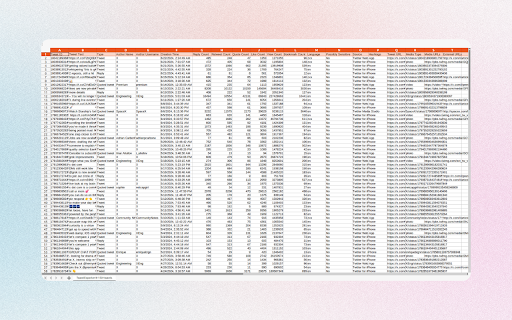
TweetExporter is a powerful tool to export and download tweets from any Twitter account to CSV, allowing you to analyze tweet data, track user activity, archive content, and manage your social media strategy more effectively.

Features
- Export tweets including replies from a user
- Export tweets from a user within a specific date range
- Automatically handling Twitter's rate limit
- Save as CSV / Excel

Note
- TweetExporter follows a freemium model, enabling you to export up to 200 tweets at no cost. If additional exports are required, consider upgrading to our premium version.
- Twitter imposes rate limits to manage the volume of requests to its API and prevent abuse. Typically, the most common rate limit interval is 15 minutes. However, rest assured that our app already handles these rate limits seamlessly. It will automatically pause and retry, ensuring uninterrupted exports.

What type of data can you export?
- Tweet ID
- Tweet Text
- Type
- Author Name
- Author Username
- Creation Time
- Reply Count
- Retweet Count
- Quote Count
- Like Count
- View Count
- Bookmark Count
- Language
- Possibly Sensitive
- Source
- Hashtags
- Tweet URL
- Media Type
- Media URLs
- External URLs

How to export tweets with TweetExporter?
To use our Twitter Tweets Export Tool, simply add our extension to browser and create an account. Once you have signed in, you can input the username whose tweets you want to export and click the "Export" button. The tweets data will be exported to a CSV or Excel file, which you can then download to your computer.

Data Privacy
All data is processed on your local computer, never passing through our web servers. Your exports are confidential.

FAQ
https://tweetexporter.toolmagic.app/#faqs
Feel free to contact us if you have any other questions.

Disclaimer
Twitter is a trademark of Twitter, LLC. This extension is not affiliated with or endorsed by Twitter, Inc.
Technical
- Version
- 1.12.0
- Manifest
- V3
- Size
- 616KiB
- Min Chrome
- 88
- Languages
- 51
- Featured
- No
Metadata
- ID
- bfkchioljbanmplddkgpalpjandldafa
- Developer ID
- u19f1d27e1e00a5cc726f2c53094b30e3
- Developer Email
- [email protected]
- Created
- Jun 29, 2024
- Last Updated (Store)
- Jun 4, 2026
- Last Scraped
- Jun 9, 2026
- Website
- —
- Support URL
- —
- Privacy Policy
- https://tweetexporter.toolmagic.app/privacy
Similar extensions
Alternatives to TweetExporter - Export Tweets From Any User, ranked by description similarity.

TwExporter - Export Twitter Followers
Export Twitter Follower and Following list to CSV for analysis.
914
★ 3.0

TwExport - Export Tweets
TwExport is a Chrome extension designed for Twitter that enables you to export and download tweets from any account into a CSV file.
5.0K
★ 4.9

TwSearchExporter - Export Twitter Search Results
One click to export users or tweets from searches or hashtags to CSV.
946

Twitter/X Exporter - Export Tweets, Followers, Bookmarks to CSV
Export tweets, replies, likes, bookmarks, followers & search results from Twitter/X. Download data as CSV, Excel, or JSON. Fast…
611
★ 5.0

XCommentExport - Export Twitter Comments
Export comments from any Twitter/X tweet to CSV or Excel with a single click.
118

TwExtract - export anyone's tweets to CSV
Export and download all tweets from a user to CSV/Excel for Twitter
3.0K
★ 3.0

Export Twitter Comments
Export all tweet comments to a CSV file with one click.
138
★ 4.9

Twitter Follower Export - Free & Unlimited by exporter24
Export Twitter followers and followings, profile with email. Free and unlimited.
503
★ 5.0
Data sourced from the Chrome Web Store · last verified Jun 9, 2026.