
ReSearch
Advanced Search with Regular Expressions
As of June 2026, ReSearch has 2 users in the Productivity category.
Usersdown 50.0 percent−50.0%
2
2
Ratingno change0%
—
— reviews
Reviewsno change0%
—
Version
0.1.0
Manifest V3
History
2 snapshotsTracking since May 13, 2026.
View as table
| Date | Users | Rating | Reviews | Version |
|---|---|---|---|---|
| May 13, 2026 | 4 | — | — | 0.1.0 |
| Jun 8, 2026 | 5 | — | — | 0.1.0 |
| Now | 2 | — | — | 0.1.0 |
Permissions & access
- Permissions
- activeTab
- Host access
- None declared
Screenshots
About
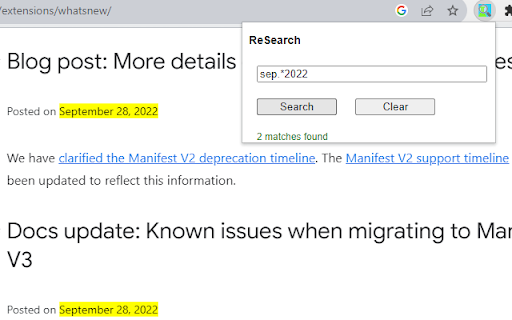
Use Regular Expressions to power-up your search through web pages.

You can try it yourself - just input "\bthe\b" (without quotes) in the search field and find all "the" as a separated word.

Or you can use it just as a regular search - try "the" (without quotes).

The extension uses JavaScript Regular Expressions, for more information please review an official documentation:

https://developer.mozilla.org/en-US/docs/Web/JavaScript/Guide/Regular_expressions

https://developer.mozilla.org/en-US/docs/Web/JavaScript/Guide/Regular_expressions/Cheatsheet

Pay attention, that JS regex implementation has some differences with other popular implementations such as Python regex. For example:
"\w+" also finds all separated digits as "12" or "2022".
Technical
- Version
- 0.1.0
- Manifest
- V3
- Size
- 53.26KiB
- Min Chrome
- 88
- Languages
- 1
- Featured
- No
Metadata
- ID
- opicebpjacolaggcmbiamkgiagiflanb
- Developer ID
- u4bae261f60439821b8e7338f87990dcc
- Developer Email
- [email protected]
- Created
- Sep 12, 2023
- Last Updated (Store)
- Sep 12, 2023
- Last Scraped
- Jun 8, 2026
- Website
- —
- Support URL
- —
- Privacy Policy
- —
Similar extensions
Alternatives to ReSearch, ranked by description similarity.

RegEx Page Finder
Find text on the current page using regular expressions.
49

Regex Search
Search and highlight matches on the current page using regular expressions.
16
★ 5.0

Regex Find
Regex-powered find: highlight matches, keyword search, capture groups, batch copy/export. Privacy-first: all processing stays local.
11

Chrome Regex Search
Use Chrome Regex Search extension with regular expressions for advanced find in Chrome
761
★ 3.9

Deep Page Search
Advanced semantic search tool with AND/OR/NEAR operators, autocomplete, and regex support for finding content on any webpage
11

Regex Search
This regex search tool highlights matches on a page, allowing navigation between results and copying matches to the clipboard.
5.0K
★ 3.9

Fuzzy Find
A browser extension to fuzzy search for text on a web page.
16

Text/Regex Search
Finds, highlights, and navigates text and regex matches on a page.
13
★ 5.0
Data sourced from the Chrome Web Store · last verified Jun 8, 2026.