
RegEx Page Finder
Find text on the current page using regular expressions.
As of June 2026, RegEx Page Finder has 49 users in the Productivity category.
Usersup 11.4 percent+11.4%
49
49
Ratingno change0%
—
— reviews
Reviewsno change0%
—
Version
1.0
Manifest V3
History
3 snapshotsTracking since Apr 20, 2026.
View as table
| Date | Users | Rating | Reviews | Version |
|---|---|---|---|---|
| Apr 20, 2026 | 44 | — | — | 1.0 |
| May 5, 2026 | 50 | — | — | 1.0 |
| Jun 4, 2026 | 53 | — | — | 1.0 |
| Now | 49 | — | — | 1.0 |
Permissions & access
- Permissions
- activeTabscriptingstorage
- Host access
- None declared
Screenshots
About
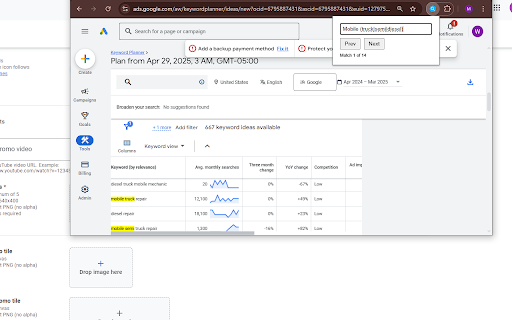
🔍 Unlock Advanced In-Page Searching with Regular Expressions! 😫 Tired of the limitations of your browser's standard "Find" (Ctrl+F)? ✨ RegEx Page Finder empowers you to search webpages with the full precision and flexibility of Regular Expressions (RegEx). Locate complex patterns, specific data formats, or nuanced text variations that simple keyword searches miss. 👨💻 Whether you're a: > Developer debugging code > Tester validating content > Researcher extracting data Or just someone needing more powerful search capabilities... This extension is for you! 🛠️ Key Features: ⚙️ Powerful RegEx Engine Use standard JavaScript Regular Expression syntax directly within a familiar find interface. 🧩 Seamless Integration Simple popup from your toolbar, designed to feel like the native find function. 💡 Live Highlighting Matches are instantly highlighted on the page, with the current match clearly marked. 🔄 Dynamic Content Awareness Automatically re-scans and updates highlights when websites load content dynamically. 📣 Clear Feedback See results like: ✅ "Match X of Y" ❌ "No matches found" ⚠️ "Invalid Regular Expression" 📌 Persistent Search Remembers your last used RegEx pattern between sessions. ⚡ Efficient Performance Optimized to search even large pages smoothly and quickly. 🧭 How to Use: 1️⃣ Click the RegEx Page Finder icon in your Chrome toolbar. 2️⃣ Enter your Regular Expression in the input field. 3️⃣ Matches will automatically highlight on the page. 4️⃣ Use "Next" and "Prev" buttons or press Enter to navigate. 🚫 Stop scrolling endlessly! ✅ Find exactly what you need, faster and smarter, with RegEx Page Finder.
Technical
- Version
- 1.0
- Manifest
- V3
- Size
- 17.25KiB
- Min Chrome
- 88
- Languages
- 1
- Featured
- No
Metadata
- ID
- ohhejeocpggohheifpbjhikmlnmkccpe
- Developer ID
- uf124251d7baa06a925efc8d25b82781d
- Developer Email
- [email protected]
- Created
- Apr 30, 2025
- Last Updated (Store)
- Apr 30, 2025
- Last Scraped
- Jun 4, 2026
- Website
- —
- Support URL
- —
- Privacy Policy
- —
Similar extensions
Alternatives to RegEx Page Finder, ranked by description similarity.

Advanced Find Extension
Advanced text finding, highlighting, and export extension
82

Deep Page Search
Advanced semantic search tool with AND/OR/NEAR operators, autocomplete, and regex support for finding content on any webpage
11

Chrome Regex Search
Use Chrome Regex Search extension with regular expressions for advanced find in Chrome
761
★ 3.9

Regex Search
Search and highlight matches on the current page using regular expressions.
16
★ 5.0

Regex Search
This regex search tool highlights matches on a page, allowing navigation between results and copying matches to the clipboard.
5.0K
★ 3.9

Regex Find
Regex-powered find: highlight matches, keyword search, capture groups, batch copy/export. Privacy-first: all processing stays local.
11

Fuzzy Find
A browser extension to fuzzy search for text on a web page.
16

SearchBarFindInPage
Find words in page
15
★ 3.0
Data sourced from the Chrome Web Store · last verified Jun 4, 2026.