
Android Messages For Web
Unofficial Chrome app created to make it easier for ChromeOS users to access Android messages.
As of June 2026, Android Messages For Web has 567 users and a 3.78/5 rating from 9 reviews.
Usersdown 8.7 percent−8.7%
567
567
Ratingno change0%
3.78
9 reviews
Reviewsno change0%
9
Version
1.6
Manifest V2
History
3 snapshotsTracking since Apr 23, 2026.
View as table
| Date | Users | Rating | Reviews | Version |
|---|---|---|---|---|
| Apr 23, 2026 | 621 | 3.78 | 9 | 1.6 |
| May 13, 2026 | 609 | 3.78 | 9 | 1.6 |
| Jun 8, 2026 | 574 | 3.78 | 9 | 1.6 |
| Now | 567 | 3.78 | 9 | 1.6 |
Permissions & access
- Permissions
- webviewnotificationsstoragesystem.displayaccessibilityFeatures.read
- Host access
- None declared
Screenshots


About
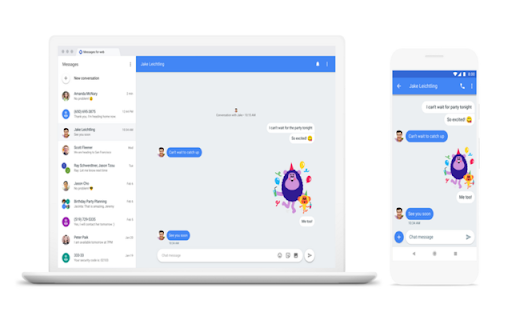
Unofficial Chrome app created to make it easier for ChromeOS users to access android messages.  This will open the https://messages.android.com page within a ChromeOS app window, instead of opening messages in a chrome tab.  This shows a handy icon in the app drawer and also supports multi-tasking with an app window that can be resized to fit your workspace requirements!

*NEW v1.5* Added a dark titlebar theme and theme toggle.  Make your app window styling match the theme selected for Android Messages for Web!

Check your SMS text messages on your computer!

You can use your computer to chat with your friends through Messages for web, which shows what’s on your Android Messages mobile app. Android Messages for web sends SMS messages using a connection from your computer to your phone, so carrier fees will apply, just like on the mobile app.

Note: The QR code for Messages for web is unique to your computer and pairs the mobile app to that computer. You can pair your Messages account on multiple devices, but only one will be active at a time. When you open Messages for web on a computer, your conversations on any other computers or browser tabs will become inactive.

What you need to get started
On your phone, you need:
 - The latest version of Messages
 - Wi-Fi or data connection

On your Chromebook, you need:
  - An internet connection

Tip: You might get charged for data if you use your phone. To avoid extra charges, connect your phone to Wi-Fi.

Set up Android Messages for Web:
  1) On your phone, open Messages Android Messages.
  2) Tap More and then Messages for web.
  3) On your Chromebook, open Messages for Web
        Optional: To sign in to Messages for web automatically next time, check the box "Remember
        this computer." If you don’t check the box, you can tap More and then Settings and toggle
        on Remember this device after you log in to the Chrome app.
  4) Using your phone, tap Scan QR code and hold your phone up to the QR code on the web page.
       When it’s ready, your phone will vibrate.

Note: Your latest conversation threads, contacts, and other settings will be encrypted and cached on your browser. If you don’t use your Messages account for 14 days, you’ll automatically be signed out for security reasons.
Technical
- Version
- 1.6
- Manifest
- V2
- Size
- 478KiB
- Min Chrome
- 37.0.0.0
- Languages
- 45
- Featured
- No
Metadata
- ID
- opcadaccphecaddkafnlcnkjhhenhdpc
- Developer ID
- ufb88b0d45d89f22ddb52184916e27c6d
- Developer Email
- —
- Created
- Jun 30, 2018
- Last Updated (Store)
- Jul 12, 2018
- Last Scraped
- Jun 8, 2026
- Website
- —
- Privacy Policy
- —
Similar extensions
Alternatives to Android Messages For Web, ranked by description similarity.

mysms - SMS from Computer
Send & receive SMS on your computer through your Android phone. Take advantage of your full keyboard instead of typing on the phone.
100.0K
★ 4.2

Web for Google Messages
Access to Chat - Android Messages on Desktop Computer. Google Messages for Web. Plus Google Meet for calls and video-calls.
10.0K
★ 3.3

Android Messages
A Chrome application that allows you to use Android Messages web interface as a separate desktop application.
22
Pulse SMS Extension
Text message your friends from your computer
9.0K
★ 4.2

Pulse SMS App
Text message your friends from your computer
3.0K
★ 3.9

Notifications in Browser Plugin
Sync Android notifications with app from developer Damian Piwowarski
773
★ 3.3

Yappy App
Send & Receive text messages from Chrome using your Android phone number
784
★ 3.1

Messenger - How To Use
Learn how to use messenger apps like Snapchat, Facebook Messenger, WhatsApp, Skype, Viber, imo, Kik, Tango, LINE, WeChat.
3.0K
★ 3.1
Data sourced from the Chrome Web Store · last verified Jun 8, 2026.