
mysms - SMS from Computer
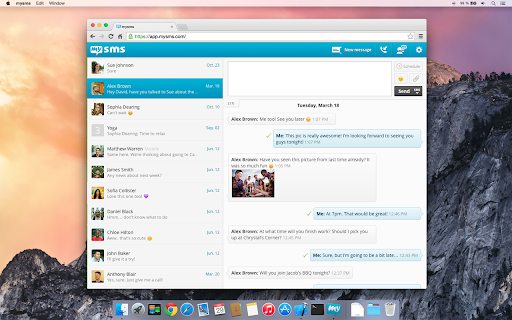
Send & receive SMS on your computer through your Android phone. Take advantage of your full keyboard instead of typing on the phone.
As of June 2026, mysms - SMS from Computer has 100,000 users and a 4.23/5 rating from 4,817 reviews.
Usersno change0%
100.0K
100,000
Ratingno change0%
4.23
4.8K reviews
Reviewsdown 0.1 percent−0.1%
4.8K
Version
5.3.4
Manifest V2
History
3 snapshotsTracking since Apr 23, 2026.
View as table
| Date | Users | Rating | Reviews | Version |
|---|---|---|---|---|
| Apr 23, 2026 | 100.0K | 4.23 | 4.8K | 5.3.4 |
| May 12, 2026 | 100.0K | 4.23 | 4.8K | 5.3.4 |
| Jun 7, 2026 | 100.0K | 4.23 | 4.8K | 5.3.4 |
| Now | 100.0K | 4.23 | 4.8K | 5.3.4 |
Permissions & access
- Permissions
- unlimitedStoragenotifications
- Host access
- None declared
Screenshots



About
● Text from Chrome (real SMS and MMS) using your Android #
● Automatic sync of SMS messages between your Android phone and computer
● SMS notifications on your computer via SMS Popup
● Call notifications on your computer - when you receive a call on your phone
● Complete call log history from your Android on your computer
● MMS Group Chat (group messaging)
● Multimedia messages (picture messages and files)
● Like iMessage for your PC/Mac

PLEASE NOTE:
To start texting from your computer, you need to download mysms on your Android phone and register for an account. This step is required for mysms to work. This app works for Android phone users.

HOW TO GET STARTED:
1) Install mysms on your Android phone via Google Play: https://play.google.com/store/apps/details?id=com.mysms.android.sms
2) Start this Chrome application and sign in with Google

When using mysms you will find all existing SMS messages and contacts synchronized from your Android to your computer. Your contacts won’t recognize a difference when you text from Chrome, because texts are sent via your Android phone number. And the best of all, there is no additional charge from what your carrier charges when texting from the web.

Because texts are sent via your Android phone, you must ensure an active mobile data or WI-FI connection. In addition, your phone must have battery and has to be on.


******************

We'd love to hear from you! Do you have a suggestion, question or comment? Just contact us at http://support.mysms.com . You can also reach us on Facebook at http://facebook.com/mysms, Twitter http://twitter.com/mysms and Google+ http://gplus.to/mysms.
Technical
- Version
- 5.3.4
- Manifest
- V2
- Size
- 9.53KiB
- Min Chrome
- —
- Languages
- 6
- Featured
- No
Metadata
- ID
- hnkkehjnlfplmdnallbjjdnokolhblgb
- Developer ID
- uf24f57c22e319f8709e7bcad4b39da0d
- Developer Email
- —
- Created
- Apr 13, 2011
- Last Updated (Store)
- Nov 10, 2015
- Last Scraped
- Jun 7, 2026
- Website
- http://www.mysms.com/
- Support URL
- http://support.mysms.com/
- Privacy Policy
- —
Similar extensions
Alternatives to mysms - SMS from Computer, ranked by description similarity.

Android Messages For Web
Unofficial Chrome app created to make it easier for ChromeOS users to access Android messages.
567
★ 3.8

Smshare ★ SMS and Social Media Share [App]
Send and receive SMS instantly. Enjoy SMS capabilities in Google Chrome.
5.0K
★ 3.6

Pulse SMS App
Text message your friends from your computer
3.0K
★ 3.9
Pulse SMS Extension
Text message your friends from your computer
9.0K
★ 4.2

LAN SMS
SMS on your computer by pairing to your Android phone! Your phone will need the app 'LAN SMS' for this to function.
211
★ 3.0

Assistant SMS
Assistant SMS application has been designed to ease sending of SMS, relying on PC keyboard, and bluetooth wireless connection:
-…
11
★ 1.0

Web for Google Messages
Access to Chat - Android Messages on Desktop Computer. Google Messages for Web. Plus Google Meet for calls and video-calls.
10.0K
★ 3.3
MightyText - SMS from PC & Text from Computer
SMS from PC or Mac using your Android #. Sync Text Messages, Calls, Notifications, Photos, Battery Status
200.0K
★ 4.1
Data sourced from the Chrome Web Store · last verified Jun 7, 2026.