
Reopen Closed Tabs
Use this extension to easily restore closed tabs in one click. Perfect for restoring tabs you accidentally closed
As of May 2026, Reopen Closed Tabs has 4 users in the Productivity category.
Usersup 100.0 percent+100.0%
4
4
Ratingno change0%
—
— reviews
Reviewsno change0%
—
Version
1.0.1
Manifest V3
History
1 snapshotsTracking since Apr 20, 2026.
View as table
| Date | Users | Rating | Reviews | Version |
|---|---|---|---|---|
| Apr 20, 2026 | 2 | — | — | 1.0.1 |
| Now | 4 | — | — | 1.0.1 |
Permissions & access
- Permissions
- sessionsnotifications
- Host access
- <all_urls>
Screenshots

About
Ever closed a tab by mistake and then spent forever trying to find it again? If you’ve been looking for a quick and simple way to bring back closed tabs, this extension is just what you need. The Reopen Closed Tabs Chrome Extension makes it super easy to restore your last closed tab in just one click. No more digging through your browser history or pressing keyboard shortcuts. Whether you're juggling work, research, or just browsing casually — it saves your time and keeps things running smoothly.


Key Features

Just One Click - Click once and your last closed tab pops right back — it’s that easy.

Super Lightweight - Won’t slow down your browser or clutter your space. It just works.

Simple to Use - No setup, no confusion. Anyone can use it — just install and go.

Incognito Friendly - You can even use it in incognito mode if you turn on the option.


How to Use

Install It - Go to the Chrome Web Store and install the extension.

Pin It - Pin it to your toolbar so it’s always handy.

Click When Needed - Accidentally closed a tab? Just click the icon to bring it back.

Repeat If Needed - Click again if you want to reopen more recently closed tabs.


Why It’s Useful

We all close tabs by accident — it happens. This extension saves you the hassle of searching for them again. It’s a small tool that makes a big difference in your everyday browsing.


Who It’s For

Great for anyone who works with a lot of tabs — students, professionals, multitaskers, or anyone who’s ever thought, “Oops, I didn’t mean to close that!”
Technical
- Version
- 1.0.1
- Manifest
- V3
- Size
- 6.72KiB
- Min Chrome
- 88
- Languages
- 1
- Featured
- No
Metadata
- ID
- oolpohmnghpojoljohpahchcbedpepae
- Developer ID
- u0875b73b9f60626306d2670587e12d01
- Developer Email
- [email protected]
- Created
- May 28, 2025
- Last Updated (Store)
- May 30, 2025
- Last Scraped
- May 30, 2026
- Website
- —
- Support URL
- —
Similar extensions
Alternatives to Reopen Closed Tabs, ranked by description similarity.
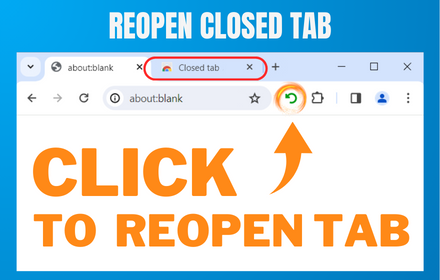
Reopen closed tab
Reopen Closed Tab: Easily restore closed tabs in one click. Enhance your browsing with the convenient "Reopen tab" button
10.0K
★ 4.1

Reopen closed tab
Reopen closed tab
42
★ 5.0

Open a Closed Tabs
Reopen lost tabs instantly with Open a Closed Tab! Easily open recently closed pages with one click.
201
★ 5.0

Closed Tabs Recovery: Fast Tab Restore & Search
Instantly recover recently closed tabs. Search and restore multiple tabs with one click.
8
Undo Tab Close
Easily restore recently closed tabs
68

Chrome Tab Recovery
Instantly restore tabs chrome with Chrome Tab Recovery. Reopen closed tabs, recover chrome tabs, and undo closed tab in one click.
394
★ 5.0

Close all tabs
A Chrome extension to instantly close all open tabs. Simplify your online browsing and web management with one click.
40
★ 5.0

Easy Undo Closed Tab
Quickly restore closed tabs with one click
9.0K
★ 4.7
Data sourced from the Chrome Web Store · last verified May 30, 2026.