
Easy Undo Closed Tab
Quickly restore closed tabs with one click
As of June 2026, Easy Undo Closed Tab has 9,000 users and a 4.69/5 rating from 114 reviews in the Productivity category.
Usersup 200.0 percent+200.0%
9.0K
9,000
Ratingno change0%
4.69
114 reviews
Reviewsup 9.6 percent+9.6%
114
Version
1.3.0
Manifest V3
90-day change · In the last 90 days this extension gained 6.0K users.
History
5 snapshotsTracking since Apr 19, 2026.
View as table
| Date | Users | Rating | Reviews | Version |
|---|---|---|---|---|
| Apr 19, 2026 | 3.0K | 4.69 | 104 | 1.3.0 |
| May 4, 2026 | 3.0K | 4.70 | 105 | 1.3.0 |
| May 13, 2026 | 3.0K | 4.70 | 106 | 1.3.0 |
| May 26, 2026 | 3.0K | 4.69 | 108 | 1.3.0 |
| Jun 7, 2026 | 8.0K | 4.69 | 111 | 1.3.0 |
| Now | 9.0K | 4.69 | 114 | 1.3.0 |
Permissions & access
- Permissions
- storagetabscontextMenusfavicon
- Host access
- None declared
Screenshots


About
"Easy Undo Closed Tab" is a powerful and practical Chrome browser extension designed to provide users with a convenient way to restore closed tabs.

In our daily web browsing, we often accidentally close a tab. This may be due to misoperation, browsing too fast, or an unexpected browser crash. Either way, losing an important web tab can be inconvenient. The mission of "Easy Undo" is to solve this problem, so that you don't have to worry about accidentally closing tabs and can easily restore them.

Once you install the Easy Undo extension, it will become a great addition to your Chrome browser. Here are the main functions and features of the extension:

1. One-click recovery: With "Easy Undo", you can reopen the recently closed tab with just one click. This means you no longer have to spend time and effort hunting down your history or re-searching for lost content.

2. Restore multiple tabs: Sometimes, we may close multiple tabs at one time. "Easy Undo" not only supports the recovery of a single tab, but also can restore multiple tabs at the same time, helping you get back to your web browsing tasks more efficiently.

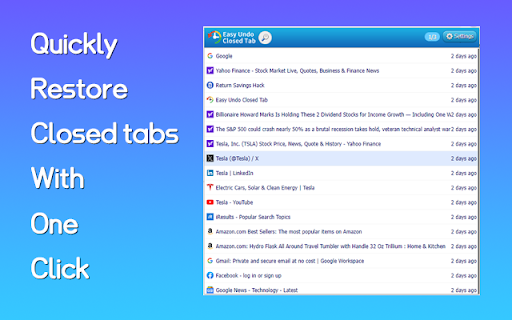
3. History viewing: "Easy Undo" also provides a convenient history viewing function, allowing you to browse the list of your recently closed tabs. This way, even if you don't need to restore the tab at the moment, you can always view your closing history.

4. Quick search: If you have a lot of closed tabs, don’t worry about not being able to find a specific page. "Easy Undo" also has a quick search function, allowing you to quickly locate the tab you want to restore based on its title or URL.

5. Customization options: "Easy Undo" allows users to customize the behavior of the extension, including setting shortcut keys, changing appearance and interface options, and adjusting the behavior of the recovery tab to meet personal needs.

6. Interference-free experience: The extension’s design is simple and intuitive and will not interfere with your browsing experience. It only appears when you need it, giving you the functionality you need.

Whether you are an individual user or a professional user, "Easy Undo" is a powerful assistant for your daily web browsing. It can help you avoid unnecessary troubles and improve your work and entertainment efficiency. No more worrying about accidentally closing tabs because Easy Undo makes it easy to get them back.

All in all, "Easy Undo Closed Tab" is a reliable Chrome extension designed to help users quickly restore closed tabs and reduce inconvenience during browsing. Install now and experience "Easy Undo" to make your web browsing easier and more enjoyable!
Technical
- Version
- 1.3.0
- Manifest
- V3
- Size
- 252KiB
- Min Chrome
- 88
- Languages
- 39
- Featured
- No
Metadata
- ID
- fhclnjohpfeehjokphdhjdpnkhmclonp
- Developer ID
- uf4931863423273dbf947a8bbc71b5f5c
- Developer Email
- [email protected]
- Created
- Sep 13, 2023
- Last Updated (Store)
- Sep 28, 2025
- Last Scraped
- Jun 7, 2026
- Website
- —
- Support URL
- —
- Privacy Policy
- http://www.dingdangv.com/protocol/
Similar extensions
Alternatives to Easy Undo Closed Tab, ranked by description similarity.

Undo Tab Close
Easily restore recently closed tabs
68
Reopen closed tab
Reopen Closed Tab: Easily restore closed tabs in one click. Enhance your browsing with the convenient "Reopen tab" button
10.0K
★ 4.1

Open a Closed Tabs
Reopen lost tabs instantly with Open a Closed Tab! Easily open recently closed pages with one click.
201
★ 5.0

Reopen closed tab
Reopen closed tab
42
★ 5.0

Closed Tabs Recovery: Fast Tab Restore & Search
Instantly recover recently closed tabs. Search and restore multiple tabs with one click.
8

Reopen Closed Tabs
Use this extension to easily restore closed tabs in one click. Perfect for restoring tabs you accidentally closed
4

Chrome Tab Recovery
Instantly restore tabs chrome with Chrome Tab Recovery. Reopen closed tabs, recover chrome tabs, and undo closed tab in one click.
394
★ 5.0

UndoClosedTabs - Tab History Restore
Reopen closed tabs with their complete history
191
★ 4.5
Data sourced from the Chrome Web Store · last verified Jun 7, 2026.