
TabNotes
Take notes in new tab
As of May 2026, TabNotes has 1,000 users and a 4.06/5 rating from 17 reviews in the Workflow & Planning category.
Usersno change0%
1.0K
1,000
Ratingno change0%
4.06
17 reviews
Reviewsno change0%
17
Version
3.0.0
Manifest V3
History
2 snapshotsTracking since Apr 20, 2026.
View as table
| Date | Users | Rating | Reviews | Version |
|---|---|---|---|---|
| Apr 20, 2026 | 1.0K | 4.06 | 17 | 3.0.0 |
| May 6, 2026 | 1.0K | 4.06 | 17 | 3.0.0 |
| Now | 1.0K | 4.06 | 17 | 3.0.0 |
Permissions & access
- Permissions
- storage
- Host access
- None declared
Screenshots



About
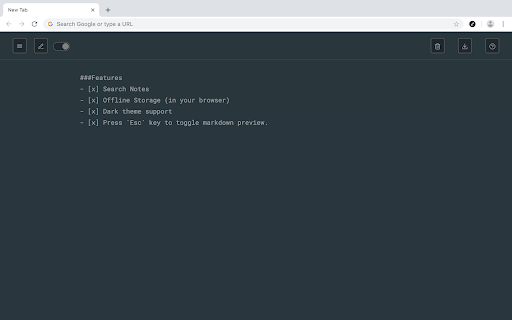
Take the notes in your new Tab.

Press CMD + T (Mac) or Ctrl + T (Windows) to take a note.
Let the new tab keep you focused on what you want to do.

Increase your productivity.

What is Tab Notes?
- TabNotes is a Browser Based Notepad
- TabNotes is a Simple Text Editor
- TabNotes is an Online text editor
- TabNotes is an Online notes taking app

Features:

- Markdown Preview
  Take notes in markdown, and preview as HTML. Press esc key to toggle HTML Preview.

- Dark mode
  Developer loves the dark mode. So we have the one. Default theme is white.

- Auto Save
  You don't need to save your text note. When you open new tab start from where you were left.

- Multiple notes.
  Chrome allows you to store up to 5MB. It's enough to save 5,000 notes of small size.

- Offline Storage
  Notes are stored directly in your browser. So only you can access your notes.

V-1.1.0
- Added HTML Preview of markdown syntax
- Changed Color Scheme of dark theme.
- Fixed some minor issues.
Technical
- Version
- 3.0.0
- Manifest
- V3
- Size
- 171KiB
- Min Chrome
- 88
- Languages
- 1
- Featured
- No
Metadata
- ID
- omgomlnnfccahaaicaphjjgkjplfkjai
- Developer ID
- u77d519550d2222f649d5b34ef9bd55c2
- Developer Email
- [email protected]
- Created
- May 27, 2019
- Last Updated (Store)
- Jul 18, 2025
- Last Scraped
- May 30, 2026
- Website
- —
- Support URL
- —
- Privacy Policy
- https://github.com/bansal/tabnotes?tab=readme-ov-file
Similar extensions
Alternatives to TabNotes, ranked by description similarity.

TabNotes: Per-Tab Notepad for Productivity
Take notes tied to each browser tab. Perfect for remote work, study, and freelancing.
13
★ 5.0

Tab Notes
Tab Notes
Tab Notes is a Chrome extension that enables users to take notes specifically for each website they visit. When a user…
13

Blank Notes
A note-taking app that replaces your new tab page. Features include markdown support, multiple tabs, quick links, and dark mode.
12

TabulaNote
A beautiful new tab page for your thoughts and notes.
11
★ 5.0

New Tab Text
A Chrome extension that transforms new tabs into a text editor
20

Tab Notes ++
Take nots directly in brower tab and easily take notes from web pages.
11

Power Notes: Add Sticky notes to your browser
Easily take notes, organize tabs, and keep everything saved locally in your browser.
12
★ 5.0

Note Cards
Transform your notes into organized, color-coded cards with smart syntax recognition
9
★ 5.0
Data sourced from the Chrome Web Store · last verified May 30, 2026.