
Tab Notes
Tab Notes Tab Notes is a Chrome extension that enables users to take notes specifically for each website they visit. When a user…
As of May 2026, Tab Notes has 13 users in the Workflow & Planning category.
Usersup 18.2 percent+18.2%
13
13
Ratingno change0%
—
— reviews
Reviewsno change0%
—
Version
1.0
Manifest V3
History
1 snapshotsTracking since May 19, 2026.
View as table
| Date | Users | Rating | Reviews | Version |
|---|---|---|---|---|
| May 19, 2026 | 11 | — | — | 1.0 |
| Now | 13 | — | — | 1.0 |
Permissions & access
- Permissions
- storageactiveTabscripting
- Host access
- None declared
Screenshots


About
Tab Notes
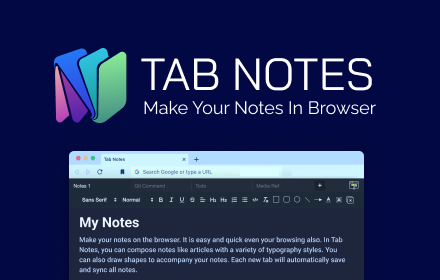
Tab Notes is a Chrome extension that enables users to take notes specifically for each website they visit. When a user visits a particular website, they can view, edit, and save notes that are unique to that site. These notes are automatically loaded when the user revisits the same site.

Main Features:
1. Site-Specific Notes:

- The extension stores notes separately for each website. This ensures that notes taken on one website are not visible when visiting another.
- Notes are stored and retrieved based on the URL of the active tab.

2. Rich Text Editing:

- Users can format their notes using rich text options such as bold, italic, and underline.
- Links can be added, and these links become clickable and highlighted when hovered over.

3. Dark Mode Support:

- The extension offers a dark mode option to reduce eye strain. This mode can be toggled on and off using a switch within the extension's popup.
- The dark mode setting is saved locally and remembered the next time the extension is opened.

4. Data Saving and Retrieval:

- Users can save their notes by clicking the "Save" button. Notes are stored in Chrome’s local storage and are specific to the user's computer.
- When the user revisits the same site, the saved notes are automatically loaded.

5. Responsive and User-Friendly Interface:

- The user interface is designed to be easy to use on both mobile and desktop devices.
- The logo and title area is clean and organized for a pleasant user experience.


Usage Instructions:
1. Taking Notes:

-After navigating to a website, click on the extension icon.
-Use the "B", "I", "U" buttons to format the text as bold, italic, or underline.

2. Saving Notes:

- To save your notes, click the “Save” button. This saves the notes specifically for the current website.
- The next time you visit the same site, these notes will be automatically loaded.

3. Enabling/Disabling Dark Mode:

- Use the toggle switch in the upper right corner of the extension popup to enable or disable dark mode.
- The dark mode setting is remembered for your next session.

4. Rich Text and Adding Links:

- To format a specific word in your notes, select the word and click the bold, italic, or underline buttons.
- To add a link, click the "🔗" icon and enter the desired URL.
Technical
- Version
- 1.0
- Manifest
- V3
- Size
- 91.65KiB
- Min Chrome
- 88
- Languages
- 1
- Featured
- No
Metadata
- ID
- ikjnchofkamjgifkdndfogigobajgken
- Developer ID
- u1c3eb220a4f01a5c24493c654dea8a2f
- Developer Email
- [email protected]
- Created
- Sep 2, 2024
- Last Updated (Store)
- Sep 2, 2024
- Last Scraped
- May 19, 2026
- Website
- —
- Support URL
- —
- Privacy Policy
- https://sites.google.com/view/batuhanozalp/tab-notes
Similar extensions
Alternatives to Tab Notes, ranked by description similarity.

TabNotes: Per-Tab Notepad for Productivity
Take notes tied to each browser tab. Perfect for remote work, study, and freelancing.
13
★ 5.0

TabNotes
Take notes in new tab
1.0K
★ 4.1

Tap Notes
Add quick notes to any webpage that are automatically saved and restored per URL
—

TabNotes
Add notes to any tab in your browser
—

Tabs Note Taker
Tabs Note Taker is a powerful browser extension that simplifies note-taking during online research and browsing. With Tabs Note…
80
★ 5.0

NoteTab - Save Your Thoughts
Capture your thoughts seamlessly in the new tab page
3.0K
★ 3.6

Sticky Notes Extension
Take notes on any webpage with floating sticky notes
13
★ 5.0
Tab Notes
Tab Notes will helps you to make notes on the browser. It is easy to use and quick to access
447
★ 3.9
Data sourced from the Chrome Web Store · last verified May 19, 2026.