
Auto Scroller & PiP for Reels, Shorts & TikTok
Auto scroll YouTube Shorts, TikTok, Instagram & Facebook Reels. Watch in Picture-in-Picture (PiP), control video speed & break timer
As of June 2026, Auto Scroller & PiP for Reels, Shorts & TikTok has 3,000 users and a 4.38/5 rating from 34 reviews in the Workflow & Planning category.
Usersup 200.0 percent+200.0%
3.0K
3,000
Ratingdown 0.7 percent−0.7%
4.38
34 reviews
Reviewsup 54.5 percent+54.5%
34
Version
2.5.0
Manifest V3
90-day change · In the last 90 days this extension gained 2.0K users, 1 version update, changed permissions.
History
7 snapshotsTracking since Apr 7, 2026.
View as table
| Date | Users | Rating | Reviews | Version |
|---|---|---|---|---|
| Apr 7, 2026 | 1.0K | 4.41 | 22 | 2.4.0 |
| Apr 19, 2026 | 1.0K | 4.43 | 23 | 2.4.0 |
| Apr 29, 2026 | 2.0K | 4.43 | 23 | 2.4.0 |
| May 25, 2026 | 2.0K | 4.46 | 24 | 2.4.0 |
| Jun 4, 2026 | 3.0K | 4.46 | 24 | 2.4.0 |
| Jun 8, 2026 | 3.0K | 4.39 | 28 | 2.5.0 |
| Jun 14, 2026 | 3.0K | 4.45 | 31 | 2.5.0 |
| Now | 3.0K | 4.38 | 34 | 2.5.0 |
Changelog
- Jun 4, 2026description
🚀 Stop Swiping, Start Watching Reels/Shorts Smarter! Transform your social media experience with the ultimate all-in-one video toolkit. Whether you are multitasking at work, cooking in the kitchen, or avoiding "thumb fatigue," this extension makes endless scrolling 100% effortless and hands-free.

This extension includes auto scroll for Shorts and Reels, a built-in video speed controller, Picture-in-Picture mode, and a smart break timer for healthier watching.

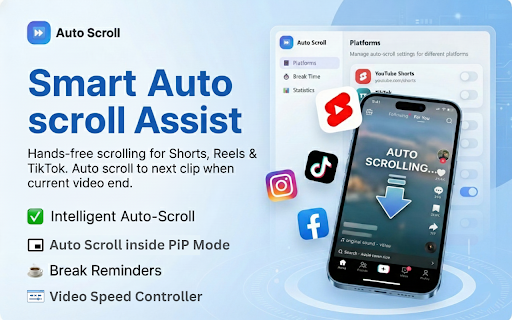
Smart Auto-Scroll Assist detects when a video ends and automatically swipes to the next one on YouTube Shorts™, Instagram Reels™, TikTok™, and Facebook Reels™.


⚡ Top Features for Power Users:

✅ Seamless Auto-Scroller: Enjoy a cinema-like experience. Our smart auto-scroll detector automatically scrolls to the next video when the current one ends—no swiping required.

📺 Picture-in-Picture (PiP) Floating Player: Watch your favorite TikToks or Reels in a floating Picture-in-Picture (PiP) window that stays on top of all other tabs. Multitask like a pro while the Auto-Scroll even works inside the PiP window!

⏩ Video Speed Controller: Take control of your time. Speed up or slow down any video from 0.5x up to 2x. Perfect for skimming tutorials or slow-motion analysis.

⏳ Smart Break Timer & Digital Wellness: Prevent "doomscrolling." Set a focus limit, and the extension will automatically block the screen when it’s time for a break.

📊 Usage Statistics: Track your viewing habits! See daily and total scrolls per platform and export your data via CSV.


🌟 Perfect For:

✓  Multitasking: Use the Floating Video Player to monitor content, Drag the Screen anywhere of your screen while you work, study, or browse.

✓  Cooking & Chores: Keep your hands clean—the extension scrolls for you while you're busy in the kitchen.

✓  Productivity: Use Speed Control to get through content faster and the Break Reminder to ensure you stay focused on your goals.

✓  Accessibility: A perfect solution for users who find repetitive manual swiping difficult or straining.


⚙️ Advanced Functionality:

✓  Individual Platform Controls: Toggle auto-scroll and speed settings independently for each site via an intuitive sidebar menu.

✓  Privacy-First Design: Built on Manifest V3. We collect zero data—all your settings and statistics are stored locally on your device.

✓  Auto-Save: Your preferences persist across browser sessions automatically.


📖 How to Get Started:

✓  Click "Add to Chrome."
✓  Open your favorite platform (YouTube™, Instagram™, TikTok™, or Facebook™).
✓  Refresh the page to activate the script.
✓  Pro Tip: If a feature stops working or any Flickering icons Issues, simply refresh the page to activate the auto-detection or fix the flickering icons issues.

🚀 Scroll Less, Discover More! 🎬 Automate your browsing 📱 Enhance your experience!

So what're you waiting for Install now 👉 Auto Scroller for Reels, Shorts and TikTok.


⚠️ Disclaimer: This extension is an independent project and is not affiliated with, endorsed by, or sponsored by Google LLC, Meta Platforms, Inc., or TikTok Ltd. The names YouTube, Facebook, Instagram, and TikTok, as well as their respective logos, are trademarks of their owners. This tool is designed solely to enhance user experience through automated scrolling functionality on supported web platforms.
Stop swiping. Start watching. Auto Scroll & PiP automatically advances YouTube Shorts, TikTok, Instagram Reels, and Facebook Reels the moment each video ends — completely hands-free. Whether you are multitasking at work, cooking in the kitchen, or just relaxing on the couch, this extension keeps your favorite short-form videos playing without lifting a finger. 🎯 SUPPORTED PLATFORMS Works seamlessly across the four biggest short-form video platforms: • YouTube Shorts — auto scroll through Shorts hands-free • TikTok — continuous TikTok video playback, no manual swiping • Instagram Reels — automated scrolling for Instagram Reels • Facebook Reels — hands-free Facebook Reels browsing 🪟 PICTURE-IN-PICTURE (PiP) — FLOATING VIDEO Watch videos in a resizable floating window while you browse other tabs, reply to emails, or get work done. The Picture-in-Picture mode keeps auto-scrolling active inside the PiP window so you never miss a video. Drag, resize, and position the floating video player anywhere on your screen. Available on YouTube Shorts, TikTok, and Facebook Reels. Instagram Reels PiP support is coming soon. ⚡ KEY FEATURES • Smart Auto-Scroll — Detects when a video ends and automatically scrolls to the next one. No timers, no guessing — it just works. • Floating Video (PiP Mode) — Enjoy a resizable Picture-in-Picture window with auto-scroll built in. Multitask like a pro. • Video Speed Control — Adjust playback speed from 0.25× to 2× on any supported platform. Speed up or slow down videos to your preference. • Break Reminders — Set custom break intervals (5–120 minutes) to pause your feed and take a break. Helps reduce doomscrolling and screen time. • Keyboard Shortcuts — Play, pause, skip to the next video, or go back to the previous one using fully customizable keyboard shortcuts. Works on the page and inside PiP mode. • Usage Statistics — Track how many videos you have auto-scrolled per day, per platform. Export your data as CSV for personal insights. • Spin the Wheel — Can not decide what to watch? Spin a fun randomizer wheel to pick a platform for you. • 48 Languages — Fully translated into 48 languages including English, Spanish, Hindi, French, German, Japanese, Korean, Chinese, Arabic, Portuguese, and more. 🧑💻 PERFECT FOR • Hands-free viewing while cooking, cleaning, exercising, or commuting • Watching Shorts and Reels in a floating window while working or studying • Reducing manual swiping fatigue during long browsing sessions • Setting healthy break reminders to manage screen time and avoid doomscrolling • Discovering new content across YouTube, TikTok, Instagram, and Facebook without interruption 📖 HOW TO USE 1. Install the extension and click the Auto Scroll icon in your toolbar. 2. Toggle ON the platforms you want (YouTube Shorts, TikTok, Instagram Reels, or Facebook Reels). 3. Open any supported page — auto-scrolling starts automatically when a video ends. 4. (Optional) Enable Picture-in-Picture from the Floating Vid tab to watch in a floating window. 5. (Optional) Set break reminders and adjust video speed from the Break Timer tab. 🔒 PRIVACY & PERMISSIONS Your data stays yours. All settings, statistics, and preferences are stored locally in your browser and synced only through your own Chrome account. We do not collect, track, or sell any personal data. No external servers, no analytics, no third-party data sharing. This extension uses only three permissions: • tabs — to detect when you are on a supported video page • storage — to save your preferences and scroll statistics locally • alarms — to power break reminders and background license checks 💎 FREE vs PREMIUM The free plan includes auto-scroll on all four platforms (40 scrolls per day), video speed control, break reminders, keyboard shortcuts, and the Spin the Wheel feature. Upgrade to Premium to unlock: • Unlimited daily auto-scrolls • Picture-in-Picture (floating video) on all supported platforms • Reset, Export CSV, and Import your scroll statistics • Use across multiple devices (1 license per device, deactivate to switch) ❓ FREQUENTLY ASKED QUESTIONS Q: Does this extension block ads? A: No. Removing platform ads would violate YouTube, TikTok, Instagram, and Facebook policies. For the best experience, use an ad blocker alongside this extension. Q: Why does the page refresh when I enable auto-scroll? A: A one-time page refresh is needed to initialize the content script that detects video endings and triggers the scroll. Q: Does Picture-in-Picture work on Instagram Reels? A: Not yet. Instagram Reels PiP support is currently in development and will be available in a future update. Q: How do I move my license to a new device? A: Go to the License Key tab, click Deactivate, then activate the same key on your new device. 📬 SUPPORT Having trouble or want to request a feature? Reach us at [email protected] — we typically respond within 24 hours. Built with care by PomodoTree — helping you browse smarter, not harder. ⚖️ DISCLAIMER This extension is an independent project and is not affiliated with, endorsed by, or sponsored by Google LLC, Meta Platforms, Inc., or TikTok Ltd. YouTube, YouTube Shorts, Instagram, Facebook, and TikTok are trademarks of their respective owners. This tool is designed solely to enhance user experience through automated scrolling functionality on supported web platforms.
- Jun 4, 2026short_description
Auto scroll YouTube Shorts, TikTok, Instagram & Facebook Reels. Watch in Picture-in-Picture (PiP), control video speed,& break timer
Auto scroll YouTube Shorts, TikTok, Instagram & Facebook Reels. Watch in Picture-in-Picture (PiP), control video speed & break timer
- Jun 4, 2026name
Auto Scroll & PiP for Reels, Shorts & TikTok | Video Speed Controller
Auto Scroller & PiP for Reels, Shorts & TikTok
- Jun 4, 2026permissions
tabs, storage
tabs, storage, alarms
Permissions & access
- Permissions
- tabsstoragealarms
- Host access
- None declared
Screenshots


About
Stop swiping. Start watching. Auto Scroll & PiP automatically advances YouTube Shorts, TikTok, Instagram Reels, and Facebook Reels the moment each video ends — completely hands-free. Whether you are multitasking at work, cooking in the kitchen, or just relaxing on the couch, this extension keeps your favorite short-form videos playing without lifting a finger. 🎯 SUPPORTED PLATFORMS Works seamlessly across the four biggest short-form video platforms: • YouTube Shorts — auto scroll through Shorts hands-free • TikTok — continuous TikTok video playback, no manual swiping • Instagram Reels — automated scrolling for Instagram Reels • Facebook Reels — hands-free Facebook Reels browsing 🪟 PICTURE-IN-PICTURE (PiP) — FLOATING VIDEO Watch videos in a resizable floating window while you browse other tabs, reply to emails, or get work done. The Picture-in-Picture mode keeps auto-scrolling active inside the PiP window so you never miss a video. Drag, resize, and position the floating video player anywhere on your screen. Available on YouTube Shorts, TikTok, and Facebook Reels. Instagram Reels PiP support is coming soon. ⚡ KEY FEATURES • Smart Auto-Scroll — Detects when a video ends and automatically scrolls to the next one. No timers, no guessing — it just works. • Floating Video (PiP Mode) — Enjoy a resizable Picture-in-Picture window with auto-scroll built in. Multitask like a pro. • Video Speed Control — Adjust playback speed from 0.25× to 2× on any supported platform. Speed up or slow down videos to your preference. • Break Reminders — Set custom break intervals (5–120 minutes) to pause your feed and take a break. Helps reduce doomscrolling and screen time. • Keyboard Shortcuts — Play, pause, skip to the next video, or go back to the previous one using fully customizable keyboard shortcuts. Works on the page and inside PiP mode. • Usage Statistics — Track how many videos you have auto-scrolled per day, per platform. Export your data as CSV for personal insights. • Spin the Wheel — Can not decide what to watch? Spin a fun randomizer wheel to pick a platform for you. • 48 Languages — Fully translated into 48 languages including English, Spanish, Hindi, French, German, Japanese, Korean, Chinese, Arabic, Portuguese, and more. 🧑💻 PERFECT FOR • Hands-free viewing while cooking, cleaning, exercising, or commuting • Watching Shorts and Reels in a floating window while working or studying • Reducing manual swiping fatigue during long browsing sessions • Setting healthy break reminders to manage screen time and avoid doomscrolling • Discovering new content across YouTube, TikTok, Instagram, and Facebook without interruption 📖 HOW TO USE 1. Install the extension and click the Auto Scroll icon in your toolbar. 2. Toggle ON the platforms you want (YouTube Shorts, TikTok, Instagram Reels, or Facebook Reels). 3. Open any supported page — auto-scrolling starts automatically when a video ends. 4. (Optional) Enable Picture-in-Picture from the Floating Vid tab to watch in a floating window. 5. (Optional) Set break reminders and adjust video speed from the Break Timer tab. 🔒 PRIVACY & PERMISSIONS Your data stays yours. All settings, statistics, and preferences are stored locally in your browser and synced only through your own Chrome account. We do not collect, track, or sell any personal data. No external servers, no analytics, no third-party data sharing. This extension uses only three permissions: • tabs — to detect when you are on a supported video page • storage — to save your preferences and scroll statistics locally • alarms — to power break reminders and background license checks 💎 FREE vs PREMIUM The free plan includes auto-scroll on all four platforms (40 scrolls per day), video speed control, break reminders, keyboard shortcuts, and the Spin the Wheel feature. Upgrade to Premium to unlock: • Unlimited daily auto-scrolls • Picture-in-Picture (floating video) on all supported platforms • Reset, Export CSV, and Import your scroll statistics • Use across multiple devices (1 license per device, deactivate to switch) ❓ FREQUENTLY ASKED QUESTIONS Q: Does this extension block ads? A: No. Removing platform ads would violate YouTube, TikTok, Instagram, and Facebook policies. For the best experience, use an ad blocker alongside this extension. Q: Why does the page refresh when I enable auto-scroll? A: A one-time page refresh is needed to initialize the content script that detects video endings and triggers the scroll. Q: Does Picture-in-Picture work on Instagram Reels? A: Not yet. Instagram Reels PiP support is currently in development and will be available in a future update. Q: How do I move my license to a new device? A: Go to the License Key tab, click Deactivate, then activate the same key on your new device. 📬 SUPPORT Having trouble or want to request a feature? Reach us at [email protected] — we typically respond within 24 hours. Built with care by PomodoTree — helping you browse smarter, not harder. ⚖️ DISCLAIMER This extension is an independent project and is not affiliated with, endorsed by, or sponsored by Google LLC, Meta Platforms, Inc., or TikTok Ltd. YouTube, YouTube Shorts, Instagram, Facebook, and TikTok are trademarks of their respective owners. This tool is designed solely to enhance user experience through automated scrolling functionality on supported web platforms.
Technical
- Version
- 2.5.0
- Manifest
- V3
- Size
- 436KiB
- Min Chrome
- 88
- Languages
- 48
- Featured
- Yes
Metadata
- ID
- ojecoogmeahmjacpimdfdmlohjookknd
- Developer ID
- ud4f582b110f6520fd423cef97500815d
- Developer Email
- [email protected]
- Created
- Aug 19, 2025
- Last Updated (Store)
- May 31, 2026
- Last Scraped
- Jun 14, 2026
- Website
- https://www.pomodotree.com/
- Support URL
- —
- Privacy Policy
- https://www.pomodotree.com/privacy-policy/
Similar extensions
Alternatives to Auto Scroller & PiP for Reels, Shorts & TikTok, ranked by description similarity.

Keep Scrolling - YouTube Shorts Auto-Scroller
Automatically scrolls through YouTube Shorts videos. Never miss content with intelligent auto-scroll that respects your preferences.
23

Short Scroll - Youtube Shorts Auto-Navigator
Automatically navigate through YouTube Shorts videos
6.0K
★ 3.9

Shorts Blocker – Block Shorts on YouTube & Reels | ZenScroll
Shorts Blocker to block shorts on YouTube, Instagram Reels, and Facebook. Remove short videos, disable Shorts, and stay focused.
505
★ 3.6

YouTube Detox — Block Shorts, Hide Recommendations & Stay Focused
A complete toolkit to help you use YouTube with purpose. Block Shorts, remove distractions, and stay focused on what truly matters.
5.0K
★ 4.6

No Youtube Shorts : Block, Skip, Count and Control
Block, Remove, Skip Shorts, Count Shorts, Focus Mode - Complete control over YouTube Shorts.
20

ScrollBlock
ScrollBlock: Focus Mode for Social Media
ScrollBlock is a browser extension designed to stop endless scrolling and manage your…
37
★ 5.0

ScrollCap
Stop doomscrolling with session-based time limits.
2

ScrollCut — Reels & Shorts Limiter
Limit daily time on Instagram Reels & YouTube Shorts. Set your limit, get blocked when you hit it. Free. No account needed.
17
★ 5.0
Data sourced from the Chrome Web Store · last verified Jun 14, 2026.