
Worktual for Google Chrome
Transform your chrome browser into powerful business communications hub by seamlessly integrating Worktual services and Google cloud
As of May 2026, Worktual for Google Chrome has 17 users and a 5.00/5 rating from 1 reviews in the Workflow & Planning category.
Usersdown 15.0 percent−15.0%
17
17
Ratingno change0%
5.00
1 reviews
Reviewsno change0%
1
Version
1.7
Manifest V3
History
2 snapshotsTracking since Apr 29, 2026.
View as table
| Date | Users | Rating | Reviews | Version |
|---|---|---|---|---|
| Apr 29, 2026 | 20 | 5.00 | 1 | 1.7 |
| May 26, 2026 | 18 | 5.00 | 1 | 1.7 |
| Now | 17 | 5.00 | 1 | 1.7 |
Permissions & access
- Permissions
- storage
- Host access
- http://www.blogger.com/, https://*.gmail.com/
Screenshots


About
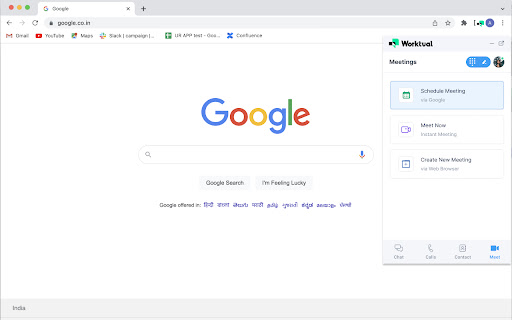
Worktual for Google Chrome provides a seamless integration with the Google Cloud to create one optimised Business Communications Hub so that the enterprise users can access the Worktual services (such as messaging, click-to-call, 1:1 voice call, conference call, video meetings, call transfer, call history) more easily, anywhere-anytime on the web, without leaving the browser.
This integration simplifies the business communications and makes users to stay connected with the business applications they use every day, thus enabling users to be more productive in their daily work at business by spending time on more meaningful tasks and making better decisions.

Some of the great features in this Chrome Extension:

- Gain quick access to Worktual Chrome extension from any Chrome tab on Windows platform and at anytime.
- Secure messaging to individuals or groups either privately or with publicly.
- React and reply to a message you have received.
- Contacts directory, all call history (including incoming calls, outgoing calls or missed calls and voicemails) and chat history are accessible.
- Use “click-to-call” feature to instantly call any linked phone number on any Chrome Browser tab via Worktual Call services.
- Manage advanced call features and settings such as call transfer, call recording, call flip, call park, ad hoc conference call, and so on.
- Receive and listen to your voicemails received to your Worktual number.
- Schedule Worktual meetings via Web Browser and Google Calendar.
- Initiate Worktual instant meetings and invite participants on the fly.
- Combine the Worktual and Google contacts together, and makes it easier to search contact.

Benefits

- Seamless Integration with Google Chrome for Business
This integration connects users with the Worktual services they use each day seamlessly while on the chrome browser, without switching between the two applications. This in turn allows users to spend time on meaningful tasks, so as to enable users to be more productive in their daily work at business.

- Improved Team Management & Productivity
The capabilities to send messages, make 1:1 voice call, conferencing and schedule meetings improve the interactions between the individuals and groups and the project management even in remote work, thereby increasing the productivity of the user or group of users, and expediting the project completion.
Technical
- Version
- 1.7
- Manifest
- V3
- Size
- 6.5MiB
- Min Chrome
- 88
- Languages
- 1
- Featured
- No
Metadata
- ID
- ojajhkiegangpmdmknlcpdaaophooefl
- Developer ID
- u47282b12e25ffe257afdf9cf9689167e
- Developer Email
- [email protected]
- Created
- Nov 5, 2022
- Last Updated (Store)
- May 15, 2023
- Last Scraped
- May 26, 2026
- Website
- —
- Support URL
- https://www.worktual.co.uk
- Privacy Policy
- https://worktual.co.uk/privacy/
Similar extensions
Alternatives to Worktual for Google Chrome, ranked by description similarity.

Worktual Contact Centre
Worktual Contact Centre for Chrome
3
★ 5.0

Collaboration 7
Streamline communication within your company, boost sales & win more customers – be efficient with Collaboration 7!
3.0K

Business Messenger
All your business chat messengers in one place!
295
★ 3.7

Elevate Chrome Extension
Elevate Chrome Extension
10.0K
★ 4.0

OneCloud CRM Integration
OneCloud CRM Integration
169
★ 5.0

ReachUC Chrome Extension
This Chrome extension allows you to Click-to-Dial phone numbers on web pages, send SMS and fax messages, and schedule web meetings.
1.0K
★ 4.3

OneCloud Connect
OneCloud UCaaS Chrome Extension for click-to-dial and screen pop
356
Workiro
Integrate any website with Workiro to create tasks and manage your work.
227
Data sourced from the Chrome Web Store · last verified May 26, 2026.