
ReachUC Chrome Extension
This Chrome extension allows you to Click-to-Dial phone numbers on web pages, send SMS and fax messages, and schedule web meetings.
As of June 2026, ReachUC Chrome Extension has 1,000 users and a 4.33/5 rating from 3 reviews in the Workflow & Planning category.
Usersno change0%
1.0K
1,000
Ratingno change0%
4.33
3 reviews
Reviewsno change0%
3
Version
4.1.4
Manifest V3
History
2 snapshotsTracking since Apr 19, 2026.
View as table
| Date | Users | Rating | Reviews | Version |
|---|---|---|---|---|
| Apr 19, 2026 | 1.0K | 4.33 | 3 | 4.1.4 |
| May 4, 2026 | 1.0K | 4.33 | 3 | 4.1.4 |
| Now | 1.0K | 4.33 | 3 | 4.1.4 |
Permissions & access
- Permissions
- webRequestactiveTabstorageidentity
- Host access
- None declared
Screenshots

About
With ReachUC Complete, you have the ability to click-to-call phone numbers on any web page in addition to a suite of features designed to boost productivity. This extension enables you to track and make more sales calls by harnessing the features of your cloud PBX from within your Chrome browser.

With ReachUC Complete,  you can:
* Initiate click-to-dial PBX calls or send SMS to any phone number on a web page
* Make outbound phone calls through your desktop, desk phone or mobile phone
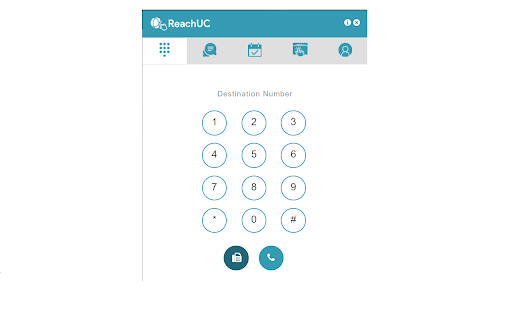
* Call, send SMS messages and send faxes from an integrated dial pad
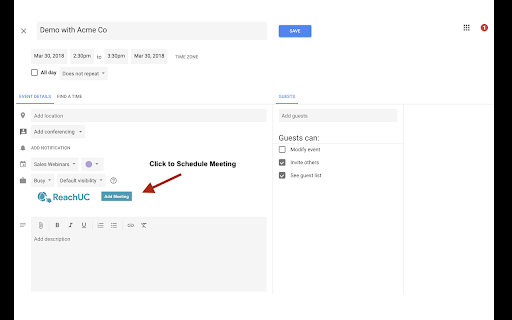
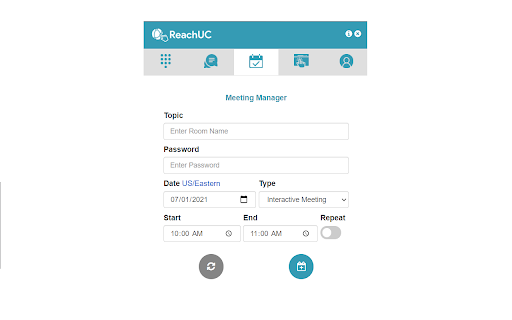
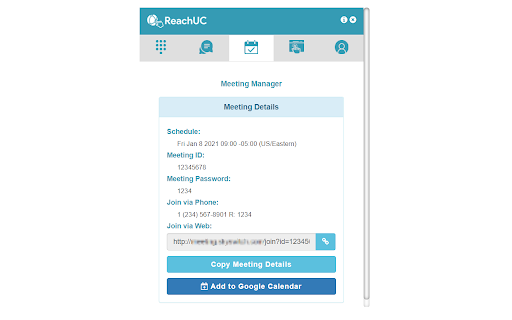
* Schedule Meeting Manager web and video conference meetings with the option to automatically synchronize to your Google Calendar account (or vice versa)
* Save contact information from your Google Contacts to your PBX Contacts list

How Does the Click-to-Call Feature Work?

Hover your mouse over any phone number on the web page. This phone number will be highlighted and produce a pop-up with three options available: Message, Call by WebRTC and Call.
* Message: Gives you the ability to write and send an SMS on your computer without leaving the web page.
* Call by WebRTC: Initiates a phone call on your computer (headphones or headset recommended).
* Call: This option will first call your PBX phone. Pick up your phone and the outbound call will be placed immediately after.

What Are the Benefits of ReachUC Complete?

* Saves time by cutting out the manual process of dialing phone numbers
* Creates a convenient workflow by allowing you to operate PBX calls, SMS messages and faxes solely through your computer with Dialpad and Click-to-Call options
* Automatically synchronizes web and video conference meetings to your Google Calendar so you don’t forget important meetings

NOTE: In order to use this extension, you will need login credentials from a hosted PBX provider that works with ReachUC.  For more information visit http://www.reachuc.com.
Technical
- Version
- 4.1.4
- Manifest
- V3
- Size
- 7.0MiB
- Min Chrome
- 88
- Languages
- 1
- Featured
- No
Metadata
- ID
- ajgfnlfggljmdkepjeaicepbokhemmhd
- Developer ID
- u58c8f9b547f17b0fec908e8163eac539
- Developer Email
- [email protected]
- Created
- Oct 31, 2017
- Last Updated (Store)
- May 6, 2025
- Last Scraped
- Jun 8, 2026
- Website
- —
- Privacy Policy
- https://www.reachuc.com/privacy-policy
Similar extensions
Alternatives to ReachUC Chrome Extension, ranked by description similarity.

ReachUC Chrome Extension
This Chrome extension allows you to Click-to-Dial phone numbers on web pages, send SMS and fax messages, and schedule web meetings.
—

OneCloud Connect
OneCloud UCaaS Chrome Extension for click-to-dial and screen pop
356
Cloud PBX
CRM Integration
15

net2phone Canada for Chrome
A net2phone browser extension to connect with net2phone features.
681
★ 4.2

net2phone for Chrome
A net2phone browser extension to connect with net2phone features.
2.0K
★ 5.0

Elevate Chrome Extension
Elevate Chrome Extension
10.0K
★ 4.0

MyOperator Click to Call
Use MyOperator's Click2Call feature to work more efficiently - directly call numbers displayed in your Chrome browser without…
1.0K
★ 4.0

RingCentral RingCX Chrome Extension
RingCentral RingCX Chrome Extension
3.0K
★ 4.0
Data sourced from the Chrome Web Store · last verified Jun 8, 2026.