
No Auto Scroll
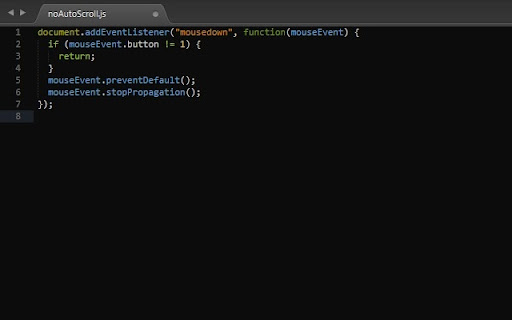
Stops auto scroll (aka smooth scroll) from activating on middle mouse click.
As of June 2026, No Auto Scroll has 2,000 users and a 4.41/5 rating from 22 reviews in the Accessibility category.
Usersup 100.0 percent+100.0%
2.0K
2,000
Ratingdown 0.5 percent−0.5%
4.41
22 reviews
Reviewsdown 4.3 percent−4.3%
22
Version
1.2
Manifest V3
90-day change · In the last 90 days this extension gained 1.0K users.
History
3 snapshotsTracking since Apr 23, 2026.
View as table
| Date | Users | Rating | Reviews | Version |
|---|---|---|---|---|
| Apr 23, 2026 | 1.0K | 4.43 | 23 | 1.2 |
| May 13, 2026 | 1.0K | 4.43 | 23 | 1.2 |
| Jun 8, 2026 | 2.0K | 4.43 | 23 | 1.2 |
| Now | 2.0K | 4.41 | 22 | 1.2 |
Permissions & access
- Permissions
- None declared
- Host access
- None declared
Screenshots
About
Do you sometimes accidentally click the middle-mouse button and activate the "automatic scrolling" feature?

If yes, then this extension prevents the activation of the auto-scroll behavior when you click on middle mouse button by mistake.
Technical
- Version
- 1.2
- Manifest
- V3
- Size
- 16.35KiB
- Min Chrome
- 88
- Languages
- 1
- Featured
- No
Metadata
- ID
- oeplmakppkomhkgoaieajhcbfogjhmdi
- Developer ID
- ufb6e6cea84f094b6ddb0970e7f7e2ed1
- Developer Email
- [email protected]
- Created
- Nov 27, 2018
- Last Updated (Store)
- Jan 13, 2024
- Last Scraped
- Jun 8, 2026
- Website
- —
- Support URL
- —
- Privacy Policy
- —
Similar extensions
Alternatives to No Auto Scroll, ranked by description similarity.

Reverse AutoScroll
Middle-click autoscroll with reversed direction on regular web pages.
25
★ 5.0

Auto Scroll
Windows-style autoscroll for Chrome/Brave - middle-click to scroll with customizable speed, colors, and controls
91

Roller
Enable auto scrolling with the mouse wheel button on Linux
74
★ 5.0

Disable Ctrl + Scroll Wheel Zoom
Disables the ctrl + scroll wheel zoom shortcut in Chrome.
7.0K
★ 4.2

Auto Scroll: Effortless Page Navigation Chrome Extension
Enhance browsing by automating page scrolling. Customizable speeds & loop options. Streamline content consumption effortlessly.
10.0K
★ 3.2

Auto Scroll Reader
Automatically scrolls pages at a steady speed for comfortable hands-free reading.
—

Not So Fast
Prevent accidental clicks due to elements moving around on the page.
6
★ 5.0

Disable Overscroll History
Prevent horizontal scrolling from triggering forward / backward page navigation.
1.0K
★ 5.0
Data sourced from the Chrome Web Store · last verified Jun 8, 2026.