
X-Brain Data Capture
Capture and store various types of data with a clean, modern interface
As of May 2026, X-Brain Data Capture has 3 users in the Productivity category.
Usersdown 57.1 percent−57.1%
3
3
Ratingno change0%
—
— reviews
Reviewsno change0%
—
Version
3.0
Manifest V3
History
3 snapshotsTracking since Apr 20, 2026.
View as table
| Date | Users | Rating | Reviews | Version |
|---|---|---|---|---|
| Apr 20, 2026 | 7 | — | — | 3.0 |
| May 5, 2026 | 5 | — | — | 3.0 |
| May 29, 2026 | 4 | — | — | 3.0 |
| Now | 3 | — | — | 3.0 |
Permissions & access
- Permissions
- activeTabstorageclipboardReadscriptingwindows
- Host access
- None declared
Screenshots
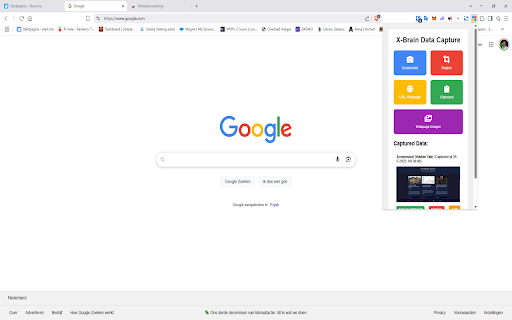
About
# X-Brain Data Capture Chrome Extension Version 3.0

A Chrome extension for capturing and annotating web content with a built-in image editor.

## Features

📷 Data Capture
- 🖥️ Screenshot: Capture visible tab content
- 🔲 Region: Select and capture specific areas
- 🌐 Webpage: Save current page URL
- 📋 Clipboard: Capture clipboard content
- 🖼️ Webpage Images: Extract images from current page

🎨 Image Editor
- ✏️ Drawing tools (pencil, highlighter, eraser)
- ⬛ Shape tools (line, arrow, rectangle, circle, polyline)
- 🎨 Color palette and custom color picker
- 📏 Adjustable line width
- ↩️ Undo/redo functionality
- 💾 Save/cancel options

## Usage

1. Click the extension icon to open the popup
2. Select a capture method:
   - Screenshot: Captures visible tab
   - Region: Lets you select an area to capture
   - Webpage: Saves current URL
   - Clipboard: Captures clipboard content
   - Webpage Images: Extracts images from page by clicking on a image
3. For screenshots/regions, use the editor to annotate
4. Save or cancel your edits
Technical
- Version
- 3.0
- Manifest
- V3
- Size
- 614KiB
- Min Chrome
- 88
- Languages
- 1
- Featured
- No
Metadata
- ID
- oempgdloigigijfdemealdgpplfjhemf
- Developer ID
- uff7f67d2902c2e804ba13b83df2ecbe1
- Developer Email
- [email protected]
- Created
- Sep 9, 2024
- Last Updated (Store)
- May 25, 2025
- Last Scraped
- May 29, 2026
- Website
- —
- Support URL
- —
- Privacy Policy
- —
Similar extensions
Alternatives to X-Brain Data Capture, ranked by description similarity.

Screenshot Editor
Create beautiful screenshots with gradients, shadows, and rounded corners
96
★ 5.0

Screenshot Extension
Take a screenshot and save it to a location of your choice.
89

Full Page Screenshot
Capture full page screenshots and edit with powerful image editor
7

Web Capture
Capture web pages - visible area, region selection, and full page capture
10
★ 5.0

Screenshot Editor
In 1 click Screenshot Editor makes Chrome screen capture and lets you edit a screenshot. Screenshot extension for Chrome done right.
1.0K
★ 5.0

Vue Screenshot
Take beautiful screenshots with this Vue 3 powered extension
3

Capture It - Screenshot Capture & Design
Capture & edit screenshots in beautiful designs.
24
★ 5.0

Full Page Capture - Screenshot Tool
Capture full page screenshots or select areas. Add annotations with built-in editor. Free extension for Chrome & Edge.
25
★ 5.0
Data sourced from the Chrome Web Store · last verified May 29, 2026.