
Capture It - Screenshot Capture & Design
Capture & edit screenshots in beautiful designs.
As of June 2026, Capture It - Screenshot Capture & Design has 24 users and a 5.00/5 rating from 1 reviews in the Productivity category.
Usersup 33.3 percent+33.3%
24
24
Ratingno change0%
5.00
1 reviews
Reviewsno change0%
1
Version
0.0.7
Manifest V3
History
9 snapshotsTracking since Apr 1, 2026.
View as table
| Date | Users | Rating | Reviews | Version |
|---|---|---|---|---|
| Apr 1, 2026 | 18 | 5.00 | 1 | 0.0.7 |
| Apr 16, 2026 | 19 | 5.00 | 1 | 0.0.7 |
| Apr 24, 2026 | 18 | 5.00 | 1 | 0.0.7 |
| May 1, 2026 | 23 | 5.00 | 1 | 0.0.7 |
| May 12, 2026 | 22 | 5.00 | 1 | 0.0.7 |
| May 18, 2026 | 25 | 5.00 | 1 | 0.0.7 |
| May 24, 2026 | 22 | 5.00 | 1 | 0.0.7 |
| May 31, 2026 | 26 | 5.00 | 1 | 0.0.7 |
| Jun 8, 2026 | 25 | 5.00 | 1 | 0.0.7 |
| Now | 24 | 5.00 | 1 | 0.0.7 |
Permissions & access
- Permissions
- activeTabtabsstoragenotificationsdownloadsoffscreen
- Host access
- <all_urls>
Screenshots


About
Capture It! A Tool to capture & edit screenshots in beautiful designs within your browser.

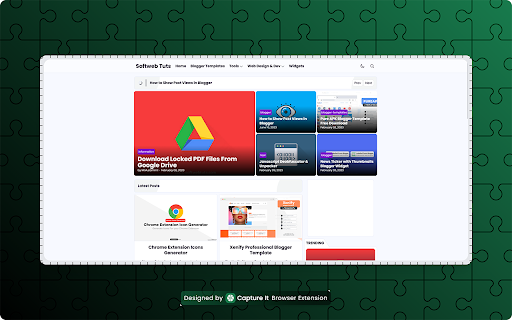
Capture it is a best screenshot chrome extension, it is a lightweight, fast, and reliable tool for turning webpage elements and screenshots into high-quality images, in beautiful designs.

Unlike other screenshot tools that lose styling or fonts, Capture It guarantees what you see is exactly what you get — no distortion, no missing styles.

🔑 Key Features

✅ Pixel-perfect capture — preserves 100% of fonts, styles, and layout
🎨 Live padding & margin controls — adjust spacing with instant preview
🔲 Rounded corners — standard radius or smooth iOS-style
🖼️ Multiple export formats — PNG, JPG, WEBP, or SVG with quality control
🌗 Theme support — Light, Dark, or System (auto-detect)
🙈 Element hiding — temporarily hide distractions with a single key (H)
⚡ Fast workflow — hover to select element to capture
🎑 Image beautification — apply beautiful gradient backgrounds
✂️ Re-crop images for further editing
⌨️ Accessibility-friendly — fully usable with keyboard navigation
🔒 Privacy-first — all processing happens locally, no login required

🧭 How It Works

1️⃣ Click the extension icon and choose capture type
2️⃣ Hover to highlight the element you want or do selection
3️⃣ Save, Copy or Edit the captured screenshot in the editor

For support or any queries, email us!
Technical
- Version
- 0.0.7
- Manifest
- V3
- Size
- 1.26MiB
- Min Chrome
- 88
- Languages
- 1
- Featured
- No
Metadata
- ID
- eglpfhbhmelampoihamjomgkeobgdofl
- Developer ID
- uf6ed36862481c282c753db5115077d0a
- Developer Email
- [email protected]
- Created
- Dec 30, 2025
- Last Updated (Store)
- Feb 24, 2026
- Last Scraped
- Jun 8, 2026
- Website
- https://softwebtuts.com/
- Support URL
- —
- Privacy Policy
- —
Similar extensions
Alternatives to Capture It - Screenshot Capture & Design, ranked by description similarity.

Full Page Screenshot
Capture full page screenshots and edit with powerful image editor
7

ScreenCapture Light - Screenshot Tool with Annotation & Scroll Capture
Capture full page, visible area, or regions with editing, annotations, cropping, and watermarks. Simple and powerful.
35

PixelPerfect Capture
Capture ultra high-resolution screenshots
15

Screenshot and Screen Recorder
Take screenshots and record your screen
1

PixelCapture
A screen capture tool that allows you to capture specific areas of webpages.
52

Screenshot Editor
Create beautiful screenshots with gradients, shadows, and rounded corners
96
★ 5.0

Chrome Screenshot
Use Chrome Screenshot: smart screenshot chrome extension! Capture, edit, save any page. Explore how to screenshot on chrome browser
2.0K
★ 4.6

UI Capture - Screenshot & UI Video Recorder
Capture beautiful screenshots and short UI videos from any website. Turn any UI into polished PNGs and MP4s in seconds.
33
★ 5.0
Data sourced from the Chrome Web Store · last verified Jun 8, 2026.