
Mobile Preview Dev
Preview any webpage in mobile device views - built for developers
As of June 2026, Mobile Preview Dev has 44 users in the Developer Tools category.
Usersup 37.5 percent+37.5%
44
44
Ratingno change0%
—
— reviews
Reviewsno change0%
—
Version
1.0.0
Manifest V3
History
5 snapshotsTracking since Apr 18, 2026.
View as table
| Date | Users | Rating | Reviews | Version |
|---|---|---|---|---|
| Apr 18, 2026 | 32 | — | — | 1.0.0 |
| May 3, 2026 | 31 | — | — | 1.0.0 |
| May 12, 2026 | 34 | — | — | 1.0.0 |
| May 24, 2026 | 33 | — | — | 1.0.0 |
| Jun 6, 2026 | 42 | — | — | 1.0.0 |
| Now | 44 | — | — | 1.0.0 |
Permissions & access
- Permissions
- activeTabstorage
- Host access
- None declared
Screenshots


About
MobilePreviewDev – Preview Your Website on Any Mobile Device Instantly

💻📱 Real-time mobile view testing made simple for web developers and designers.


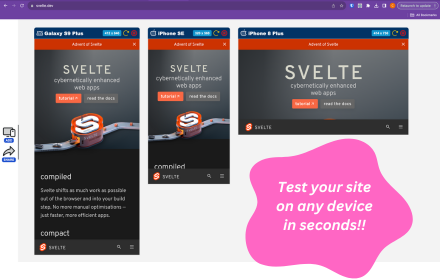
MobilePreviewDev is a lightweight and powerful Chrome extension built for developers, web designers, and coding enthusiasts who want to instantly preview their desktop websites in mobile view — without needing to connect an actual phone or tablet.

Whether you’re fine-tuning a responsive layout, checking breakpoints, or testing how your design looks on various screen sizes, MobilePreviewDev gives you a realistic mobile preview experience directly inside your browser.

Switch between popular mobile devices, toggle portrait and landscape modes, and see your live site in action — all in real time.

And the best part? It’s completely free.

Key Features:

📱 Instant Mobile Preview: Quickly switch from desktop to mobile views within your Chrome tab.

🔄 Portrait & Landscape Modes: Test your layout responsiveness easily in both orientations.

🧩 Multiple Device Presets: Choose from a range of popular devices (iPhone, Android, tablets, and more).

⚡ Real-Time Updates: Watch your design adapt live as you edit your code.

💡 No External Devices Needed: Skip the hassle of physical testing on multiple phones.

🎨 Clean, Developer-Friendly UI: Simple and minimal interface designed for productivity.

🆓 Completely Free: No ads, no subscriptions — just a clean tool that works.

Why Use MobilePreviewDev?

Modern web design demands mobile-first testing, and switching between devices can be slow and distracting.
MobilePreviewDev helps you save time, streamline your workflow, and ensure pixel-perfect results across every screen size — all without leaving your Chrome browser.

Perfect for:

Front-end developers

UI/UX designers

Web design students

QA testers

Coding enthusiasts

Try it now – Make your website look perfect on every device, right from your desktop.
Technical
- Version
- 1.0.0
- Manifest
- V3
- Size
- 43.22KiB
- Min Chrome
- 88
- Languages
- 1
- Featured
- No
Metadata
- ID
- ochcfpfkpngohcpibhgikncfjljkbpln
- Developer ID
- u2f8abd9501e837421011394934998f9b
- Developer Email
- [email protected]
- Created
- Oct 16, 2025
- Last Updated (Store)
- Oct 16, 2025
- Last Scraped
- Jun 6, 2026
- Website
- —
- Support URL
- —
- Privacy Policy
- —
Similar extensions
Alternatives to Mobile Preview Dev, ranked by description similarity.
Mobile View: Test responsive designs fast
Test your responsive designs on multiple devices at once.
20.0K
★ 4.3

Simple Mobile View
Simulate the mobile display for a webpage.
95

Responsive Preview
Preview websites across multiple device screen sizes simultaneously.
19

ViewPortify – Mobile Simulator & Responsive Design Testing Tool for Chrome
Mobile simulator for testing responsive designs across devices. Instantly preview and resize viewports in Chrome.
31

Instant Mobile Preview - Side Panel View
View mobile versions of websites side-by-side in Chrome's side panel.
750
★ 4.0

Mobile Simulator Extension: Responsive Viewer
Professional mobile device simulator with multiple views, extensive device library, and sync scrolling
1.0K
★ 5.0

Screenlytic
Advanced mobile device emulator with responsive viewer, multi-device layout, touch events, and authentic mobile interaction
—

Mobi-Sim
Preview websites in realistic mobile device frames instantly.
3
Data sourced from the Chrome Web Store · last verified Jun 6, 2026.