
PDF Barber
Seamless PDF tools from pdfbarber.com brought to your browser, completely offline
As of June 2026, PDF Barber has 916 users and a 5.00/5 rating from 3 reviews in the Productivity category.
Usersup 189.0 percent+189.0%
916
916
Ratingno change0%
5.00
3 reviews
Reviewsno change0%
3
Version
1.0.6
Manifest V3
90-day change · In the last 90 days this extension 2 version updates.
History
10 snapshotsTracking since Apr 6, 2026.
View as table
| Date | Users | Rating | Reviews | Version |
|---|---|---|---|---|
| Apr 6, 2026 | 317 | 5.00 | 3 | 1.0.4 |
| Apr 18, 2026 | 346 | 5.00 | 3 | 1.0.4 |
| Apr 23, 2026 | 353 | 5.00 | 3 | 1.0.4 |
| Apr 30, 2026 | 343 | 5.00 | 3 | 1.0.4 |
| May 7, 2026 | 344 | 5.00 | 3 | 1.0.4 |
| May 12, 2026 | 995 | 5.00 | 3 | 1.0.4 |
| May 20, 2026 | 1.0K | 5.00 | 3 | 1.0.4 |
| May 27, 2026 | — | 5.00 | 3 | 1.0.5 |
| Jun 3, 2026 | 795 | 5.00 | 3 | 1.0.6 |
| Jun 9, 2026 | 939 | 5.00 | 3 | 1.0.6 |
| Now | 916 | 5.00 | 3 | 1.0.6 |
Changelog
- May 27, 2026description
PDF Barber – All-in-One PDF Toolkit (First 7 Operations Free)

Edit, organize, and transform PDFs directly in Chrome — no uploads, no servers, complete privacy.

Works completely offline in your browser.

FEATURES
• Split & merge PDFs
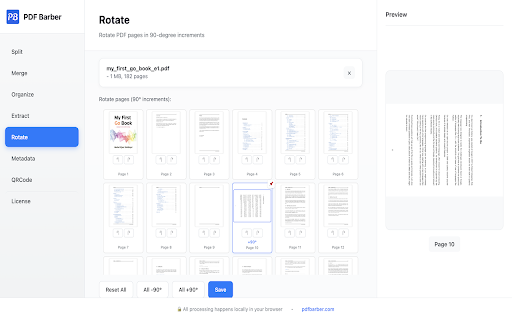
• Rearrange, rotate, and delete pages
• Extract specific pages & in bulk
• Edit PDF metadata & in bulk
• N-up: arrange multiple PDF pages in a page
• Create custom QR codes

WHY PDF BARBER?
• Fully offline processing — your files never leave your device
• First 7 operations are free
• One-time license unlocks unlimited use
• Simple drag-and-drop interface

Perfect for: students, professionals, and anyone managing PDFs daily.

Get started instantly — no sign-up required.

----------------------------------

# v1.0.3
What is new:

- Full page extension
- Preview of pages on hover for split, organise and rotate features
- Pin and zoom the page content
- Better user experience

----------------------------------

# v1.0.4
What is new:

- Better experience on zoom page preview
- Performance optimisation

----------------------------------

# v1.0.5
What is new:

- N-up — arrange multiple PDF pages onto each output sheet (2, 4, 6, 8, 9, or 16 per page)
- Bulk Extract — extract page ranges from up to 20 PDFs at once, with optional merge into a single output
- Bulk Metadata — update or clear title/author/subject/keywords across up to 20 PDFs in one go
- Performance — faster previews, lower memory use, and smoother handling of large PDFs
PDF Barber – All-in-One PDF Toolkit (First 7 Operations Free)

Edit, organize, and transform PDFs directly in Chrome — no uploads, no servers, complete privacy.

Works completely offline in your browser.

FEATURES
• Split & merge PDFs
• Rearrange, rotate, and delete pages
• Extract specific pages & in bulk
• Edit PDF metadata & in bulk
• N-up: arrange multiple PDF pages in a page
• Create custom QR codes

WHY PDF BARBER?
• Fully offline processing — your files never leave your device
• First 7 operations are free
• One-time license unlocks unlimited use
• Simple drag-and-drop interface

Perfect for: students, professionals, and anyone managing PDFs daily.

Get started instantly — no sign-up required.

----------------------------------

# v1.0.3
What is new:

- Full page extension
- Preview of pages on hover for split, organise and rotate features
- Pin and zoom the page content
- Better user experience

----------------------------------

# v1.0.4
What is new:

- Better experience on zoom page preview
- Performance optimisation

----------------------------------

# v1.0.5
What is new:

- N-up — arrange multiple PDF pages onto each output sheet (2, 4, 6, 8, 9, or 16 per page)
- Bulk Extract — extract page ranges from up to 20 PDFs at once, with optional merge into a single output
- Bulk Metadata — update or clear title/author/subject/keywords across up to 20 PDFs in one go
- Performance — faster previews, lower memory use, and smoother handling of large PDFs

----------------------------------

# v1.0.6
What is new:

- Refreshed sidebar with tool icons, clearer active state, and a pinned License/Feedback footer
- Cleaner, more compact page headers across all tools
- Sidebar now scrolls on short screens instead of clipping
- May 20, 2026description
PDF Barber – All-in-One PDF Toolkit (First 30 Operations Free)

Edit, organize, and transform PDFs directly in Chrome — no uploads, no servers, complete privacy.

Works completely offline in your browser.

FEATURES
• Split & merge PDFs
• Rearrange, rotate, and delete pages
• Extract specific pages
• Edit PDF metadata
• Create custom QR codes

WHY PDF BARBER?
• Fully offline processing — your files never leave your device
• First 30 operations are free
• One-time license unlocks unlimited use
• Simple drag-and-drop interface

Perfect for: students, professionals, and anyone managing PDFs daily.

Get started instantly — no sign-up required.

----------------------------------

# v1.0.3
What is new:

- Full page extension
- Preview of pages on hover for split, organise and rotate features
- Pin and zoom the page content
- Better user experience

----------------------------------

# v1.0.4
What is new:

- Better experience on zoom page preview
- Performance optimisation
PDF Barber – All-in-One PDF Toolkit (First 7 Operations Free)

Edit, organize, and transform PDFs directly in Chrome — no uploads, no servers, complete privacy.

Works completely offline in your browser.

FEATURES
• Split & merge PDFs
• Rearrange, rotate, and delete pages
• Extract specific pages & in bulk
• Edit PDF metadata & in bulk
• N-up: arrange multiple PDF pages in a page
• Create custom QR codes

WHY PDF BARBER?
• Fully offline processing — your files never leave your device
• First 7 operations are free
• One-time license unlocks unlimited use
• Simple drag-and-drop interface

Perfect for: students, professionals, and anyone managing PDFs daily.

Get started instantly — no sign-up required.

----------------------------------

# v1.0.3
What is new:

- Full page extension
- Preview of pages on hover for split, organise and rotate features
- Pin and zoom the page content
- Better user experience

----------------------------------

# v1.0.4
What is new:

- Better experience on zoom page preview
- Performance optimisation

----------------------------------

# v1.0.5
What is new:

- N-up — arrange multiple PDF pages onto each output sheet (2, 4, 6, 8, 9, or 16 per page)
- Bulk Extract — extract page ranges from up to 20 PDFs at once, with optional merge into a single output
- Bulk Metadata — update or clear title/author/subject/keywords across up to 20 PDFs in one go
- Performance — faster previews, lower memory use, and smoother handling of large PDFs
Permissions & access
- Permissions
- storage
- Host access
- None declared
Screenshots



About
PDF Barber – All-in-One PDF Toolkit (First 7 Operations Free)

Edit, organize, and transform PDFs directly in Chrome — no uploads, no servers, complete privacy.

Works completely offline in your browser.

FEATURES
• Split & merge PDFs
• Rearrange, rotate, and delete pages
• Extract specific pages & in bulk
• Edit PDF metadata & in bulk
• N-up: arrange multiple PDF pages in a page
• Create custom QR codes

WHY PDF BARBER?
• Fully offline processing — your files never leave your device
• First 7 operations are free
• One-time license unlocks unlimited use
• Simple drag-and-drop interface

Perfect for: students, professionals, and anyone managing PDFs daily.

Get started instantly — no sign-up required.

----------------------------------

# v1.0.3
What is new:

- Full page extension
- Preview of pages on hover for split, organise and rotate features
- Pin and zoom the page content
- Better user experience

----------------------------------

# v1.0.4
What is new:

- Better experience on zoom page preview
- Performance optimisation

----------------------------------

# v1.0.5
What is new:

- N-up — arrange multiple PDF pages onto each output sheet (2, 4, 6, 8, 9, or 16 per page)
- Bulk Extract — extract page ranges from up to 20 PDFs at once, with optional merge into a single output
- Bulk Metadata — update or clear title/author/subject/keywords across up to 20 PDFs in one go
- Performance — faster previews, lower memory use, and smoother handling of large PDFs

----------------------------------

# v1.0.6
What is new:

- Refreshed sidebar with tool icons, clearer active state, and a pinned License/Feedback footer
- Cleaner, more compact page headers across all tools
- Sidebar now scrolls on short screens instead of clipping
Technical
- Version
- 1.0.6
- Manifest
- V3
- Size
- 713KiB
- Min Chrome
- 88
- Languages
- 1
- Featured
- No
Metadata
- ID
- npfemhnjjfnbdhmegfoaeejhenjfkebj
- Developer ID
- u570d267a0b56867689ad82169fec1a4d
- Developer Email
- [email protected]
- Created
- Aug 14, 2025
- Last Updated (Store)
- May 21, 2026
- Last Scraped
- Jun 9, 2026
- Website
- —
- Support URL
- —
- Privacy Policy
- https://www.pdfbarber.com/chrome-ext/privacy
Similar extensions
Alternatives to PDF Barber, ranked by description similarity.

PDF Master Pro
Complete PDF toolkit - Merge, Split, Compress, Convert & more. All locally processed for maximum privacy.
15
★ 5.0

Offline PDF Tools
100% offline PDF modification tools - merge, split, extract, rotate, delete pages. No uploads, complete privacy.
62
★ 4.0

PDFlys — Free PDF Tools
Edit, merge, split, compress, sign & convert PDFs — 100% free, 100% private. Your files never leave your device.
3

PDF Manager Simple
Organize PDFs directly in your browser. Simple and fast.
114
★ 1.0

Smart PDF - Professional Tools
Premium PDF Tools: Merge (Grid), Watermark, Page Numbers, Convert, Edit.
35
★ 5.0

PDF Toolkit: Merge, Split, Compress & Edit PDFs
All-in-one PDF toolkit: Merge, split, compress, convert, and edit PDF files. 100% privacy - files never leave your device.
27

PDF Toolkit - handle all your PDF Manipulation
PDF Toolkit transforms the way you work with PDF documents in Chrome, providing editing capabilities without the complexity or cost.
21

PDF Total Privacy
Advanced tool to manage, modify, and process PDF files quickly.
9
Data sourced from the Chrome Web Store · last verified Jun 9, 2026.