
PDF Toolkit - handle all your PDF Manipulation
PDF Toolkit transforms the way you work with PDF documents in Chrome, providing editing capabilities without the complexity or cost.
As of June 2026, PDF Toolkit - handle all your PDF Manipulation has 21 users in the Productivity category.
Usersup 61.5 percent+61.5%
21
21
Ratingno change0%
—
— reviews
Reviewsno change0%
—
Version
1.0
Manifest V3
History
4 snapshotsTracking since Apr 1, 2026.
View as table
| Date | Users | Rating | Reviews | Version |
|---|---|---|---|---|
| Apr 1, 2026 | 13 | — | — | 1.0 |
| Apr 20, 2026 | 14 | — | — | 1.0 |
| May 11, 2026 | 18 | — | — | 1.0 |
| Jun 6, 2026 | 17 | — | — | 1.0 |
| Now | 21 | — | — | 1.0 |
Permissions & access
- Permissions
- None declared
- Host access
- None declared
Screenshots
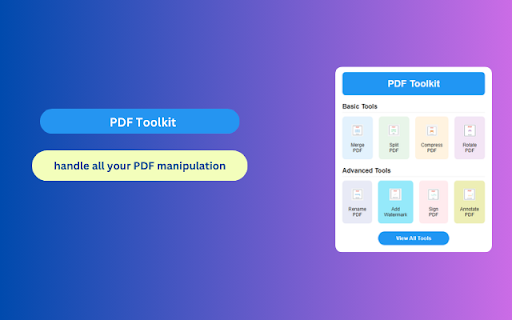

About
PDF Toolkit is a powerful Chrome extension designed to handle all your PDF manipulation needs directly in your browser. This all-in-one solution eliminates the need for expensive desktop software or multiple online tools, providing seamless PDF editing functionality with just a few clicks. PDF Toolkit integrates smoothly with Chrome's interface, allowing users to efficiently manage, edit, and convert PDF documents while maintaining document security and quality.
Key Features of PDF Toolkit

1. PDF Merge - Combine multiple PDF files into a single cohesive document, perfect for creating comprehensive reports, portfolios, or consolidated resources.

2. PDF Split - Extract specific pages or divide large PDFs into smaller, more manageable documents with precise page selection options.

3. PDF Compression - Reduce file sizes without significant quality loss, making documents easier to share, email, and store while preserving essential content.

4. Page Rotation - Adjust page orientation (90°, 180°) to correct improperly scanned documents or improve readability.

5. PDF Renaming - Change filenames directly within your browser to maintain organized documentation and improve workflow efficiency.

6. Watermarking - Add customizable text or image watermarks to protect intellectual property and indicate document status (Draft, Confidential, etc.).

7. PDF Annotation - Add notes, highlights, comments, and markups to enhance collaboration and document review processes.

8. Page Management - Reorder, delete, or insert pages within PDF files to create perfectly structured documents.

9. Digital Signatures - Add legally-binding signatures to documents, streamlining approval processes and reducing paper waste.

10. PDF to Image Conversion - Transform PDF pages into common image formats (JPG, PNG) for easy sharing and use in presentations.

11. Image to PDF Conversion - Convert single or multiple images into professional PDF documents while preserving quality and layout.

How to Use PDF Toolkit
Installation
Visit the Chrome Web Store and search for "PDF Toolkit"
Click "Add to Chrome" and confirm the installation
Access PDF Toolkit from the Chrome extension toolbar

Using Core Features
For PDF Merging:

Click the PDF Toolkit icon in your browser
Select the "Merge" tool
Upload multiple PDF files by clicking "Add Files" or using drag-and-drop
Arrange documents in desired order using the intuitive interface
Click "Merge PDFs" to combine files
Download the merged document

For PDF Compression:

Open PDF Toolkit extension
Select the "Compress" tool
Upload your PDF file
Choose compression level (Low, Medium, High)
Click "Compress PDF"
Download the compressed file

For PDF Annotation:

Access PDF Toolkit
Select the "Annotate" tool
Upload your PDF document
Use the annotation toolbar to add highlights, notes, or drawings
Save changes and download the annotated PDF

For PDF-to-Image Conversion:

Open the PDF Toolkit extension
Select "PDF to Image" tool
Upload your PDF file
Choose desired image format and quality settings
Select specific pages or convert entire document
Click "Convert" and download images

Conclusion
PDF Toolkit transforms the way you work with PDF documents in Chrome, providing professional-grade editing capabilities without the complexity or cost of traditional PDF software. With its intuitive interface and comprehensive feature set, this extension empowers users to efficiently handle every aspect of PDF manipulation—from basic tasks like merging and splitting to more advanced functions such as annotation and digital signing. Whether you're a student, professional, or business owner, PDF Toolkit streamlines your document workflow, saving valuable time and resources while delivering high-quality results directly in your browser.
Technical
- Version
- 1.0
- Manifest
- V3
- Size
- 962KiB
- Min Chrome
- 88
- Languages
- 44
- Featured
- No
Metadata
- ID
- cpeocoodeoonfoikeoadlgncgefibaph
- Developer ID
- ud0cc3e060c5b8ce82e9e81efadf85ce6
- Developer Email
- [email protected]
- Created
- Apr 5, 2025
- Last Updated (Store)
- Apr 5, 2025
- Last Scraped
- Jun 6, 2026
- Website
- pdf-toolkit.blogspot.com
- Support URL
- —
Similar extensions
Alternatives to PDF Toolkit - handle all your PDF Manipulation, ranked by description similarity.

PDF Toolkit: Merge, Split, Compress & Edit PDFs
All-in-one PDF toolkit: Merge, split, compress, convert, and edit PDF files. 100% privacy - files never leave your device.
27

PDF Guru: PDF Converter & Editor Extension for Chrome
PDF Guru's extension connects you to the platform so that you can convert, edit, compress, and merge files all in one place!
10.0K
★ 3.6

PDFlys — Free PDF Tools
Edit, merge, split, compress, sign & convert PDFs — 100% free, 100% private. Your files never leave your device.
3

SmallPDF Free Chrome Extension
With SmallPDF Free you can easily manage PDFs and images from your browser.
2.0K
★ 3.7

PDF Utility Extension
A Chrome extension for various PDF utilities like split, extract, merge, and more.
2

Free PDF Editor & Reader — Compress, Merge, Convert PDFs · PDFly
Edit PDF, convert PDF to Word, merge, split & compress PDF files. Free PDF editor, reader, e-sign & AI tools — all in one.
2.0K
★ 4.2

PDF Document Merger
Combine your PDF files quickly and securely, right in Chrome. All processing happens locally.
271
★ 5.0

Smart PDF - Professional Tools
Premium PDF Tools: Merge (Grid), Watermark, Page Numbers, Convert, Edit.
35
★ 5.0
Data sourced from the Chrome Web Store · last verified Jun 6, 2026.