
PDF Toolkit: Merge, Split, Compress & Edit PDFs
All-in-one PDF toolkit: Merge, split, compress, convert, and edit PDF files. 100% privacy - files never leave your device.
As of June 2026, PDF Toolkit: Merge, Split, Compress & Edit PDFs has 27 users in the Productivity category.
Usersup 35.0 percent+35.0%
27
27
Ratingno change0%
—
— reviews
Reviewsno change0%
—
Version
1.0.2
Manifest V3
History
4 snapshotsTracking since May 4, 2026.
View as table
| Date | Users | Rating | Reviews | Version |
|---|---|---|---|---|
| May 4, 2026 | 20 | — | — | 1.0.2 |
| May 13, 2026 | 22 | — | — | 1.0.2 |
| May 26, 2026 | 23 | — | — | 1.0.2 |
| Jun 7, 2026 | 25 | — | — | 1.0.2 |
| Now | 27 | — | — | 1.0.2 |
Permissions & access
- Permissions
- None declared
- Host access
- None declared
Screenshots



About
PDF Toolkit: Your Complete PDF Solution

Transform your PDF workflow with our all-in-one PDF toolkit that works entirely in your browser. No uploads, no waiting, no privacy concerns - your files never leave your device.

🔧 CORE FEATURES:

📄 MERGE PDF
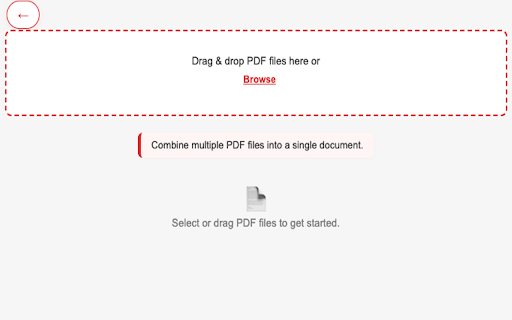
• Combine multiple PDF files into a single document
• Drag and drop interface for easy file selection
• Maintain original quality and formatting
• Perfect for reports, presentations, and document organization

✂️ SPLIT PDF
• Split large PDFs into smaller, manageable files
• Extract specific pages or page ranges
• Create separate documents from any section
• Ideal for sharing specific chapters or sections

🗜️ COMPRESS PDF
• Reduce file size while maintaining quality
• Multiple compression levels to choose from
• Perfect for email attachments and storage optimization
• Preserve text quality and readability

🔄 CONVERT & TRANSFORM
• Convert PDF pages to high-quality images (PNG, JPG)
• Transform images into professional PDF documents
• Support for multiple image formats
• Batch processing capabilities

📋 ORGANIZE & EDIT
• Reorder pages with drag-and-drop interface
• Rotate pages to correct orientation
• Select and extract specific pages
• Delete unwanted pages easily

✏️ ENHANCE & CUSTOMIZE
• Edit PDF metadata (title, author, subject, keywords)
• Add watermarks and stamps to documents
• Professional branding and customization options
• Secure document identification

🔒 PRIVACY & SECURITY
• 100% client-side processing - files never leave your device
• No data collection or tracking
• Works offline - no internet required after installation
• Complete privacy protection

⚡ PERFORMANCE & USABILITY
• Lightning-fast processing with modern web technologies
• Intuitive, mobile-inspired interface
• No registration or account required
• Works with any PDF file size
• Cross-platform compatibility

🎯 PERFECT FOR:
• Students organizing research papers and assignments
• Professionals managing business documents
• Content creators preparing materials
• Anyone who works with PDFs regularly

💡 WHY CHOOSE PDF TOOLKIT?
• No monthly subscriptions or hidden fees
• No file size limitations
• No watermarks on processed files
• Instant processing - no waiting for uploads
• Professional-grade results
• Trusted by thousands of users worldwide

Transform your PDF workflow today with PDF Toolkit - the complete solution for all your PDF needs, right in your browser!

🔧 Technical Requirements:
• Chrome browser (version 88 or higher)
• No additional software installation required
• Works on Windows, Mac, and Linux

Download PDF Toolkit now and experience the most powerful, privacy-focused PDF solution available!
Technical
- Version
- 1.0.2
- Manifest
- V3
- Size
- 688KiB
- Min Chrome
- 88
- Languages
- 1
- Featured
- No
Metadata
- ID
- fghjmlnppiakpmicjpeffllngmbojohk
- Developer ID
- u8d0fe0295ba19ab3ed372d3300cfe28b
- Developer Email
- [email protected]
- Created
- Sep 12, 2025
- Last Updated (Store)
- Sep 12, 2025
- Last Scraped
- Jun 7, 2026
- Website
- —
- Support URL
- —
Similar extensions
Alternatives to PDF Toolkit: Merge, Split, Compress & Edit PDFs, ranked by description similarity.

PDF Toolkit - handle all your PDF Manipulation
PDF Toolkit transforms the way you work with PDF documents in Chrome, providing editing capabilities without the complexity or cost.
21

Smart PDF - Professional Tools
Premium PDF Tools: Merge (Grid), Watermark, Page Numbers, Convert, Edit.
35
★ 5.0

PDF Master Pro
Complete PDF toolkit - Merge, Split, Compress, Convert & more. All locally processed for maximum privacy.
15
★ 5.0

PDF Utility Extension
A Chrome extension for various PDF utilities like split, extract, merge, and more.
2

Local PDF Toolkit - Merge & Split
Free Local PDF merger and splitter. 100% local processing — your files never leave your device.
39

PDFavo - PDF Editor & Converter
Transform your PDFs instantly - merge, split, compress, convert. All processing happens locally for maximum privacy.
49

PDF Total Privacy
Advanced tool to manage, modify, and process PDF files quickly.
9

Ultimate PDF: All-in-One Editor
Convert, merge, split, rotate, compress PDFs and more. 100% local and private.
48
Data sourced from the Chrome Web Store · last verified Jun 7, 2026.