
IQDB Context
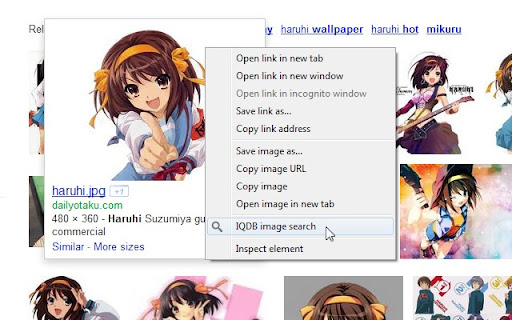
Right-click anime images to reverse-image-search for larger versions through IQDB.
As of May 2026, IQDB Context has 3,000 users and a 4.78/5 rating from 54 reviews in the Productivity category.
Usersno change0%
3.0K
3,000
Ratingno change0%
4.78
54 reviews
Reviewsno change0%
54
Version
2.0
Manifest V3
History
1 snapshotsTracking since May 2, 2026.
View as table
| Date | Users | Rating | Reviews | Version |
|---|---|---|---|---|
| May 2, 2026 | 3.0K | 4.78 | 54 | 2.0 |
| Now | 3.0K | 4.78 | 54 | 2.0 |
Permissions & access
- Permissions
- contextMenusstorage
- Host access
- None declared
Screenshots

About
Right-click on anime images to reverse-image-search for larger/similar versions through iqdb.org.  Results open in a new background tab.  (Can change settings to open in foreground.)

This is an unofficial extension; I am not related to IQDB.

***
Version History (changelog):

2.0:
- Updated to extension manifest v3.  Minimum Chrome version increased to 88.  If you need the previous version of the extension (0.6.1), it can be downloaded here:
https://drive.google.com/file/d/1A_LMEQG3obQSDRhAHn2ze5PjV7rkxi82/view?usp=sharing
- Settings code revised for manifest v3 compatibility.  You may need to reapply your settings.
- Added option to always spawn the Results tab next to the current tab (enabled by default).
- Closing the Results tab now returns to the tab you searched from.

0.6.1:
- Changed tab-creation setting to use "active" instead of "selected", since the latter was deprecated after Chrome 33.

0.6:
- Now with HTTPS, thanks to the site admin adding support.  Merry Christmas!

0.5:
- Changed from background page to event page, so the extension process is only loaded when needed.
- Minimum Chrome version increased to 22, due to above change.
- <all_urls> permission removed, since the contextMenu permission made it redundant at some point.

0.4:
- Updated to extension manifest v2, per Chrome requirements going forward.
- Minimum Chrome version increased to 18, due to above change.
- Removed defunct iqdb.hanyuu.net mirror from options.

0.3.1:
- Added 48x48 and 128x128 icons from the "Token" iconset by Evan Brooks (http://brsev.com), used under the Creative Commons attribution-noncommercial-share-alike 3.0 license.
- Added credits file.

0.3:
- Filenames with spaces and special characters should now work correctly.
- Added 48x48 icon.

0.2:
- Initial release.
Technical
- Version
- 2.0
- Manifest
- V3
- Size
- 17.56KiB
- Min Chrome
- 88
- Languages
- 1
- Featured
- Yes
Metadata
- ID
- nmahlbngglnabceabpgifacibgoogjcb
- Developer ID
- uc88a7f07cbe55ff1eca3b00d3b16b05c
- Developer Email
- [email protected]
- Created
- Sep 12, 2010
- Last Updated (Store)
- Oct 19, 2021
- Last Scraped
- May 31, 2026
- Website
- —
- Support URL
- —
- Privacy Policy
- —
Similar extensions
Alternatives to IQDB Context, ranked by description similarity.

Image Search Optionless
Image Search Optionless adds quick reverse image search options to your right-click menu, supporting multiple engines.
6.0K
★ 4.6

Context Menu Search
Use the right-click menu to search for selected text in different search engines
100.0K
★ 4.5

TinEye Reverse Image Search
This is the official TinEye Chrome extension. Find out where an image came from, how it's used, or find higher resolution versions.
400.0K
★ 4.5

RevEye Reverse Image Search
Perform a search by image. Choose between the image search engines Google, Bing, Yandex, TinEye, or user-defined engines.
100.0K
★ 4.1

Search in PeeringDB
Use the search bar, search box, or the context menu to seek for ASNs, Networks, and IXs in PeeringDB
236
★ 5.0

Selection Search
Search for the selected text in search engines
40.0K
★ 4.7

AI Image Detector by IsItAI.com
Quickly detect AI-generated images with IsItAI.com's powerful analysis engine
185
★ 5.0

iRIS - Reverse Image Search (Hotkeys)
Search images through custom search engines. Right click & navigate through context menu. Use hotkeys for quicker access.
17
Data sourced from the Chrome Web Store · last verified May 31, 2026.