Apowersoft Free Screen Recorder
Free & Easy-to-use screen recorder, capture video and audio with just a single click.
As of June 2026, Apowersoft Free Screen Recorder has 100,000 users and a 4.69/5 rating from 1,171 reviews in the Workflow & Planning category.
Usersno change0%
100.0K
100,000
Ratingdown 0.4 percent−0.4%
4.69
1.2K reviews
Reviewsup 1.6 percent+1.6%
1.2K
Version
3.2
Manifest V3
History
3 snapshotsTracking since Apr 23, 2026.
View as table
| Date | Users | Rating | Reviews | Version |
|---|---|---|---|---|
| Apr 23, 2026 | 100.0K | 4.71 | 1.2K | 3.2 |
| May 13, 2026 | 100.0K | 4.70 | 1.2K | 3.2 |
| Jun 8, 2026 | 100.0K | 4.70 | 1.2K | 3.2 |
| Now | 100.0K | 4.69 | 1.2K | 3.2 |
Permissions & access
- Permissions
- scripting
- Host access
- https://*/
Screenshots

About
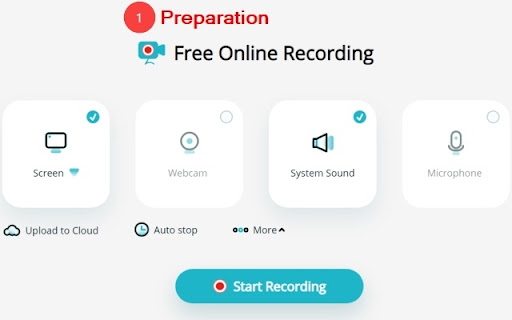
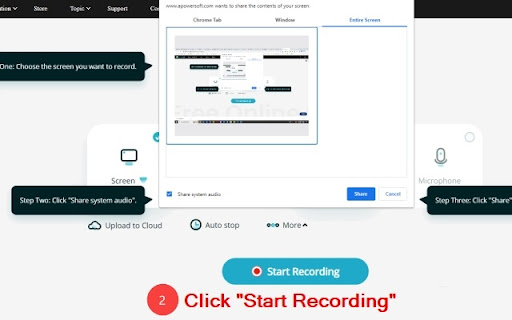
Apowersoft Free Screen Recorder lets you effortlessly record all kinds of activities on your computer screen, such as entertainment videos, online meetings, gaming sessions, educational activities, chat videos, etc. It supports full-screen/selected area recording modes. It can record video as well as system audio and microphone sound simultaneously, and has the ability to record webcam for a picture-in-picture effect. You can freely choose to record entire computer screens, windows of applications, or individual Chrome tabs.

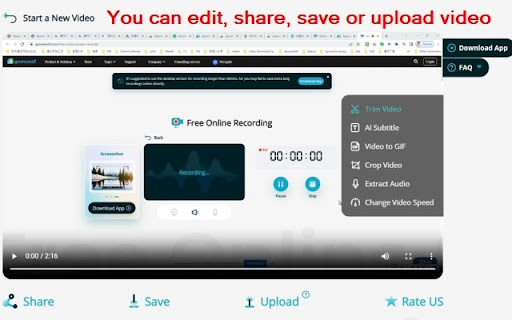
After recording, it helps you edit the video, such as trimming, AI-assisted subtitle adding, video adjustment, audio extraction, variable speed adjusting, and video-to-GIF conversion. Additionally, you can upload videos to the cloud and share them with just one click or download them directly to your local device for viewing at any time easily.

❤️ Key Features ❤️
● Record computer screens, webcams, system audio, and microphone sound
● Record windows of running applications
● Record browser tabs with audio
● Video trimming/cropping and AI subtitles
● Audio extraction, adjust video speed, and video-to-GIF conversion
● One-click video sharing
● Upload videos to cloud storage
● Save videos for local viewing

💻 Efficient and Convenient Screen Recording Software 💻
● No installation or download required; start recording with just one click
● High-definition video recording of computer screens
● Synchronized audio and video capture
● Webcam recording functionality
● Full-screen/selected area recording with seamless switching

✂️ Numerous practical video editing features ✂️
1. Free, fast, and precise splitting and cutting of videos
2. AI-generated subtitles, translated into various languages (such as English, Japanese, French, Portuguese, etc.), supports AI bilingual subtitles
3. High-quality, fast video to GIF creation
4. Supports multiple aspect ratio cropping (such as 16:9, 1:1, 9:16, 4:3, original ratio, custom ratio)
5. One-click extraction of audio from videos
6. Easily adjust video speed, supporting 0.5, 0.75, 1, 1.25, 1.5, and 2x speed rates

Video sharing/uploading/saving:
1. Generate video links and share with just one click
2. Save videos to your local device with just one click
3. Upload videos to the cloud for convenient management

FAQ: https://www.apowersoft.com/faq/online-screen-recorder-guide.html
Desktop version: https://www.apowersoft.com/record-all-screen

If you have any suggestions or feedback while you are using this online video recorder, we
sincerely invite you to contact us at any time through our official email: [email protected]

We sincerely ask for your five-star rating. Your encouragement and support will motivate us to continuously improve our software and increase product quality. Your positive feedback will be a strong driving force for our ongoing improvement. Thank you once again!
Technical
- Version
- 3.2
- Manifest
- V3
- Size
- 115KiB
- Min Chrome
- 88
- Languages
- 7
- Featured
- No
Metadata
- ID
- lgcbiaeenojjpckkemdckcmfebgjkoce
- Developer ID
- u4d455ca6b6d6f0a78822122c7d34ee72
- Developer Email
- [email protected]
- Created
- Dec 6, 2022
- Last Updated (Store)
- Nov 28, 2023
- Last Scraped
- Jun 8, 2026
- Website
- https://www.apowersoft.com/
- Support URL
- https://www.apowersoft.com/support/
- Privacy Policy
- https://lightpdf.com/privacy
Similar extensions
Alternatives to Apowersoft Free Screen Recorder, ranked by description similarity.
ApowerREC Screen Recorder
One-click to start your unlimited recordings!
10.0K
★ 3.4

Screen Recorder with Webcam + Video Editor
Screen recorder & desktop capture tool. Record a video, presentation, open a front camera, or a window. Edit, download, and share.
1.0K
★ 4.3

Screen & Webcam recorder - Flonnect
Allows Screen Recording from your Webcam and Desktop
100.0K
★ 4.6

Screen recorder
Elevate your productivity with Screen Recorder tool. Effortlessly capture and share your screen recordings for optimal efficiency.
4.0K
★ 3.6

Video Recorder
Use Video Recorder, a simple tool to screen record. It also lets you audio recorder online, capturing both your camera and display.
10.0K
★ 4.3

Awesome Screen Recorder & Screenshot
The best screen recorder and screen capture & screenshot tool to record screen.
3.0M
★ 4.7

Screen Recorder for Chrome Free
Record your screen, tab, or camera with advanced features.
191
★ 4.7

Screen Recorder & Capture Full Page Screenshot
Record screen/Tab with audio, embed webcam & mic, capture full-page/visible/selected screenshots with built-in editor, export in HD
133
★ 5.0
Data sourced from the Chrome Web Store · last verified Jun 8, 2026.