
PassLok Image Steganography
The reigning champion of image steganography
As of June 2026, PassLok Image Steganography has 629 users in the Social & Communication category.
Usersdown 0.6 percent−0.6%
629
629
Ratingno change0%
—
— reviews
Reviewsno change0%
—
Version
2.0.0
Manifest V3
90-day change · In the last 90 days this extension 1 version update.
History
7 snapshotsTracking since Apr 1, 2026.
View as table
| Date | Users | Rating | Reviews | Version |
|---|---|---|---|---|
| Apr 1, 2026 | 633 | — | — | 1.0.4 |
| Apr 30, 2026 | 685 | — | — | 1.0.4 |
| May 27, 2026 | 647 | — | — | 1.0.4 |
| Jun 1, 2026 | 632 | — | — | 2.0.0 |
| Jun 5, 2026 | 642 | — | — | 2.0.0 |
| Jun 9, 2026 | 644 | — | — | 2.0.0 |
| Jun 18, 2026 | 641 | — | — | 2.0.0 |
| Now | 629 | — | — | 2.0.0 |
Changelog
- May 27, 2026description
Steganography is the art of hiding secrets in plain sight. This app implements an improved version of A. Westfeld's F5 algorithm in order to embed text and other data into images without leaving any traces that might be detected, as presented before experts at the ForenSecure 2017 conference. It is the same stego algorithm implemented in PassLok Privacy, PassLok for Email, and URSA, also available in this store, but its output is not compatible with those because this app does not include the same encryption engine.

Processing is done completely within your browser, without contacting any outside machine or website. You can use the app with your network turned off, if you feel paranoid. Because it is an extension, the other extensions and addons installed on your browser are prevented from seeing what this app is doing. This includes any password managers you may have installed.

The images can be saved in the popular JPG format, or in PNG format, which can contain more hidden data. Then you can send them by email or upload it to a sharing site so your friends can get it. This can be very useful if you are under surveillance of live under a repressive regime. Please refrain from using the app if your intent is to engage in illegal activity.

For greatly enhanced security, please use a Password that you share with your friends. If no Password is used, anyone who has this app will be able to extract the data. Without knowing the Password, it will be very difficult even to know that there is anything hidden.

There is a Help screen that tells you how to use the app step by step, always just one click away.

For the super-paranoid, the app can hide a short second message, which requires a separate Password. It can only be retrieved if both Passwords are correct. Details are in the Help screen.

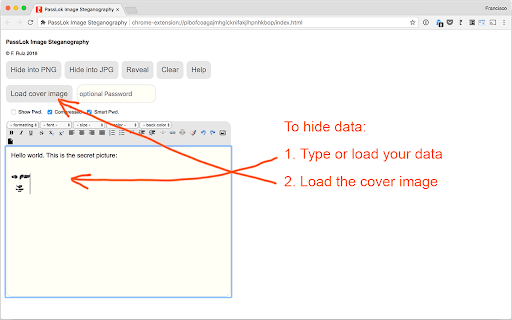
This is the process to hide data in an image:
1. Type, paste, or use the toolbar buttons to load text or data into the main box.
2. Load a cover image by clicking the "Load cover image" button.
3. Type a Password in the small box (you can omit it, but we strongly recommend that you don't).
4. Make sure the "Compress" and "Smart Pwd." options are selected the way you want them.
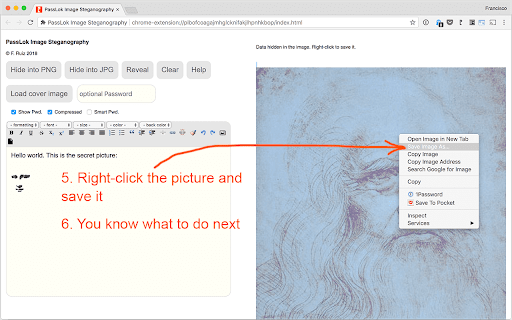
5. Click either the "Hide into PNG" or the "Hide into JPG" button.
6. When the process is complete, right-click the image and select "save image as..." in order to save it locally.

To reveal the hidden data:
1. Load the image by clicking the "Load cover image" button.
2. Type the Password, if any, in the small box. Must the the same one used for hiding the data.
3. Set the "Compress" and "Smart Pwd." options the same way they were set when the data was hidden.
4. Click the "Reveal" button. If successful the hidden data will appear in the main box.
PASSLOK STEGO: IMAGE STEGANOGRAPHY VIA ENHANCED F5 ALGORITHM

PassLok Stego is a specialized tool for the secure embedding of data within digital images. It utilizes an enhanced implementation of A. Westfeld's F5 algorithm, designed to mitigate statistical traces detectable through standard steganalysis. This methodology was presented at the ForenSecure 2017 conference on Cyber Forensics and Information Security.

TECHNICAL IMPLEMENTATION

ARCHITECTURE: This extension operates as a purely client-side utility. All cryptographic and embedding operations occur within the browser's local memory; no external network calls are required for core functionality.

DATA DISTRIBUTION: The engine employs a Pseudorandom Number Generator (PRNG) to distribute hidden data across image pixels. This non-linear distribution is a critical component in providing resistance to forensic discovery.

PLAUSIBLE DENIABILITY: The implementation supports the embedding of a short secondary message protected by an independent password. This feature is designed for high-risk scenarios where the presence of the primary hidden message may be compromised.

OPERATIONAL PARAMETERS

FORMAT SUPPORT: Data can be embedded into JPG or PNG carriers. PNG is recommended for larger data payloads where pixel-perfect integrity is required.

ENTROPY HARDENING: We recommend the use of high-entropy passwords to initialize the embedding process. Without the correct key, it is computationally difficult to distinguish an altered image from a standard carrier.

PROCEDURES

I. EMBEDDING DATA

Input or load the target data into the primary interface.

Select a cover image (JPG or PNG) to serve as the carrier.

Define the initialization password.

Execute the "Hide into PNG" or "Hide into JPG" routine.

Save the resulting image locally via the browser's context menu.

II. EXTRACTING DATA

Load the carrier image containing the hidden data.

Provide the original initialization password.

Ensure the "Compress" and "Smart Pwd" parameters match the original embedding settings.

Execute "Reveal" to extract the data payload.

LICENSE AND METADATA

AUTHOR: Francisco Ruiz, Associate Professor at the Illinois Institute of Technology.

LICENSE: Open Source software released under the GNU General Public License v3.0.

ECOSYSTEM INTEGRATION: The algorithm used here serves as the core steganography engine for the Privacy Bar extension (https://chromewebstore.google.com/detail/privacy-bar/objpfdibjogbdpjjpomnoaflkgdeaanb).

AUDIT AND ADOPTION: The source code (specifically plstego.js) is available for public audit and community adoption on GitHub at: https://github.com/fruiz500/PassLok-stego.

"Don't Trust. Verify."
Permissions & access
- Permissions
- None declared
- Host access
- None declared
Screenshots



About
PASSLOK STEGO: IMAGE STEGANOGRAPHY VIA ENHANCED F5 ALGORITHM

PassLok Stego is a specialized tool for the secure embedding of data within digital images. It utilizes an enhanced implementation of A. Westfeld's F5 algorithm, designed to mitigate statistical traces detectable through standard steganalysis. This methodology was presented at the ForenSecure 2017 conference on Cyber Forensics and Information Security.

TECHNICAL IMPLEMENTATION

ARCHITECTURE: This extension operates as a purely client-side utility. All cryptographic and embedding operations occur within the browser's local memory; no external network calls are required for core functionality.

DATA DISTRIBUTION: The engine employs a Pseudorandom Number Generator (PRNG) to distribute hidden data across image pixels. This non-linear distribution is a critical component in providing resistance to forensic discovery.

PLAUSIBLE DENIABILITY: The implementation supports the embedding of a short secondary message protected by an independent password. This feature is designed for high-risk scenarios where the presence of the primary hidden message may be compromised.

OPERATIONAL PARAMETERS

FORMAT SUPPORT: Data can be embedded into JPG or PNG carriers. PNG is recommended for larger data payloads where pixel-perfect integrity is required.

ENTROPY HARDENING: We recommend the use of high-entropy passwords to initialize the embedding process. Without the correct key, it is computationally difficult to distinguish an altered image from a standard carrier.

PROCEDURES

I. EMBEDDING DATA

Input or load the target data into the primary interface.

Select a cover image (JPG or PNG) to serve as the carrier.

Define the initialization password.

Execute the "Hide into PNG" or "Hide into JPG" routine.

Save the resulting image locally via the browser's context menu.

II. EXTRACTING DATA

Load the carrier image containing the hidden data.

Provide the original initialization password.

Ensure the "Compress" and "Smart Pwd" parameters match the original embedding settings.

Execute "Reveal" to extract the data payload.

LICENSE AND METADATA

AUTHOR: Francisco Ruiz, Associate Professor at the Illinois Institute of Technology.

LICENSE: Open Source software released under the GNU General Public License v3.0.

ECOSYSTEM INTEGRATION: The algorithm used here serves as the core steganography engine for the Privacy Bar extension (https://chromewebstore.google.com/detail/privacy-bar/objpfdibjogbdpjjpomnoaflkgdeaanb).

AUDIT AND ADOPTION: The source code (specifically plstego.js) is available for public audit and community adoption on GitHub at: https://github.com/fruiz500/PassLok-stego.

"Don't Trust. Verify."
Technical
- Version
- 2.0.0
- Manifest
- V3
- Size
- 116KiB
- Min Chrome
- 88
- Languages
- 1
- Featured
- Yes
Metadata
- ID
- njpilngdjodbciagblmkceapenlpnjhl
- Developer ID
- u44ee8c9c3a2360b9b35198d5f2005327
- Developer Email
- [email protected]
- Created
- Sep 3, 2018
- Last Updated (Store)
- May 12, 2026
- Last Scraped
- Jun 18, 2026
- Website
- https://passlok.com/
- Support URL
- https://passlok.weebly.com/faq.html
Similar extensions
Alternatives to PassLok Image Steganography, ranked by description similarity.

Hidden Text, Image in the Picture
A steganography tool to hide images or text in a image picture. You can use it to hide and encrypt images or text in an image.
51
★ 3.5

NeonCrypt
Infinity Stream - Steganographic GIF Encoder with Preset Backgrounds, up to 1000+ words
4

StegCloak
Hide secrets with invisible characters in plain text securely using passwords 🧙🏻♂️⭐
103
★ 5.0

Privacy Extension for WhatsApp Privacy
Instantly blur WhatsApp messages, media, names, and previews. Protect your chats and lock the app with a password.
300.0K
★ 4.4

Total Privacy For WhatsApp Web - Whatsapp extra privacy
Blur and Hides your messages until you hover over them.
10.0K
★ 4.6
Hide for WhatsApp Web
Hide media, messages, names and more in your WhatsApp for Web.
1.0K
★ 2.3

Privacy Extension For WhatsApp Web
Hides your messages until you hover over them.
1.0M
★ 2.8

WhatsApp Privacy - Cloak of Invisibility 2.0
WhatsApp Web Privacy extension for Google Chrome. Created with ❤️ by Shivam Chopra
45
★ 5.0
Data sourced from the Chrome Web Store · last verified Jun 18, 2026.