
Privacy Extension for WhatsApp Privacy
Instantly blur WhatsApp messages, media, names, and previews. Protect your chats and lock the app with a password.
As of June 2026, Privacy Extension for WhatsApp Privacy has 300,000 users and a 4.41/5 rating from 558 reviews in the Social & Communication category.
Usersup 50.0 percent+50.0%
300.0K
300,000
Ratingup 0.7 percent+0.7%
4.41
558 reviews
Reviewsup 11.6 percent+11.6%
558
Version
2.0.10
Manifest V3
90-day change · In the last 90 days this extension gained 100.0K users, 5 version updates, changed permissions.
History
16 snapshotsTracking since Apr 1, 2026.
View as table
| Date | Users | Rating | Reviews | Version |
|---|---|---|---|---|
| Apr 1, 2026 | 200.0K | 4.38 | 500 | 1.0.69 |
| Apr 5, 2026 | 200.0K | 4.38 | 501 | 1.0.69 |
| Apr 16, 2026 | 200.0K | 4.38 | 504 | 1.0.69 |
| Apr 20, 2026 | 300.0K | 4.39 | 513 | 2.0.0 |
| Apr 26, 2026 | 300.0K | 4.39 | 513 | 2.0.1 |
| May 15, 2026 | 300.0K | 4.39 | 514 | 2.0.1 |
| May 23, 2026 | 300.0K | 4.39 | 514 | 2.0.2 |
| May 25, 2026 | 300.0K | 4.39 | 519 | 2.0.2 |
| May 28, 2026 | 300.0K | 4.40 | 525 | 2.0.2 |
| May 31, 2026 | 300.0K | 4.40 | 529 | 2.0.4 |
| Jun 3, 2026 | 200.0K | 4.40 | 532 | 2.0.4 |
| Jun 6, 2026 | 200.0K | 4.40 | 534 | 2.0.5 |
| Jun 8, 2026 | 300.0K | 4.40 | 537 | 2.0.5 |
| Jun 11, 2026 | 300.0K | 4.40 | 541 | 2.0.5 |
| Jun 15, 2026 | 300.0K | 4.40 | 545 | 2.0.8 |
| Jun 22, 2026 | 300.0K | 4.40 | 555 | 2.0.8 |
| Now | 300.0K | 4.41 | 558 | 2.0.10 |
Changelog
- May 28, 2026permissions
storage, scripting, alarms
storage, alarms
- Apr 16, 2026description
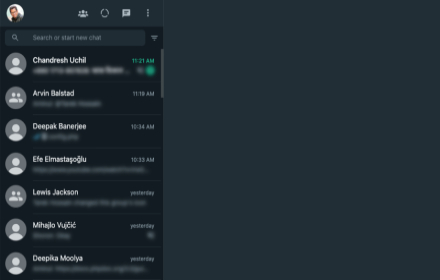
To enhance privacy in shared spaces, a WhatsApp™ Web privacy extension blurs your messages until you hover over them.

Your messages and other content will only appear when you hover your cursor over them.

How to hide messages? You can toggle different settings on the WhatsApp privacy extension to meet your personal needs.

Features:
Screen Lock: Using Password Protection
Blur messages within chats.
Blur message previews on the left side of the screen.
Blur all media (images, videos, stickers, etc.) separate from the text.
Blur profile pictures.
Hover to display specific content as needed.

More Tools Recommendation:
Our team has delved deeply into the realm of WhatsApp for quite some time, offering various extensions in different functional directions on our More Tools page for you to choose from.


------------------------------------------
LEGAL
------------------------------------------
WhatsApp is a trademark of WhatsApp Inc. registered in the U.S. and other countries. WAPlus is an independent project and has no relationship to WhatsApp.
Instantly blur WhatsApp messages, media, names, and previews. Protect your chats and lock the app with a password.

To enhance privacy in shared spaces, a WhatsApp™ Web privacy extension blurs your messages until you hover over them.

Your messages and other content will only appear when you hover your cursor over them.

How to hide messages? You can toggle different settings on the WhatsApp privacy extension to meet your personal needs.

Privacy & screen lock

Screen lock: password protection, plus auto lock when WhatsApp Web stays idle for a time you choose.
Blur messages inside the current chat.
Blur last message previews in the chat list on the left.
Blur media previews and media gallery separately from plain text.
Blur the message input box so drafts and what you type stay private.
Blur profile pictures and group / contact names.
Fine-tuned reveal behavior: optional no transition delay for snappier blur/unblur, and “unblur all when hovering the app” when you want everything visible at once instead of item by item.
Hover to display specific content as needed.
WhatsApp Web enhancements (optional toggles)

Reactions-style “like” on messages, pin chats shortcut, custom chat wallpaper (upload and apply from the panel).
Contact info helpers: optional contact info icon, keep contact info open, and start a chat with numbers that are not saved in your contacts (with phone + country code).
Online contacts notifications when enabled.
Business tools (in-panel tabs)

Broadcasting: send to contacts, groups, labels, or countries; spacing between sends; schedule or repeat; import targets from a list.
Smart replies: keyword-triggered auto replies tied to message templates (text / file / vCard), with rules such as allowed days, delays, optional group replies, mark read / archive after reply, and more.
Scheduled messaging: timezone-aware delayed sends managed from a list.
Click-to-chat link generator: prefilled message, country code, and easy sharing.
Webhooks (outgoing): send structured message events to your endpoint (up to 5 webhooks).
Export / import extension-related settings for backup and migration.
Data export & statistics

Export contacts and chat-derived data to XLSX, CSV, or TXT, with filters such as all contacts, all chats, specific groups, labels, or countries, and selectable fields.
Statistics overview for phone contacts, all chats, personal vs group chats, and broadcasts.
Interface

Built-in multi-language selector in the overlay (e.g. English, Indonesian, Portuguese, Spanish, German, French, Arabic, Chinese, and more as you ship them).

LEGAL
WhatsApp is a trademark of WhatsApp Inc. registered in the U.S. and other countries. WAPlus is an independent project and has no relationship to WhatsApp.
Permissions & access
- Permissions
- storagealarms
- Host access
- *://*.whatsapp.com/*
Screenshots


About
Instantly blur WhatsApp messages, media, names, and previews. Protect your chats and lock the app with a password.

To enhance privacy in shared spaces, a WhatsApp™ Web privacy extension blurs your messages until you hover over them.

Your messages and other content will only appear when you hover your cursor over them.

How to hide messages? You can toggle different settings on the WhatsApp privacy extension to meet your personal needs.

Privacy & screen lock

Screen lock: password protection, plus auto lock when WhatsApp Web stays idle for a time you choose.
Blur messages inside the current chat.
Blur last message previews in the chat list on the left.
Blur media previews and media gallery separately from plain text.
Blur the message input box so drafts and what you type stay private.
Blur profile pictures and group / contact names.
Fine-tuned reveal behavior: optional no transition delay for snappier blur/unblur, and “unblur all when hovering the app” when you want everything visible at once instead of item by item.
Hover to display specific content as needed.
WhatsApp Web enhancements (optional toggles)

Reactions-style “like” on messages, pin chats shortcut, custom chat wallpaper (upload and apply from the panel).
Contact info helpers: optional contact info icon, keep contact info open, and start a chat with numbers that are not saved in your contacts (with phone + country code).
Online contacts notifications when enabled.
Business tools (in-panel tabs)

Broadcasting: send to contacts, groups, labels, or countries; spacing between sends; schedule or repeat; import targets from a list.
Smart replies: keyword-triggered auto replies tied to message templates (text / file / vCard), with rules such as allowed days, delays, optional group replies, mark read / archive after reply, and more.
Scheduled messaging: timezone-aware delayed sends managed from a list.
Click-to-chat link generator: prefilled message, country code, and easy sharing.
Webhooks (outgoing): send structured message events to your endpoint (up to 5 webhooks).
Export / import extension-related settings for backup and migration.
Data export & statistics

Export contacts and chat-derived data to XLSX, CSV, or TXT, with filters such as all contacts, all chats, specific groups, labels, or countries, and selectable fields.
Statistics overview for phone contacts, all chats, personal vs group chats, and broadcasts.
Interface

Built-in multi-language selector in the overlay (e.g. English, Indonesian, Portuguese, Spanish, German, French, Arabic, Chinese, and more as you ship them).

LEGAL
WhatsApp is a trademark of WhatsApp Inc. registered in the U.S. and other countries. WAPlus is an independent project and has no relationship to WhatsApp.
Technical
- Version
- 2.0.10
- Manifest
- V3
- Size
- 6.62MiB
- Min Chrome
- 88
- Languages
- 66
- Featured
- Yes
Metadata
- ID
- cgipcgghboamefelooajpiabilddemlh
- Developer ID
- uaa320291b5202e3bc73d53a31fd30666
- Developer Email
- [email protected]
- Created
- May 17, 2022
- Last Updated (Store)
- Jun 20, 2026
- Last Scraped
- Jun 22, 2026
- Website
- https://watools.ai/
- Support URL
- https://waplus.io/c/WdcmPROG
- Privacy Policy
- https://watools.ai/privacy-policy
Similar extensions
Alternatives to Privacy Extension for WhatsApp Privacy, ranked by description similarity.

Privacy Extension For WhatsApp Web
Hides your messages until you hover over them.
1.0M
★ 2.8

Privacy Blur for WhatsApp
Smart privacy for WhatsApp Web. Blur messages, images & contacts. Hover to reveal. Secure your screen from prying eyes.
878
★ 5.0

Privacy Extension for WhatsApp Web
Privacy Extension for WhatsApp Web enhances your online privacy with advanced blur effects.
10.0K
★ 5.0

ChatBlurr - WhatsApp Privacy
Control the privacy of your WhatsApp interface
434
★ 5.0

Privacy Extension For WhatsApp Web - Chat Lock & Blur | WPPME.COM
Lock WhatsApp Web with a password and blur chats, names, or media to protect your privacy when using WhatsApp on your browser.
711
★ 4.7

Total Privacy For WhatsApp Web - Whatsapp extra privacy
Blur and Hides your messages until you hover over them.
10.0K
★ 4.6

Privacy Extension for Whatsapp Web: Blur chats and contacts
Blur messages, images, account profile and more on WhatsApp Web screen with this privacy extension for WhatsApp.
84
Smart Privacy Extension For WA Message
It enables the user to hide or show the whatsapp messages on the web.
926
★ 5.0
Data sourced from the Chrome Web Store · last verified Jun 22, 2026.