
WhatsApp Privacy - Cloak of Invisibility 2.0
WhatsApp Web Privacy extension for Google Chrome. Created with ❤️ by Shivam Chopra
As of May 2026, WhatsApp Privacy - Cloak of Invisibility 2.0 has 45 users and a 5.00/5 rating from 2 reviews in the Social & Communication category.
Usersdown 6.3 percent−6.3%
45
45
Ratingno change0%
5.00
2 reviews
Reviewsno change0%
2
Version
2.1.7
Manifest V3
History
1 snapshotsTracking since May 22, 2026.
View as table
| Date | Users | Rating | Reviews | Version |
|---|---|---|---|---|
| May 22, 2026 | 48 | 5.00 | 2 | 2.1.7 |
| Now | 45 | 5.00 | 2 | 2.1.7 |
Permissions & access
- Permissions
- scriptingactiveTabstorage
- Host access
- None declared
Screenshots

About
WhatsApp Privacy Cloak of Invisibility: Chrome Extension

Overview:

~ This Product will always be FREE for Lifetime ~
~~ This will only work with WhatsApp Web and NOT with WhatsApp Desktop App ~~


WhatsApp Privacy Cloak of Invisibility is a groundbreaking Chrome extension tailored to enhance your privacy on WhatsApp Web. This extension is crafted to provide users with unparalleled control over their online presence, offering features that help maintain your privacy without compromising the functionality of WhatsApp Web. From hiding your online status to managing read receipts and much more, WhatsApp Privacy Cloak of Invisibility ensures your conversations remain private and under your control.

Key Features:

Invisible Online Status: Stay online without revealing your status to others.
Read Receipts Control: Choose when to send read receipts, giving you the power to read messages on your terms.
Stealth Mode: Send messages or navigate through WhatsApp Web without triggering any online or typing indicators.
Selective Receipts: Selectively send read receipts for specific chats while keeping others in the dark.
Privacy-Focused Notifications: Get notifications without exposing sensitive information or your activity status.
How to Use WhatsApp Privacy Cloak of Invisibility:

Installation:

Access the Chrome Web Store and search for "WhatsApp Privacy Cloak of Invisibility."
Click "Add to Chrome" to initiate the installation.
After installation, you'll see the extension's icon in your browser's toolbar.

Setting Up:

Launch WhatsApp Web in your Chrome browser.
--Troubleshoot: Logout Whatsapp, login again, close all tabs and re-open WhatsApp Web and re-open the extension.
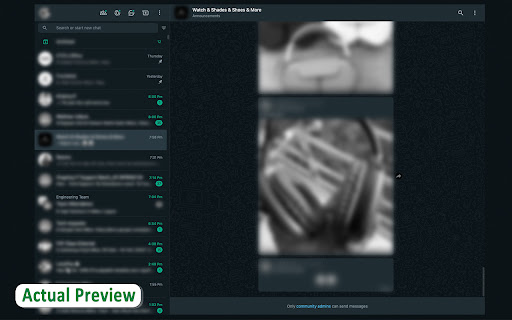
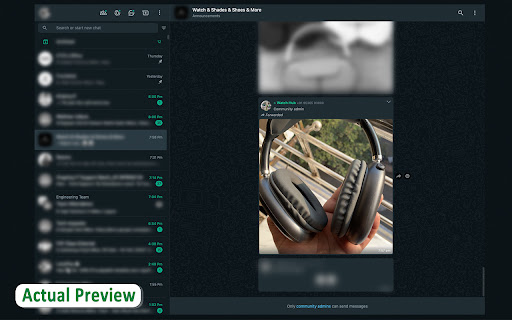
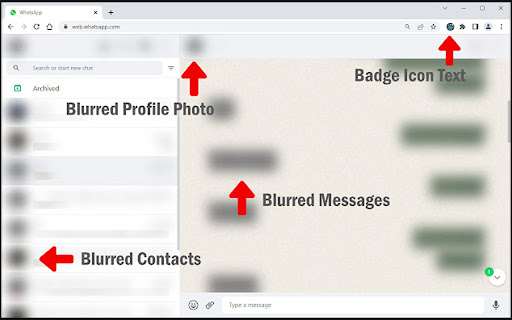
Click the extension's icon in the toolbar to open the privacy dashboard and click on "enable blur".

Activating Features:

Invisible Online Status: Toggle this feature in the "Privacy Settings" to remain invisible while online.
Read Receipts Control: Adjust your read receipts preferences, enabling them for certain contacts or situations.
Stealth Mode: Activate stealth mode from the dashboard to navigate WhatsApp Web undetected.
Selective Receipts: Manage read receipts on a per-chat basis directly from the chat window.
Privacy-Focused Notifications: Customize notifications in the settings to ensure they don’t betray your activity or online status.
Support:

If you encounter any issues or have suggestions for the WhatsApp Privacy Cloak of Invisibility, please visit our support page or reach out to our dedicated customer service team. Your feedback is invaluable as we continually strive to enhance the extension.

Privacy and Security:

At the core of WhatsApp Privacy Cloak of Invisibility is a commitment to your privacy and security. The extension operates strictly on your device, without storing or transmitting personal data externally. All features are designed with privacy-first principles, ensuring a secure and private messaging experience.

Dive into a new realm of privacy on WhatsApp Web with WhatsApp Privacy Cloak of Invisibility. Control your online presence and protect your privacy without sacrificing the convenience and features you love.
Technical
- Version
- 2.1.7
- Manifest
- V3
- Size
- 12.69MiB
- Min Chrome
- 88
- Languages
- 1
- Featured
- No
Metadata
- ID
- fmmnoehopopadmibngkmdmanoafodghl
- Developer ID
- u64298d074877849a8718fd612c7cdda1
- Developer Email
- [email protected]
- Created
- Mar 4, 2024
- Last Updated (Store)
- Mar 19, 2024
- Last Scraped
- May 22, 2026
- Website
- —
- Support URL
- —
Similar extensions
Alternatives to WhatsApp Privacy - Cloak of Invisibility 2.0, ranked by description similarity.

Privacy Extension For WhatsApp Web - Chat Lock & Blur | WPPME.COM
Lock WhatsApp Web with a password and blur chats, names, or media to protect your privacy when using WhatsApp on your browser.
711
★ 4.7

Privacy Blur for WhatsApp
Smart privacy for WhatsApp Web. Blur messages, images & contacts. Hover to reveal. Secure your screen from prying eyes.
878
★ 5.0

WA Web Plus – WhatsApp Web Tools for Privacy & Deleted Messages
Blur chats & media for privacy, view deleted messages, download status, track online activity on WhatsApp Web.
10.0K
★ 4.8

Privacy Extension for WhatsApp Web
Protect your privacy on WhatsApp Web, lock your screen, and hide messages, images, profile, and more with blur effects.
285
★ 5.0

Privacy Extension for WhatsApp Privacy
Instantly blur WhatsApp messages, media, names, and previews. Protect your chats and lock the app with a password.
300.0K
★ 4.4

Privacy Extension For WhatsApp Web
Hides your messages until you hover over them.
1.0M
★ 2.8

Privacy Extension for WhatsApp Web
Privacy Extension for WhatsApp Web offers robust privacy controls for WhatsApp Web users.
6.0K
★ 5.0

Privacy Extension for WhatsApp Web
Blur WhatsApp messages, media, names and previews. Protect your chats: auto-blur when idle, reveal on hover.
4.0K
★ 5.0
Data sourced from the Chrome Web Store · last verified May 22, 2026.