
Media Beam
Peer-to-peer file and text sharing over WebRTC.
As of June 2026, Media Beam has 5 users in the Productivity category.
Usersup 25.0 percent+25.0%
5
5
Ratingno change0%
—
— reviews
Reviewsno change0%
—
Version
1.0.0
Manifest V3
History
7 snapshotsTracking since Apr 11, 2026.
View as table
| Date | Users | Rating | Reviews | Version |
|---|---|---|---|---|
| Apr 11, 2026 | 4 | — | — | 1.0.0 |
| Apr 21, 2026 | 3 | — | — | 1.0.0 |
| May 1, 2026 | 2 | — | — | 1.0.0 |
| May 9, 2026 | 2 | — | — | 1.0.0 |
| May 18, 2026 | 7 | — | — | 1.0.0 |
| May 27, 2026 | 5 | — | — | 1.0.0 |
| Jun 5, 2026 | 3 | — | — | 1.0.0 |
| Now | 5 | — | — | 1.0.0 |
Permissions & access
- Permissions
- clipboardWrite
- Host access
- https://mediabeam.live/*, https://www.mediabeam.live/*
Screenshots


About
Media Beam makes moving files and text between your devices fast, private, and hassle-free — without uploading anything to the cloud.

Send photos from your phone to your computer instantly. Share documents with your laptop. Copy text snippets between devices. No accounts, no sign-in, no third-party storage.

Everything transfers directly between your browsers using secure WebRTC peer-to-peer connections. Your files never touch a server and are never stored by Media Beam or anyone else.

Why install it?

• Get photos off your phone and onto your computer quickly without emailing yourself or using cloud drives.
• Avoid slow or intrusive services that require accounts, logins, or social profiles.
• Keep total control over your files — no cloud storage, no analytics, no tracking.
• Simple setup: click “Host”, scan the QR code or enter the code on another device, and send.
• Works across platforms (Windows, macOS, Linux, Android, iOS* via browser).
• Efficient for screenshots, homework files, documents, PDFs, images, and text.

Core principles:

✔ Direct peer-to-peer transfer (no cloud upload)
✔ No accounts or authentication
✔ No tracking, analytics, or telemetry
✔ End-to-end DTLS encryption (WebRTC standard)
✔ No file size compression (you keep full quality)

Use cases:

• Move pictures from phone → laptop without iCloud, Google Photos, or USB cables.
• Share files between personal and school/work devices without signing in.
• Copy text snippets and links between browsers.
• Exchange files privately on public Wi-Fi without exposing data to cloud services.

Media Beam is built for users who value speed, privacy, and simplicity.

Note: On very restrictive networks, direct P2P may be blocked — in that case the app will offer guidance and connection alternatives. Relayed transfers are supported but slower and size-limited.

Media Beam is privacy-first by design. We do not collect, store, or transmit personal data.
Technical
- Version
- 1.0.0
- Manifest
- V3
- Size
- 844KiB
- Min Chrome
- 88
- Languages
- 1
- Featured
- No
Metadata
- ID
- nhgjhokgdofgbnnhhccfpilmfipedkmk
- Developer ID
- uc894697931392d7b903173a02e08efe0
- Developer Email
- [email protected]
- Created
- Jan 19, 2026
- Last Updated (Store)
- Jan 21, 2026
- Last Scraped
- Jun 5, 2026
- Website
- mediabeam.live
- Support URL
- https://www.wileydigital.tech/contact
- Privacy Policy
- https://www.mediabeam.live/privacy.html
Similar extensions
Alternatives to Media Beam, ranked by description similarity.

Photon - Instant, Secure P2P Sharing
Photon Chrome Extension - Transfer files, links, and text at the speed of thought. No cloud, no delays, no limits.
2

FastShare — P2P File Sharing
Share files of any size directly between devices. No account, no cloud, no limits. Powered by WebRTC.
9

Secure share extension
SecureShare-extension
11
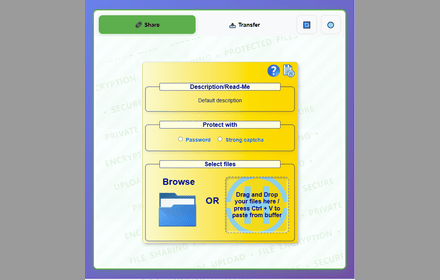
Fileshare
Secure file sharing extension with end-to-end encryption, password protection, and anonymous transfers for maximum privacy.
279
★ 4.5

Share Files - TransferWoW
Send & receive files instantly! Fast, secure P2P file sharing like WeTransfer. No size limits. Includes 1:1 Video Call.
109
★ 5.0

NotesQR Extension
Share files easily and securely using NotesQR backend.
27
★ 5.0

Eii File Transfer
Fast, secure, and simple file transfer between your devices with a 6-digit code.
32
★ 5.0

StrongFolder - File Share
Use StrongFolder - File Share to send large files & folders directly — no clouds, no limits, just transfer files fast and secure.
359
★ 5.0
Data sourced from the Chrome Web Store · last verified Jun 5, 2026.