
Secure share extension
SecureShare-extension
As of June 2026, Secure share extension has 11 users in the Productivity category.
Usersdown 21.4 percent−21.4%
11
11
Ratingno change0%
—
— reviews
Reviewsno change0%
—
Version
0.0.1
Manifest V3
History
2 snapshotsTracking since Apr 1, 2026.
View as table
| Date | Users | Rating | Reviews | Version |
|---|---|---|---|---|
| Apr 1, 2026 | 14 | — | — | 0.0.1 |
| May 3, 2026 | 15 | — | — | 0.0.1 |
| Now | 11 | — | — | 0.0.1 |
Permissions & access
- Permissions
- None declared
- Host access
- https://*/*
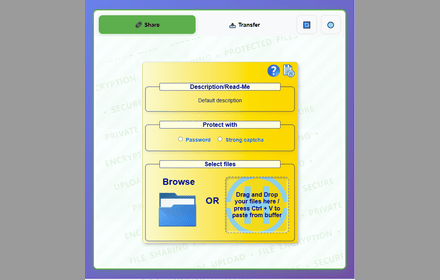
Screenshots


About
# SecureShare - Secure P2P File Sharing & Transfer

## 🔒 Your Private & Secure File Sharing Solution

SecureShare is a free, secure, and lightning-fast P2P file sharing tool that puts your privacy first. Transfer text, images, files, and folders directly between devices with end-to-end encryption - no server storage, no size limits, no registration required.

## 🌟 Why Choose SecureShare?

### Unmatched Privacy & Security
- Direct P2P connection using WebRTC technology
- End-to-end encryption (E2EE) for all transfers
- No server storage - files transfer directly between devices
- Your data never touches third-party servers
- Perfect for sensitive document sharing

### Superior Convenience
- No file size limits
- No speed restrictions
- No registration or login required
- Support for multiple simultaneous receivers
- Cross-platform compatibility
- Mobile-optimized interface

### Perfect for Professional Use
- Transfer large design files
- Share sensitive documents securely
- Collaborate on creative projects
- Back up important data
- Sync work across devices
- Share meeting materials instantly

## 💼 Ideal Use Cases

### Office Collaboration
- Share large presentations
- Transfer high-resolution design files
- Distribute meeting materials
- Exchange confidential documents
- Team file sharing
- Quick clipboard sharing

### Creative Work
- Share design assets
- Transfer video files
- Sync project files
- Portfolio sharing
- Collaborate on creative works
- Exchange source files

### Personal Use
- Export phone photos
- Transfer video recordings
- Quick file backup
- Share travel photos
- Exchange personal documents
- Family file sharing

## 🚀 Key Features

1. Universal Compatibility
   - Works across all major platforms
   - Optimized for mobile devices
   - Browser-based - no software installation needed

2. Efficient Transfer
   - Direct device-to-device connection
   - Maximum transfer speed
   - Support for bulk transfers
   - Folder structure preservation

3. Enhanced Security
   - End-to-end encryption
   - No data storage on servers
   - Secure connection protocols
   - Private sharing channels

4. User-Friendly Interface
   - Clean, intuitive design
   - Easy drag-and-drop support
   - Custom sharing IDs
   - QR code sharing

## 💫 Unique Advantages

- Use as a secure online clipboard
- Perfect for temporary file transfer
- Ideal for large file sharing
- Great for team collaboration
- Excellent for backing up data
- Perfect for mobile-to-PC transfer

## 🌐 Multilingual Support
Available in 7 languages:
- English
- 中文 (Chinese)
- 日本語 (Japanese)
- Español (Spanish)
- Deutsch (German)
- Français (French)
- 한국어 (Korean)

## 🔍 Perfect Solution For:

### Businesses
- Share confidential documents securely
- Transfer large design files quickly
- Distribute meeting materials efficiently
- Collaborate on team projects
- Exchange sensitive information safely
- Back up important business data

### Creatives
- Share high-resolution artwork
- Transfer large video files
- Exchange design assets
- Collaborate on projects
- Share portfolios
- Sync work across devices

### Personal Users
- Transfer photos between devices
- Share personal documents
- Back up important files
- Exchange travel photos
- Share family videos
- Quick file sharing

## 🛡️ Security Features

- WebRTC technology for secure P2P connections
- End-to-end encryption for all transfers
- No server storage - direct device-to-device transfer
- Secure connection protocols
- Private sharing channels
- Temporary sharing links

## 💻 Technical Specifications

- Built with WebRTC technology
- End-to-end encryption (DTLS protocol)
- P2P direct connection
- Cross-platform compatibility
- Mobile-optimized interface
- Support for all file types

## 🆓 Always Free

- No premium features
- No hidden costs
- No advertisements
- No registration required
- No file size limits
- No speed restrictions

## Official Website
Visit our website for more information and direct access to the tool:
https://www.securityshare.xyz

Entrance in different languages:
- English: https://www.securityshare.xyz/en
- 中文: https://www.securityshare.xyz/zh
- 日本語: https://www.securityshare.xyz/ja
- Español: https://www.securityshare.xyz/es
- Deutsch: https://www.securityshare.xyz/de
- Français: https://www.securityshare.xyz/fr
- 한국어: https://www.securityshare.xyz/ko

Experience the future of secure file sharing with SecureShare - where privacy meets convenience.

Your files, your privacy, your control.

#SecureFileSharing #P2P #Privacy #Security #FileTransfer #WebRTC #Encryption

Note: This extension respects your privacy and requires minimal permissions to function. We never collect, store, or share your personal data or files.
Technical
- Version
- 0.0.1
- Manifest
- V3
- Size
- 105KiB
- Min Chrome
- 88
- Languages
- 1
- Featured
- No
Metadata
- ID
- adjilcbeoemjblakhbbhhlfopejcpghj
- Developer ID
- ub02db399197c0642104c4f669167dc41
- Developer Email
- [email protected]
- Created
- Jan 20, 2025
- Last Updated (Store)
- Jan 20, 2025
- Last Scraped
- Jun 2, 2026
- Website
- securityshare.xyz
- Support URL
- https://www.securityshare.xyz/en/help
- Privacy Policy
- https://www.securityshare.xyz/en/privacy
Similar extensions
Alternatives to Secure share extension, ranked by description similarity.
Fileshare
Secure file sharing extension with end-to-end encryption, password protection, and anonymous transfers for maximum privacy.
279
★ 4.5

FastShare — P2P File Sharing
Share files of any size directly between devices. No account, no cloud, no limits. Powered by WebRTC.
9

StrongFolder - File Share
Use StrongFolder - File Share to send large files & folders directly — no clouds, no limits, just transfer files fast and secure.
359
★ 5.0

EasyShare - Quick File Sharing
Upload any file with one click and instantly share it via temporary download links. No accounts required.
155
★ 5.0

NotesQR Extension
Share files easily and securely using NotesQR backend.
27
★ 5.0

Share Files - TransferWoW
Send & receive files instantly! Fast, secure P2P file sharing like WeTransfer. No size limits. Includes 1:1 Video Call.
109
★ 5.0

CrossLink Share
Share files/clipboard across multiple devices
44

PeerScreen
Share your screen with other users using WebRTC and PeerJS.
288
★ 5.0
Data sourced from the Chrome Web Store · last verified Jun 2, 2026.