
Lock Tab
Prevents a tab from being closed accidentally
As of June 2026, Lock Tab has 10,000 users and a 3.38/5 rating from 88 reviews in the Productivity category.
Usersno change0%
10.0K
10,000
Ratingdown 0.3 percent−0.3%
3.38
88 reviews
Reviewsup 4.8 percent+4.8%
88
Version
1.3.2
Manifest V3
History
3 snapshotsTracking since Apr 20, 2026.
View as table
| Date | Users | Rating | Reviews | Version |
|---|---|---|---|---|
| Apr 20, 2026 | 10.0K | 3.39 | 84 | 1.3.2 |
| Apr 29, 2026 | 10.0K | 3.43 | 86 | 1.3.2 |
| May 26, 2026 | 10.0K | 3.40 | 87 | 1.3.2 |
| Now | 10.0K | 3.38 | 88 | 1.3.2 |
Permissions & access
- Permissions
- activeTabstorage
- Host access
- None declared
Screenshots

About
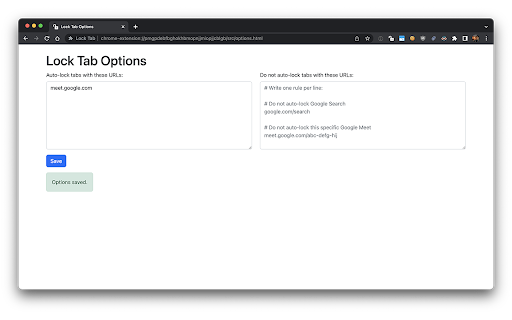
Adds a padlock icon that allows toggling each tab's lock/unlocked state. When a locked tab is being closed, a confirmation dialog which allows preventing the tab from closing, is displayed.

📣 IMPORTANT: after locking, some interaction with the page is required for it to work. So you need to, for example, click anywhere on the page after locking to actually prevent the tab from being closed. This is how Chrome works.
Technical
- Version
- 1.3.2
- Manifest
- V3
- Size
- 43.66KiB
- Min Chrome
- 88
- Languages
- 1
- Featured
- Yes
Metadata
- ID
- nhbdiieigbgalknjplfpgmjnpbnkchnb
- Developer ID
- u845d13da31f968518a63e6ddefc62e42
- Developer Email
- [email protected]
- Created
- Jun 24, 2022
- Last Updated (Store)
- Dec 7, 2025
- Last Scraped
- Jun 4, 2026
- Website
- —
- Support URL
- —
- Privacy Policy
- —
Similar extensions
Alternatives to Lock Tab, ranked by description similarity.

Tab Lock - Secure Any Website Easily
Enhance privacy and security by locking any browser tab with a PIN - works on all websites
1.0K
★ 3.1

Secure Tab Locker - Domain Password Protection
Protect your browsing with domain-specific passwords for enhanced privacy and security.
81
★ 3.5

PageLock
Password-protected webpage lock plugin
13

Chrome Profile Lock
Password protection for Chrome profiles with auto-lock on inactivity
197
★ 5.0

Tab Guard - Instant Stealth
Hide tabs in one keypress with a custom decoy page, Instant Lock, Auto-Return, and optional Master Lock for restores.
24

Page Locker
Blurs all tabs on hotkey press for quick privacy.
122
★ 5.0

Stealth Tab
Instantly switch to a preloaded tab with a secret key.
20
★ 5.0

Tab Locker
Password-lock any browser tab to hide its content from view
191
★ 1.0
Data sourced from the Chrome Web Store · last verified Jun 4, 2026.