
Send 2 Photopea
Send image to Photopea
As of May 2026, Send 2 Photopea has 1,000 users and a 5.00/5 rating from 2 reviews in the Workflow & Planning category.
Usersno change0%
1.0K
1,000
Ratingno change0%
5.00
2 reviews
Reviewsup 100.0 percent+100.0%
2
Version
0.3.99
Manifest V3
History
2 snapshotsTracking since Apr 26, 2026.
View as table
| Date | Users | Rating | Reviews | Version |
|---|---|---|---|---|
| Apr 26, 2026 | 1.0K | 5.00 | 1 | 0.3.99 |
| May 23, 2026 | 1.0K | 5.00 | 1 | 0.3.99 |
| Now | 1.0K | 5.00 | 2 | 0.3.99 |
Permissions & access
- Permissions
- activeTabcontextMenusscriptingstorage
- Host access
- <all_urls>
Screenshots


About
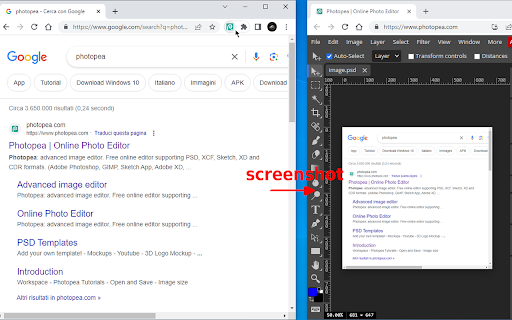
Right-click and send images right to Photopea.
If you have an instance of Photopea open, the image will be sent there.

Browse and edit your images, faster.

Should work for Image Elements, and Video Elements too. ;D

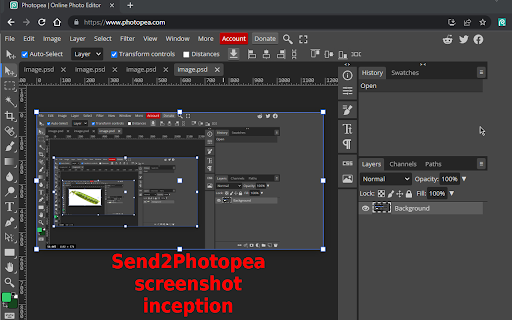
Now you can also right-click on the extension button and choose "Take page screenshot..." to send a screenshot to Photopea.

... and choose to open Photopea in incognito if it's not already open (tick "Use incognito..." from the extension button context menu).

TIP: to take screenshots of YouTube videos right-click twice on the video to get past the custom context menu and to the native one that will show a "Send to Photopea" entry (or use the new picker feature) ;)

Right-click on the extension button and select "Toggle element picker..." to activate a picker that let's you visually choose the element to send to Photopea.
When it's active you can fine-tune the selection with Q/A keys, and then press SPACE to send the highlighted element.
The highlighted elements' background should turn green if it's actionable.
In this way you're also able to send images and videos behind an overlay (e.g. vimeo).

Experimental support has been added for SVG and CANVAS elements (via picker).

Please file bugs/feature requests at https://github.com/azrafe7/send2photopea/issues


I frequently use this extension in combination with my other extension (WebClip Element) to clip elements on a page and then send them to Photopea.

CODE: https://github.com/azrafe7/send2photopea

CHANGELOG: https://github.com/azrafe7/send2photopea/blob/main/CHANGELOG.md

WebClipElement: https://chrome.google.com/webstore/detail/webclipelement/ndkjiolmefobbpbiejfnihoccngfbpjh

DISCLAIMER: I'm not affiliated with Photopea, just a big fan of it. :D
Technical
- Version
- 0.3.99
- Manifest
- V3
- Size
- 30.06KiB
- Min Chrome
- 88
- Languages
- 1
- Featured
- Yes
Metadata
- ID
- ngjdphpkaopdenfbgkkkgmajgcmhpkme
- Developer ID
- u19a7f73408ecd170a8d05ad5fcd10e52
- Developer Email
- [email protected]
- Created
- Jul 6, 2023
- Last Updated (Store)
- Feb 13, 2024
- Last Scraped
- May 23, 2026
- Website
- —
- Privacy Policy
- —
Similar extensions
Alternatives to Send 2 Photopea, ranked by description similarity.

WebClip Element
Take a screenshot of highligthed element (or visible page)
93
★ 5.0

ElemSnap - Quick capture elements
Quick capture of webpage elements, conversion to images, and automatic beautification.
340
★ 4.0

Copy WebP as PNG
Converts .webp images to .png when copying them to clipboard.
528
★ 3.9

Full Page Screenshot: ScreenTool.io
Take Full Page Screenshots effortlessly, snip specific areas, and share in seconds.
9.0K
★ 3.9

Screenety - Screen Recorder & Annotation Tool
Screenshot tool
154
★ 5.0

Picsee - collect and organize image
This extension makes easy to collect images or videos and save full-page screenshots from website
1.0K
★ 3.0
Easy Screenshot - a Web Clipper
all-in-on capturing tool for the visual part, the entire page, or a selective area with auto-scrolling and editing support
20.0K
★ 4.2

EdShot
Screenshots, Cropped shots, Snap-shots, Videos and Screencasts taken with a single click.
780
★ 4.1
Data sourced from the Chrome Web Store · last verified May 23, 2026.