Easy Screenshot - a Web Clipper
all-in-on capturing tool for the visual part, the entire page, or a selective area with auto-scrolling and editing support
As of June 2026, Easy Screenshot - a Web Clipper has 20,000 users and a 4.19/5 rating from 74 reviews in the Workflow & Planning category.
Usersno change0%
20.0K
20,000
Ratingno change0%
4.19
74 reviews
Reviewsno change0%
74
Version
0.5.2
Manifest V3
History
1 snapshotsTracking since Apr 18, 2026.
View as table
| Date | Users | Rating | Reviews | Version |
|---|---|---|---|---|
| Apr 18, 2026 | 20.0K | 4.19 | 74 | 0.5.2 |
| Now | 20.0K | 4.19 | 74 | 0.5.2 |
Permissions & access
- Permissions
- contextMenusactiveTabscriptingdownloadsnotificationsstoragedebugger
- Host access
- *://webbrowsertools.com/jspaint/pwa/build/*
Screenshots
About
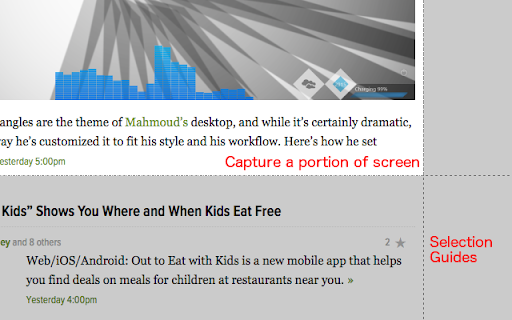
You can capture screenshots from the active tab with just two clicks. It provides multiple options for capturing specific portions of the page, the visual viewport, or even the entire page if it extends beyond the screen with both vertical and horizontal scroll bars. The captured image can be saved to the default download directory, copied to the clipboard, or opened in an online paint editor. The extension currently integrates JSPaint, a web-based replica of MS Paint, which offers offline functionality, allowing you to edit your images without an internet connection.

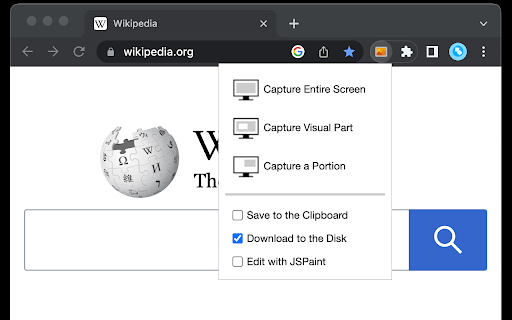
The extension adds a toolbar button to the browser's action area. Clicking on this button opens a popup window with three options:
1. Capture the Entire Screen (3 methods. Works even if the page contains fixed-position elements)
2. Capture Visual Part
3. Capture a Portion

Supported formats: PNG, JPEG, Avif, and WebP

These options are also accessible via the right-click context menu on any page, providing easy access to the screenshot functionality.

Here are some additional notes about the extension:
1. When selecting the "Capture Entire Screen" option, and the page size exceeds the window size, the extension will automatically scroll through the entire page to capture different sections and merge them into a single image. This process may take a few seconds to complete.
2. The resolution of the captured image depends on the screen resolution. For instance, if you have a 4K display, such as a Retina display, the image resolution will be at least four times higher than a regular display.
3. To ensure compatibility across various devices, the extension saves all captured screenshots in the widely supported PNG format, which offers high-quality lossless images.
4. The extension does NOT add watermarks to the captured images.
5. If you prefer to customize the format of the filenames for downloaded images, you can visit the options page and utilize the "filename mask" option to make the desired changes.
Technical
- Version
- 0.5.2
- Manifest
- V3
- Size
- 50.85KiB
- Min Chrome
- 88
- Languages
- 12
- Featured
- Yes
Metadata
- ID
- ilihnlnookgcpkpnjafigbkdniceonip
- Developer ID
- u5f4ced533d80f19d9c18dea3723e99b9
- Developer Email
- [email protected]
- Created
- Apr 7, 2015
- Last Updated (Store)
- Nov 3, 2025
- Last Scraped
- Jun 2, 2026
- Website
- —
- Privacy Policy
- —
Similar extensions
Alternatives to Easy Screenshot - a Web Clipper, ranked by description similarity.

Full Page Screenshot - Screen Capture
Screenshot tool for making a full page or partial screen capture with further edit, text adding and download.
3.0K
★ 4.3

Screen Selection to Max Quality JPEG
Capture screen selection and save as max-quality JPEG with proper scaling.
23

Recorder & Screenshot | Sitespedia - Screen Video Recorder & Screenshot
Take screenshots entirely or partially of websites, annotate them, and manage them in a centralized place.
6

Full Page Screen Capture
Enable this extension to capture screenshots whether it's a visible screen, crop capture andfull-page screen
70.0K
★ 3.9

Web Screenshot for Chrome
Capture the visible content of the active tab on any website
440
★ 2.0

Screenshot Master: Full Page Capture
Easy, free and full-featured screenshot app to capture, edit and save your screenshots.
60.0K
★ 4.7

Easy Screenshot
Capture full-page screenshots instantly. Manually select any part of the page to capture exactly what you need.
4

Full Page Screenshot
Capture full-page screenshots of any webpage
687
★ 1.0
Data sourced from the Chrome Web Store · last verified Jun 2, 2026.