
Image to Vector Converter
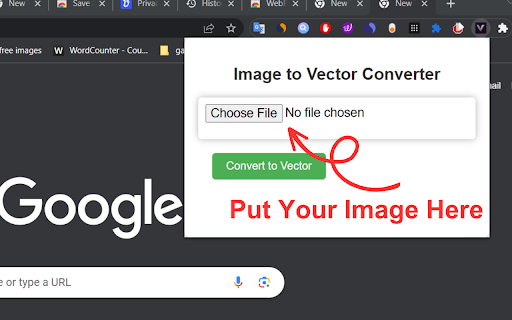
Convert images png, jpg to vector graphics.
As of May 2026, Image to Vector Converter has 304 users in the Workflow & Planning category.
Usersup 3.8 percent+3.8%
304
304
Ratingno change0%
—
— reviews
Reviewsno change0%
—
Version
1.1
Manifest V3
History
2 snapshotsTracking since Apr 29, 2026.
View as table
| Date | Users | Rating | Reviews | Version |
|---|---|---|---|---|
| Apr 29, 2026 | 293 | — | — | 1.1 |
| May 26, 2026 | 278 | — | — | 1.1 |
| Now | 304 | — | — | 1.1 |
Permissions & access
- Permissions
- storage
- Host access
- https://onlinetechbd.com/twbot/vector.php
Screenshots

About
**Image to Vector Converter Extension**

The "Image to Vector Converter" is a powerful and user-friendly Chrome extension designed to transform raster images into scalable vector graphics (SVG) effortlessly. Whether you're a graphic designer, web developer, or simply someone who enjoys creative projects, this extension is an invaluable tool for converting images into high-quality vectors with just a few clicks.

**Key Features:**

1. **Seamless Image Conversion:** The extension's intuitive interface makes image-to-vector conversion a breeze. Users can easily upload their images directly from their local storage or simply drag and drop images onto the extension window for quick processing.

2. **Highly Accurate Vectorization:** Powered by advanced algorithms, the extension ensures precise and accurate vectorization of images. It can handle various image formats, such as JPEG, PNG, and GIF, converting them into editable vector files that retain their sharpness and clarity at any scale.

3. **Real-Time Preview:** With a live preview feature, users can instantly view the vectorized version of their image before finalizing the conversion. This real-time feedback allows for quick adjustments and ensures the output meets their expectations.

4. **Regular Updates:** The "Image to Vector Converter" extension is continuously updated with new features, optimizations, and improvements to ensure users have access to the latest advancements in vectorization technology.

Overall, the "Image to Vector Converter" Chrome extension empowers users to unlock the full potential of their images, enabling them to create stunning vector graphics suitable for a wide range of applications, including logos, icons, illustrations, and more. Whether you're a seasoned professional or a casual enthusiast, this extension revolutionizes the way you transform images into scalable, editable, and visually impressive vector art.
Technical
- Version
- 1.1
- Manifest
- V3
- Size
- 16.11KiB
- Min Chrome
- 88
- Languages
- 1
- Featured
- No
Metadata
- ID
- ncncpjepaagacmgaglhlmbogphcjajnf
- Developer ID
- ud7b703056045f9b2e6cd0c1a8cb3e69b
- Developer Email
- [email protected]
- Created
- Aug 6, 2023
- Last Updated (Store)
- Aug 6, 2023
- Last Scraped
- May 26, 2026
- Website
- —
- Support URL
- —
- Privacy Policy
- https://sites.google.com/view/roblx-policy/
Similar extensions
Alternatives to Image to Vector Converter, ranked by description similarity.

Download svg
Download svg: free solution to export SVG files from any website
10.0K
★ 3.6
Image Format Converter
Effortlessly convert your images to different formats directly in your browser with the Image Format Converter extension!
2.0K
★ 3.7

Image Converter & Compressor
Convert images between JPG, PNG and WebP and control compression directly in your browser.
35
★ 5.0

Image Resizer For Chrome Dev
Upload and upscale images using Image Resizer
16

Text to Image
Transform plain text into gorgeous visuals! Create stunning images with custom fonts and colors. Perfect for creators & marketers
1.0K
★ 4.3

File Converter - By Online-Convert.com
Convert your files from one format to another. The official app from online-convert.com
300.0K
★ 4.5

Save images as Type
Save images as PNG, JPG, WebP, and SVG. File Convert tool for converting images to different formats.
10.0K
★ 4.5

Simple Image Editor
A Simple Image Editor. You can convert your browser into a full featured image editor
86
Data sourced from the Chrome Web Store · last verified May 26, 2026.