
Save images as Type
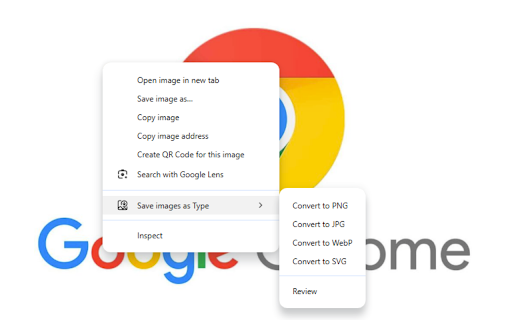
Save images as PNG, JPG, WebP, and SVG. File Convert tool for converting images to different formats.
As of May 2026, Save images as Type has 10,000 users and a 4.47/5 rating from 15 reviews in the Workflow & Planning category.
Usersup 150.0 percent+150.0%
10.0K
10,000
Ratingdown 2.8 percent−2.8%
4.47
15 reviews
Reviewsup 50.0 percent+50.0%
15
Version
1.0.7
Manifest V3
90-day change · In the last 90 days this extension gained 6.0K users.
History
2 snapshotsTracking since Apr 25, 2026.
View as table
| Date | Users | Rating | Reviews | Version |
|---|---|---|---|---|
| Apr 25, 2026 | 4.0K | 4.60 | 10 | 1.0.7 |
| May 21, 2026 | 9.0K | 4.67 | 12 | 1.0.7 |
| Now | 10.0K | 4.47 | 15 | 1.0.7 |
Permissions & access
- Permissions
- contextMenusdownloadsoffscreen
- Host access
- <all_urls>
Screenshots
About
🖼️ Save images as Type - Image Format Converter

✨ Transform your images instantly with our powerful file conversion tool! ✨

Save images as Type is the ultimate browser extension for quickly converting images between popular formats. With just a few clicks, transform any image to PNG, JPG, WebP, or SVG format.

🚀 Key Features:

🔄 Simple & Intuitive Interface: Easy-to-use design for both beginners and professionals
📊 Multiple Format Support: Convert to PNG, JPG, WebP, and SVG formats
📦 Batch Conversion: Process multiple images simultaneously to save time
👁️ Preview Before Saving: See how your converted image will look before downloading
🔌 No Internet Required: All conversions happen locally in your browser
🔒 Privacy Focused: Your images never leave your device

👍 Perfect For:

🎨 Web designers needing different image formats for websites
🖌️ Digital artists saving work in various file types
📱 Content creators optimizing images for social media
💻 Anyone who needs to quickly change image formats without installing software
Whether you need to reduce file size with WebP, maintain transparency with PNG, ensure compatibility with JPG, or scale infinitely with SVG, Save images as Type handles it all with ease.

🔄 Supported Conversions:

📸 JPG Conversions:

🖼️ JPG to PNG
🌐 JPG to WebP
📊 JPG to SVG

🎨 PNG Conversions:

📷 PNG to JPG
🌐 PNG to WebP
📊 PNG to SVG

🌐 WebP Conversions:

📷 WebP to JPG
🖼️ WebP to PNG
📊 WebP to SVG

📊 SVG Conversions:

📷 SVG to JPG
🖼️ SVG to PNG
🌐 SVG to WebP

✨ With our extension, you can easily convert between any of these formats with just a few clicks! No matter what image format you have, Save images as Type has you covered! ✨

⬇️ Download now and simplify your image conversion workflow! ⬇️

Contact: [email protected]
Technical
- Version
- 1.0.7
- Manifest
- V3
- Size
- 531KiB
- Min Chrome
- 88
- Languages
- 21
- Featured
- No
Metadata
- ID
- ppfngkdknicokcdembnnlpahnpanlcko
- Developer ID
- u38c7cc9c016143f8e1d609b8639c9181
- Developer Email
- [email protected]
- Created
- Feb 15, 2023
- Last Updated (Store)
- Mar 18, 2025
- Last Scraped
- May 21, 2026
- Website
- —
- Support URL
- —
Similar extensions
Alternatives to Save images as Type, ranked by description similarity.

Image Save as Type (JPG, PNG, WebP)
Save images in JPG, PNG, and WebP formats with a single click from the context menu
120

Save image as Type
Save images as PNG, JPG or WebP format directly from the context menu with custom size options
319

Better Save Image as Type
Save images in your desired format via context menu. Supports custom naming, and compression!
78

Image Converter & Compressor
Convert images between JPG, PNG and WebP and control compression directly in your browser.
35
★ 5.0
Save image as PDF
Save image as PDF using the context menu on the image for download photo. An easy way to save picture as PDF, JPG, PNG, or WebP.
100.0K
★ 4.3

Image Format Converter
Effortlessly convert your images to different formats directly in your browser with the Image Format Converter extension!
2.0K
★ 3.7

Image Format Selector
Right-click images and choose the format (JPG, PNG, WEBP) to save them.
7
★ 5.0

File Convertor
chrome extension
32
★ 5.0
Data sourced from the Chrome Web Store · last verified May 21, 2026.