
Simple Image Editor
A Simple Image Editor. You can convert your browser into a full featured image editor
As of May 2026, Simple Image Editor has 86 users in the Workflow & Planning category.
Usersup 2.4 percent+2.4%
86
86
Ratingno change0%
—
— reviews
Reviewsno change0%
—
Version
1.0.1
Manifest V3
History
2 snapshotsTracking since Apr 29, 2026.
View as table
| Date | Users | Rating | Reviews | Version |
|---|---|---|---|---|
| Apr 29, 2026 | 84 | — | — | 1.0.1 |
| May 26, 2026 | 87 | — | — | 1.0.1 |
| Now | 86 | — | — | 1.0.1 |
Permissions & access
- Permissions
- contextMenus
- Host access
- None declared
Screenshots


About
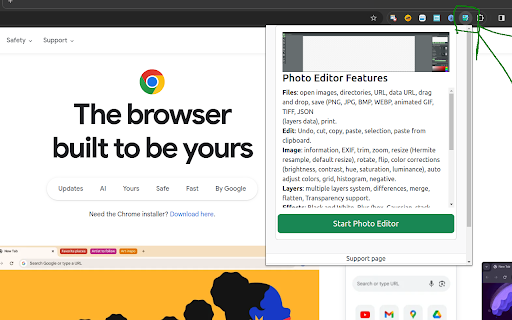
Introducing the Chrome Image Master extension, the ideal image editing partner for your surfing experience. With a robust set of capabilities, it's your go-to tool for anything from image enhancement to releasing your creativity. Here is what it offers:

1. Find Image URLs & Edit Image: With a single right-click, you can instantly find the source of any image on the web.

2. Download and alter: You may easily download and alter photos from any website, allowing you complete control over your online visual experience.

3. Stock Image Integration: Access a massive bank of high-quality stock images from Pixabay.com directly from your browser, making it easier than ever to select the ideal graphics for your projects.

4. Creative Tools: Use a variety of creative tools to let your creativity run wild. Draw freely; construct geometric, add text, crop image, resize, apply filters

5. Advanced Editing: Make sure your visuals seem exactly how you want them to by fine-tuning your photographs with precise controls for color, brightness, contrast, and more.

6. Flexible Image Source: You can access and edit your photographs in a variety of ways by opening them directly from a URL or from your computer.

7. Save and Share: You have the option of saving your works straight to your smartphone or storing them in the cloud for convenient access from any location.

8. Image Layer Support: Take advantage of the convenience of organizing and manipulating visual elements with the versatility that comes with working with numerous layers.

Chrome Image Master puts the capability of professional-grade image editing at your fingertips, easily integrating into your surfing experience. Whether you're a casual user trying to improve your social media postings or a seasoned designer working on a big project, this plugin will help you bring your creative ideas to life with ease and speed. Chrome Image Master offers the next level of image editing simplicity!
Technical
- Version
- 1.0.1
- Manifest
- V3
- Size
- 1.63MiB
- Min Chrome
- 88
- Languages
- 1
- Featured
- No
Metadata
- ID
- jhomfmnehepkeejomjdiigidheojkdfm
- Developer ID
- u42011ea33f6a97f635472f0588707835
- Developer Email
- [email protected]
- Created
- Mar 21, 2024
- Last Updated (Store)
- Mar 22, 2024
- Last Scraped
- May 26, 2026
- Website
- —
- Privacy Policy
- https://www.simpletools.nl/privacy.php
Similar extensions
Alternatives to Simple Image Editor, ranked by description similarity.

ImagePress Studio Pro
Simple image editor with crop, resize, text, watermark, and filters.
1

Image & PDF Tools - Watermarkly
Easily edit images, add text and watermarks with Watermarkly
1.0K
★ 4.2

Image Editor & Tools - iLoveIMG
Easily edit, convert or download web page images and screenshots with iLoveIMG
10.0K
★ 4.0

All In One Image Tool Pro
Welcome to All in One Image Tool Pro - your ultimate image companion for the web. This browser extension is designed for everyone…
52

Pixify: The Ultimate Image Scraping Tool
Effortlessly scrape, organize, and download images from any webpage with this fast, secure, and user-friendly Chrome extension.
339
★ 3.7

Image Downloader - Bulk Image Downloader & Filter
Download images from any webpage with advanced filtering, bulk download, and preview features. Fast, easy, and powerful!
27

ImgCompressor
Effortlessly compress images to reduce file sizes while preserving quality.
18
★ 5.0

Image to Vector Converter
Convert images png, jpg to vector graphics.
304
Data sourced from the Chrome Web Store · last verified May 26, 2026.