
Workbench Tools for Google Chrome™
Google Chrome™ extension for logging into Workbench from an active Salesforce session.
As of May 2026, Workbench Tools for Google Chrome™ has 4,000 users and a 3.21/5 rating from 14 reviews in the Developer Tools category.
Usersno change0%
4.0K
4,000
Ratingno change0%
3.21
14 reviews
Reviewsno change0%
14
Version
1.4.0
Manifest V3
Permissions & access
- Permissions
- cookiesdeclarativeContentnotificationsscriptingstoragetabs
- Host access
- https://*.salesforce.com/*, https://*.force.com/*
Screenshots


About
Extension to log you into the Salesforce Workbench in one click from Google Chrome or Brave. This is *NOT* the Workbench itself.

For information on how to install the Workbench, please refer to the Github repository (which is now in maintenance only mode) https://github.com/forceworkbench/forceworkbench

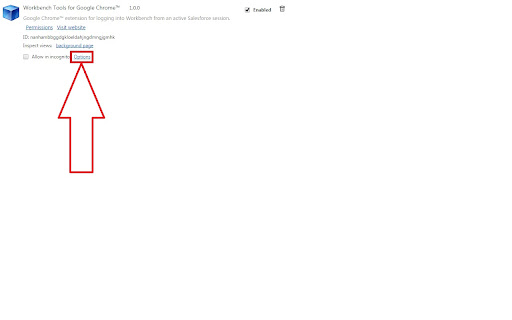
Once you have installed the Workbench locally, for the extension to work, you have to set the base URL of the Workbench by clicking on "options" like shown on the Screenshot.

If you want to browse the source code, or log issues, or simply star the repository, please come here https://github.com/Krisa/Salesforce-Workbench
Technical
- Version
- 1.4.0
- Manifest
- V3
- Size
- 29.12KiB
- Min Chrome
- 88
- Languages
- 1
- Featured
- No
Metadata
- ID
- nanhambbggdgkloeldahjngdmngjgmhk
- Developer ID
- u16fa64a0f3971412921e646d91b1e9cd
- Developer Email
- [email protected]
- Created
- Sep 30, 2014
- Last Updated (Store)
- Jan 25, 2023
- Last Scraped
- May 26, 2026
- Website
- —
- Privacy Policy
- —
Similar extensions
Alternatives to Workbench Tools for Google Chrome™, ranked by description similarity.

Salesforce LogXplorer
Read Apex and API logs in a very easy and quick way.
153
★ 5.0

Lightning Web Runtime (LWR) Build Info
For Salesforce Experience Cloud. Learn, Demo & Build Great LWR Sites. Get detailed information about components on the page.
390
★ 3.0

Salesforce Inspector Reloaded
Productivity tools for Salesforce administrators and developers to inspect data and metadata directly from the Salesforce UI.
500.0K
★ 4.8

Salesforce Assistant
Enhances Salesforce with extension features to boost your productivity
62
★ 5.0

Field Finder
A Chrome extension to find Salesforce field setup pages.
8

SF Console Test Apex Explorer
Search apex class code coverage after running tests from SF Developer Console
25
★ 5.0

The Platform Helper
This extension is developed for Salesforce Developer's & Administrators to make easiness in their daily routine tasks
2
★ 4.7

SF Developer Console
Open Salesforce Developer Console from any Salesforce org.
15
Data sourced from the Chrome Web Store · last verified May 26, 2026.