
Salesforce LogXplorer
Read Apex and API logs in a very easy and quick way.
As of May 2026, Salesforce LogXplorer has 153 users and a 5.00/5 rating from 8 reviews in the Developer Tools category.
Usersup 7.7 percent+7.7%
153
153
Ratingno change0%
5.00
8 reviews
Reviewsno change0%
8
Version
2.1.5
Manifest V3
History
4 snapshotsTracking since Apr 20, 2026.
View as table
| Date | Users | Rating | Reviews | Version |
|---|---|---|---|---|
| Apr 20, 2026 | 142 | 5.00 | 8 | 2.1.5 |
| May 5, 2026 | 141 | 5.00 | 8 | 2.1.5 |
| May 15, 2026 | 147 | 5.00 | 8 | 2.1.5 |
| May 29, 2026 | 146 | 5.00 | 8 | 2.1.5 |
| Now | 153 | 5.00 | 8 | 2.1.5 |
Permissions & access
- Permissions
- storagetabssystem.displaycookies
- Host access
- https://*.salesforce.com/, https://*.force.com/*, https://*.salesforce-setup.com
Screenshots


About
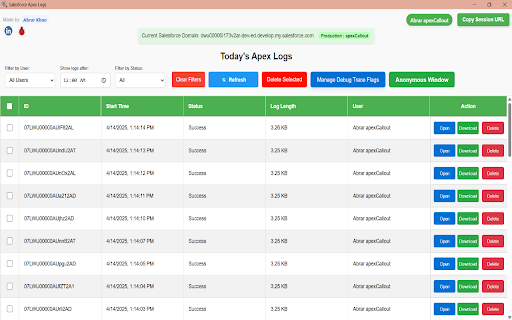
Salesforce LogXplorer is a Chrome extension designed to help Salesforce developers efficiently view and manage recent Apex logs from your Salesforce organization. With LogXplorer, you can easily access all the latest Apex logs in a well-organized table format that provides crucial details for debugging and monitoring your Salesforce processes.

Key Features:
1. Table View of Apex Logs
Upon loading the extension, you'll be presented with a table displaying all recent Apex logs from your Salesforce org. The logs are shown in a clean, tabular format that allows you to quickly review important information at a glance.

2. Filters
LogXplorer offers three convenient filters that can help you narrow down the logs:

   *Filter by User: View logs generated by a specific user in your Salesforce org.
   *Filter by Status: Easily filter logs by their status, whether they are "Success" or
       "Error."
   *Filter by Time: Refine your search to view logs from a specific time range.

In addition to the filters, you'll find two buttons near them:

  *Refresh: Bring new logs from org.
  *Clear Filter: Remove all filters to return to the full list of logs.


4. Actions for Each Log Entry
Each row in the table provides three actionable buttons:

  *Open: Clicking this will open a detailed modal displaying the full log raw content.
  *Download: Download the log in its entirety for offline analysis.
  *Delete: Remove the log entry from the backend if it is no longer required.

5.Detailed Log View in Modal
When you click Open, a modal opens displaying the log body. The log content is presented in a user-friendly manner, with debug values highlighted in red font color for easy identification, making it simpler to spot key information.

6.Log Filters within the Modal
The modal offers two checkboxes to help you filter the log content further:

*Show Debug Only: This option filters the log to show only debug-related entries, making it easier to focus on the debug information.
*Show Error Only: If you're troubleshooting errors, this filter will display only error logs.

7. Trace Flag Management (New)
Easily create or update Debug Trace Flags directly from the extension!
Set your own:

* Start and expiration times

* Target user or Apex class

* Debug level

Perfect for managing logs on the fly without going into Setup.

8. ⚡ Execute Anonymous Apex (Beta)
You can now run anonymous Apex directly from the extension in a dedicated modal window. This is an early beta feature and might be refined over time — feel free to send feedback!

Additionally, there is a search bar at the top of the modal, allowing you to quickly find specific terms or log entries by typing.

Quick Access to Salesforce Instance URL
At the top right corner of the modal, you’ll find a button that allows you to quickly copy the current Salesforce org's instance URL. This feature is perfect for quickly referencing your Salesforce org without having to navigate away from the extension.

Helpful Links and Reporting
Salesforce LogXplorer also provides easy access to external resources:

Two icons at the top left corner allow you to quickly navigate to your LinkedIn profile and GitHub issue report page. The bug report icon lets users report any issues with the extension.


Salesforce LogXplorer is designed with Salesforce developers in mind, This may have some bug which you can report on the git-hub page, I would love to solve them and provide you a better experience. This is my first extension, and I would be happy if you provide any kind of feedback to me on my linked profile.
Technical
- Version
- 2.1.5
- Manifest
- V3
- Size
- 177KiB
- Min Chrome
- 88
- Languages
- 1
- Featured
- No
Metadata
- ID
- bkkoahkbpolafmpmgbhedgkdocjgjcjb
- Developer ID
- uee9938dc162ec4b2ff2a3641f5170b46
- Developer Email
- [email protected]
- Created
- Mar 29, 2025
- Last Updated (Store)
- May 23, 2025
- Last Scraped
- May 29, 2026
- Website
- —
- Privacy Policy
- —
Similar extensions
Alternatives to Salesforce LogXplorer, ranked by description similarity.

FoxLog - Salesforce Debug Log Viewer
Display Salesforce debug logs in a user-friendly format with error detection, anti-pattern analysis, and debug control.
39

Apex Debugger
Debug Salesforce apex code with ease
10.0K
★ 4.2

Salesforce Log Viewer
View and analyze Salesforce logs.
4
★ 5.0

Salesforce Debug Log Enhancer
Instantly see Execution Type, Name, and Method in Salesforce debug logs. Includes a 'Delete All Logs' helper.
379
★ 5.0

Seacloud Software - Salesforce Debug Inspector
Inspect Salesforce data and debug logs.
12

Salesforce Speedy Debugger
Easy way to check the Debug logs
3.0K
★ 4.6

Salesforce SmartLog
Read your Salesforce logs smarter.
465
★ 4.8

Salesforce Debug Wizard
Easily view, search, and analyze Salesforce Debug Logs with this powerful Chrome extension.
322
★ 5.0
Data sourced from the Chrome Web Store · last verified May 29, 2026.