Lightning Web Runtime (LWR) Build Info
For Salesforce Experience Cloud. Learn, Demo & Build Great LWR Sites. Get detailed information about components on the page.
As of June 2026, Lightning Web Runtime (LWR) Build Info has 390 users and a 3.00/5 rating from 2 reviews in the Developer Tools category.
Usersdown 1.8 percent−1.8%
390
390
Ratingno change0%
3.00
2 reviews
Reviewsno change0%
2
Version
1.2.0
Manifest V3
History
3 snapshotsTracking since Apr 23, 2026.
View as table
| Date | Users | Rating | Reviews | Version |
|---|---|---|---|---|
| Apr 23, 2026 | 397 | 3.00 | 2 | 1.2.0 |
| May 12, 2026 | 399 | 3.00 | 2 | 1.2.0 |
| Jun 7, 2026 | 391 | 3.00 | 2 | 1.2.0 |
| Now | 390 | 3.00 | 2 | 1.2.0 |
Permissions & access
- Permissions
- declarativeContent
- Host access
- *://*/*
Screenshots


About
Easily understand how a Salesforce Lightning Web Runtime live site was built!

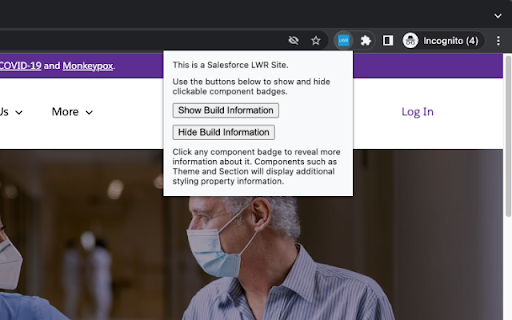
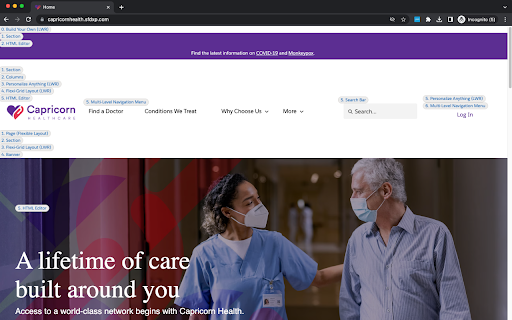
After the LWR site's page loads, open the extension to get started. The extension popup UI will allow you to add and remove a clickable badge for each Experience Builder component on the live site page.

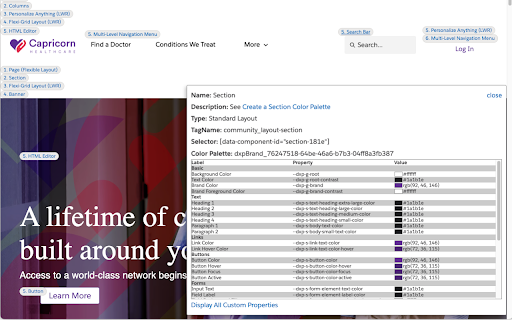
Clicking on a badge displays the following information about the component:
- Display Name in Experience Builder
- Description of usage
- Component Type
- Tag Name
- Unique Selector for CSS
- Display Styles (Margin and Padding) when set on the Experience Builder component.
- Display CSS Classes set on the Experience Builder Component.
- Display All Custom Properties as they are declared and their current value in context.
- Beyond everything above, Clicking on the Theme and Section component badges will display the dxp Styling Hook values with mapping to the standard Theme Panel Property names.

Try it on a live LWR demo site: https://capricornhealth.sfdxp.com
--Supports unpublished sites viewed from Experience Builder Preview as well!

--Permissions Information--
When you add this extension, you will be prompted that it can “Read and change all your data on all websites”. This permission is needed because a Salesforce Experience Cloud site can exist on any Custom Domain. All data required to run this extension is self contained and there is no server communication or logging of any kind. This app will check if the web page contains the HTML tag webruntime-app for the purpose of detecting if it is an LWR site. If true, the page will only be read and changed once extension popup buttons have been clicked. This scope is to process and provide information about components on the page. All code is open-source for review.
Technical
- Version
- 1.2.0
- Manifest
- V3
- Size
- 45.12KiB
- Min Chrome
- 88
- Languages
- 1
- Featured
- Yes
Metadata
- ID
- hofogbdlpfgoknbfhjngegecnadnjikc
- Developer ID
- u0b3fe863e04a67f348c57f2b26a1f74e
- Developer Email
- [email protected]
- Created
- Jun 23, 2023
- Last Updated (Store)
- May 22, 2024
- Last Scraped
- Jun 7, 2026
- Website
- —
- Privacy Policy
- —
Similar extensions
Alternatives to Lightning Web Runtime (LWR) Build Info, ranked by description similarity.

LWC Inspector
Inspect, edit, and debug Lightning Web Components (LWC) and Apex classes. Includes component view, network monitoring, code editor.
345
★ 5.0

LWC Debugger
Adds a Lightning tab to DevTools for debugging LWC on Salesforce Lightning pages.
443
★ 5.0

Salesforce LWC & Aura Finder
Find and highlight Lightning Web Components (LWC) and Aura components on Salesforce Lightning pages
62
★ 4.7

LWC Lens
Inspect Lightning Web Components on Salesforce pages — hover to identify, view component trees, copy component paths.
23
★ 5.0

Salesforce Component Highlighter
Highlight Salesforce Aura and Lightning Web Components (LWC) directly in Lightning, Classic, and Experience Cloud pages.
34
★ 5.0

LWC Finder
Find Lightning Web Components on the current Salesforce page
42
★ 5.0

Salesforce advanced Code searcher
By using the advanced quick find you can get your code few clicks shorter. Also, you can search any string your code
60.0K
★ 4.4

TrackForcePro
Salesforce toolkit: Audit Trails, SOQL/GraphQL/REST builders, LWC Explorer, Records, Security, Org Tools & Events.
—
Data sourced from the Chrome Web Store · last verified Jun 7, 2026.